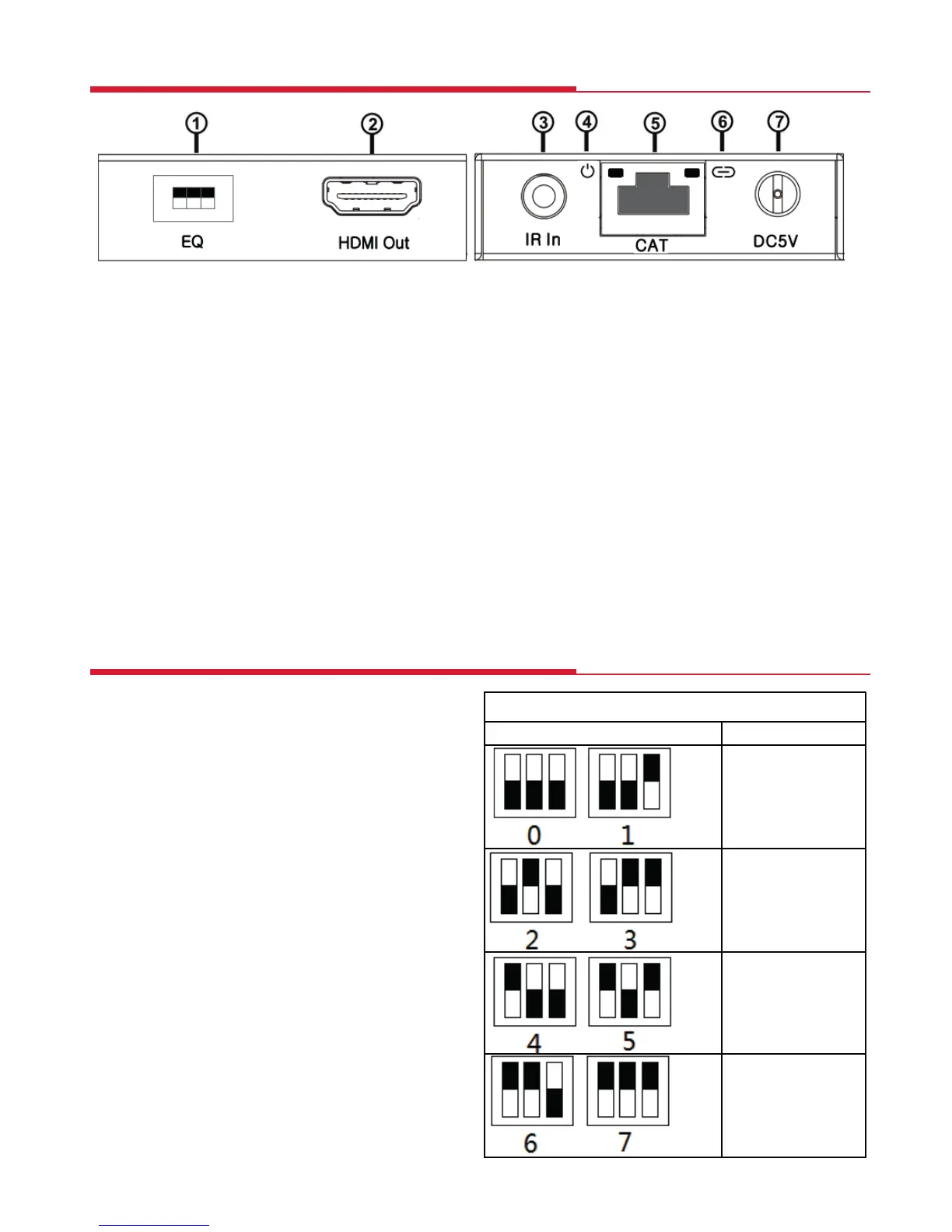
Receiver - Sockets and Switches
!
① EQ SWITCH: HDMI Receiver equaliser switch.
② HDMI OUT: Via an HDMI cable connects to the HDMI input of a display such as
an HDTV.
③ IR IN: Connection for the IR Receiver cable included in the pack for IR signal
reception. Place the IR Receiver in a position in direct line-of-sight of the
remote control. Use the sticky pad supplied to attach to a suitable surface.
④ POWER LED: Indicates that the receiver is receiving power over the
Ethernet cable
⑤ CAT: CAT: Via CAT 5e/6/7 Ethernet cable connects the receiver with the CAT
output of the transmitter.
⑥ LINK LED: Indicates when the HDMI signal from the transmitter is stable.
If the image on the display is ickering
or ashing, adjust the EQ switch to
improve the cable skew.
MAX (7) sets the strongest HDMI signal
level for the longest possible
transmission length while MIN (0) sets
the weakest HDMI signal level for the
shortest transmission length.
Adjust the signal level from 0-7 to
achieve optimum video quality.
Receiver Equaliser Distance Adjustment
5


 To Next Page