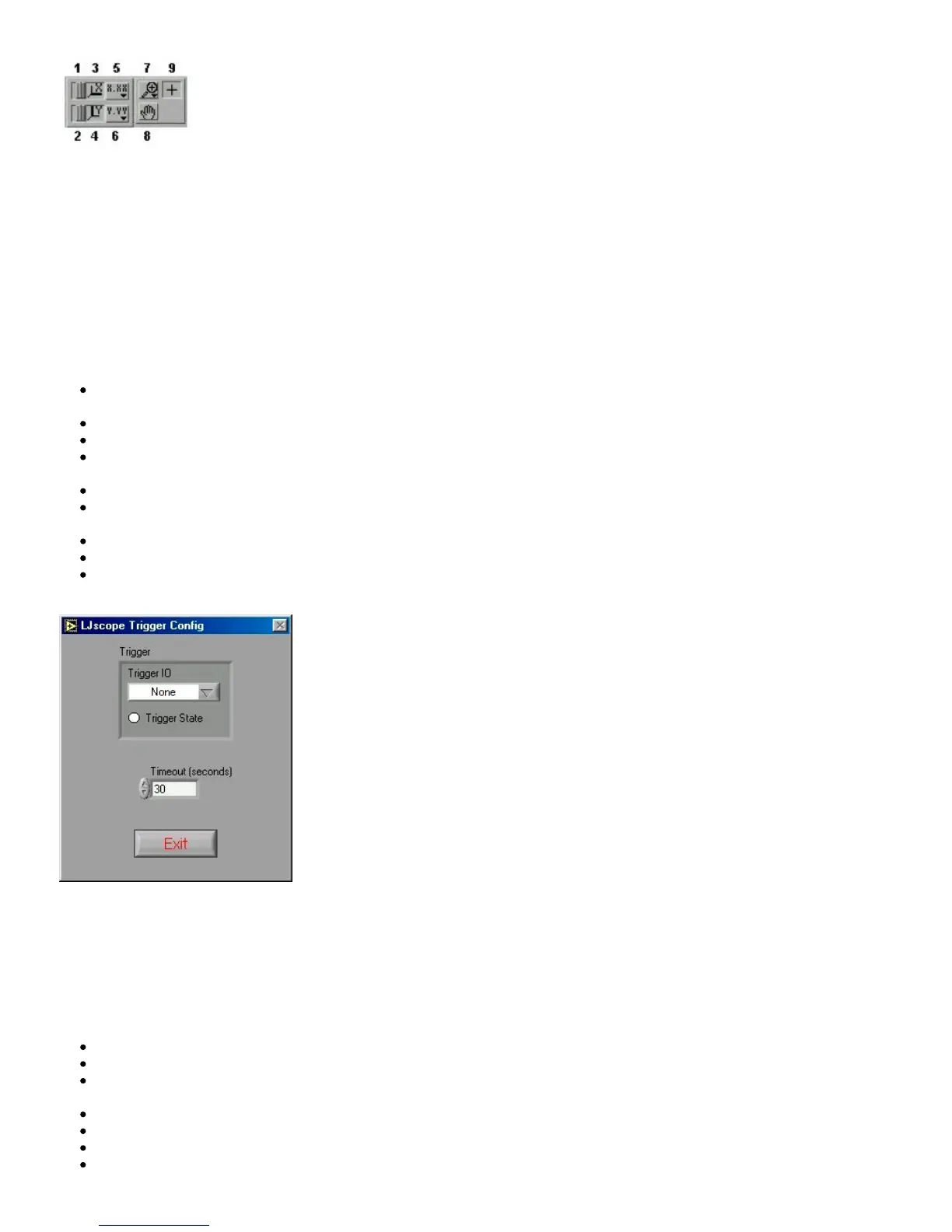
1. When you press this button it locks button 3 on (autoscale) position.
2. When you press this button it locks button 4 on (autoscale) position.
3. Pressing this button autoscales the x-axis.
4. Pressing this button autoscales the y-axis.
5. Miscellaneous x-axis formatting options.
6. Miscellaneous y-axis formatting options.
7. Zooming tool. Press this button to see different options for zooming. When collecting data, zooming will not work well unless
autoscaling is off.
8. Panning tool. Allows you to drag and scroll around the graph.
9. Not applicable.
Other LJscope controls include:
Channel A/B: Select the two AI channels that will be acquired. If a differential channel, is selected, the gain selection control
will appear.
Hide Channel B: When selected channel B will not be shown on the graph.
Scan Rate [Hz]: (256 to 4096) Determines the scans/second for both channels.
Number of Scans: (32 to 2048) Determines the number of scans that will be collected, and thus the total acquisition period.
For example, if 1024 scans are collected at 4096 Hz, a quarter second of data will be collected (as shown in Figure 3-10).
Demo: Calls “AIBurst” in demo mode so timing and data is simulated.
Save To Disk: If selected a prompt will appear for a filename, and the current burst of data is saved to a tab-delimited file
(time, channel A, channel B).
Pause: Pauses data acquisition.
Enable Trigger: Enables the IO trigger.
Configure Trigger: Brings up the window shown in Figure 3-11. Choose the IO line to trigger on and whether to trigger
when it is high or low. Also set the timeout period so the application will continue (with an error) if the trigger is not detected.
Figure 3-11. Configure Trigger
3.6 - LJstream
Uses stream mode to read, graph, and write to file, 4 AI channels. For more information, read about the stream functions
(AIStreamStart, AIStreamRead, and AIStreamClear).
Enable Stream: Starts and stops the stream acquisition.
Scan Rate: Determines the scans/second (50 to 300).
Number of Scans: Determines the number of scans that will be collected each iteration, and thus determines how fast this
application iterates.
Demo: Calls the “AIStream” functions in demo mode so timing and data is simulated.
Read Counter: Collects 1 analog input and the counter if selected.
Configure Channels: Click this button to bring up the channel configuration window shown in Figure 3-13.
Save Current Settings: Saves all the current settings, including channel configuration.


 To Next Page
 Loading...