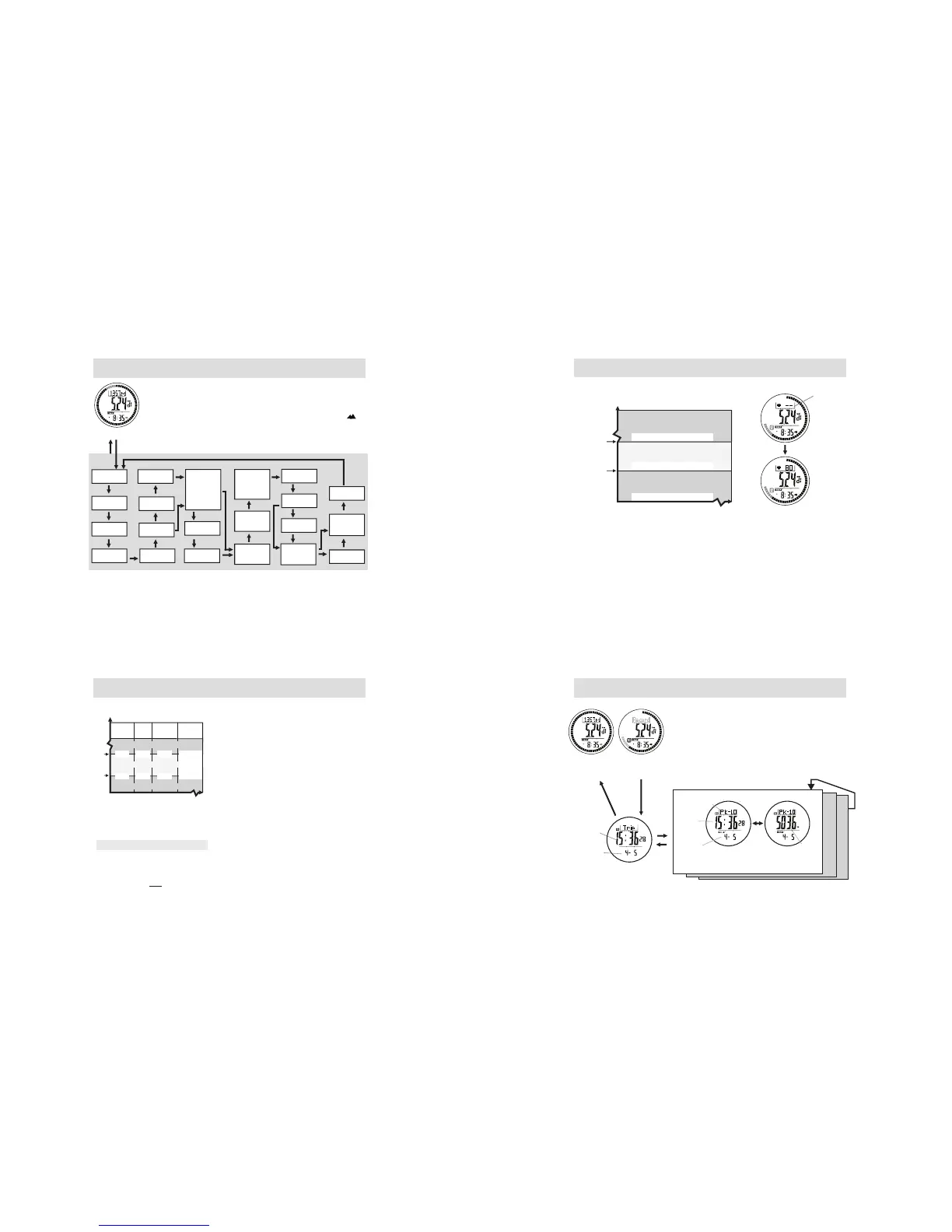
5.2 Trip Mode - Setting
[M]
Trip Mode
Hold
[M]
Hold
[M]
[M]
[M]
[M]
[M]
[M]
[M]
[M]
On
[M]
[M]
[M] User
[M]
[M][M]
[M]
[M]
[M]
On
[M]
Off
[M]
Off
Year of
Birth
Gender
Unit
Weight Height
Max Heart
Rate
Goal Data
Auto Stride
On/Off
Heart Rate
Zone:
Walk Stride
Run Stride
- User
- Health
- Fat Burn
- Aerobic
Off
[M]
On
Other
Smart Lap
On/Off
[M]
Smart Lap
Distance
Altitude
Alarm Data
[M]
[M]
[M]
Factory
Default
Altitude
Alarm
On / Off
How to Set Trip Mode
- Press and hold [M] to enter Trip mode setting.
- Press [M] to select among the settings.
- If altitude alert is set On, when the current altitude is equal to or higher than the
preset altitude level, the watch starts beeping for about 10 seconds and “ ”
icon starts flashing.
- After the first beeping, the watch will beep again for every 2 minutes if the
current is still equal or higher than the preset value.
Note: Altitude alarm will be sounded in Trip Mode only.
Min Heart
Rate
[M]
Heart Rate
Alert (Min)
On/Off
Heart Rate
Alert (Max)
On/Off
Goal Type:
- Distance
- Step
- Calorie
Calibrate
Absolute
Altitude
%
EMHR
Lower
Limit
Upper
Limit
Heart Rate Zone
AEROBIC
FAT-
BURN
HEALTH USER
50% 55% 65%
65% 75%
80%
In Zone
eAbov Z one
5.3 Trip Mode - Heart Rate Zone
What is Heart Rate Zone
Some particular training/exercise objective like
‘Aerobics’, ‘Fat burnt’, or ‘Health’ require the trainee /
exercise to maintain his/her heart rate (exercise pace)
within one particular heart rate zone during the exercise.
WARNING: Consult a doctor or trainer prior to
setting the heart rate alert zone for a serious
Cardio-fitness training.
How to select a Heart Rate Zone ( for Heart Rate
Zone Alert )
In general, a user may get the cardio-fitness training
advice from those prestigious organization websites, for
example: www.heart.org
This Watch includes three pre-defined heart rate zone
(’Aerobic’, ‘Fat-burn’, ‘Health’) and one user-defined
Heart rate zone (’My Zone’) for selection.
The Upper and Lower limits of these Zones are shown in
the adjacent diagram.
Heart Rate Zone setting based on the
percentage of Estimated Max Heart Rate
(EMHR):
EMHR = 220 - Age
Example:
Your age is 20
( Your EMHR is 200 )
If you current Heart Rate is 100
%EMHR = = 50%
100
200
User
defined
Below Zone
Inactive Heart Rate
measurement
Trip Mode
Distance Display
5.5 Trip Mode - Trip Record Recall (Highest peak record)
Highest Peak record
- Max 10 highest Peak record can be recall.
- In Trip Mode - Record View display, Press and hold [M] to enter
Trip Record Recall Mode, Press [M] to enter highest peak record.
Press [L/R] to select between 1 - 10 highest peak record.
- In Highest Peak Record view, press [S/S] to select between time
date stamp and altitude view.
To Reset Highest Peak Record
- In Highest Peak Record View, Press and Hold [L/R] to reset Peak
records.
Trip Mode
Date
Stamp
Date
Stamp
Altitude
Peak
No.
Time
Stamp
Time
Stamp
Trip Record
Time and Date Altitude
Highest Peak Record
Record View
Display
Trip Mode
Distance View
Display
Hold
[M]
Hold
[M]
[M]
[M]
[S/S]
[L/R]
Peak
Point
1
Peak
Point
2
....
Note:
The Different Heart Rate Zones and
the Corresponding Indications
The Desirable Heart Rate Zone
The Below Heart Rate Zone
The Above Heart Rate Zone
the Above
limit
the Below
limit
Heart Rate
(Beats per minute)
Audio
Indication
'beep' 'beep' 'beep'
'beep'
No beep sound
- When enter Trip Mode (Trip is not started), Heart Rate Measurement will be activated for
1 minute.
- Various audio indications will be show according to his/her heart rate and the pre-set
limits.
- Please refer to chapter 5.2 for detail on how to set and turn ON/OFF the Zone Alert.
5.4 Trip Mode - Heart Rate Zone Alert



 To Next Page