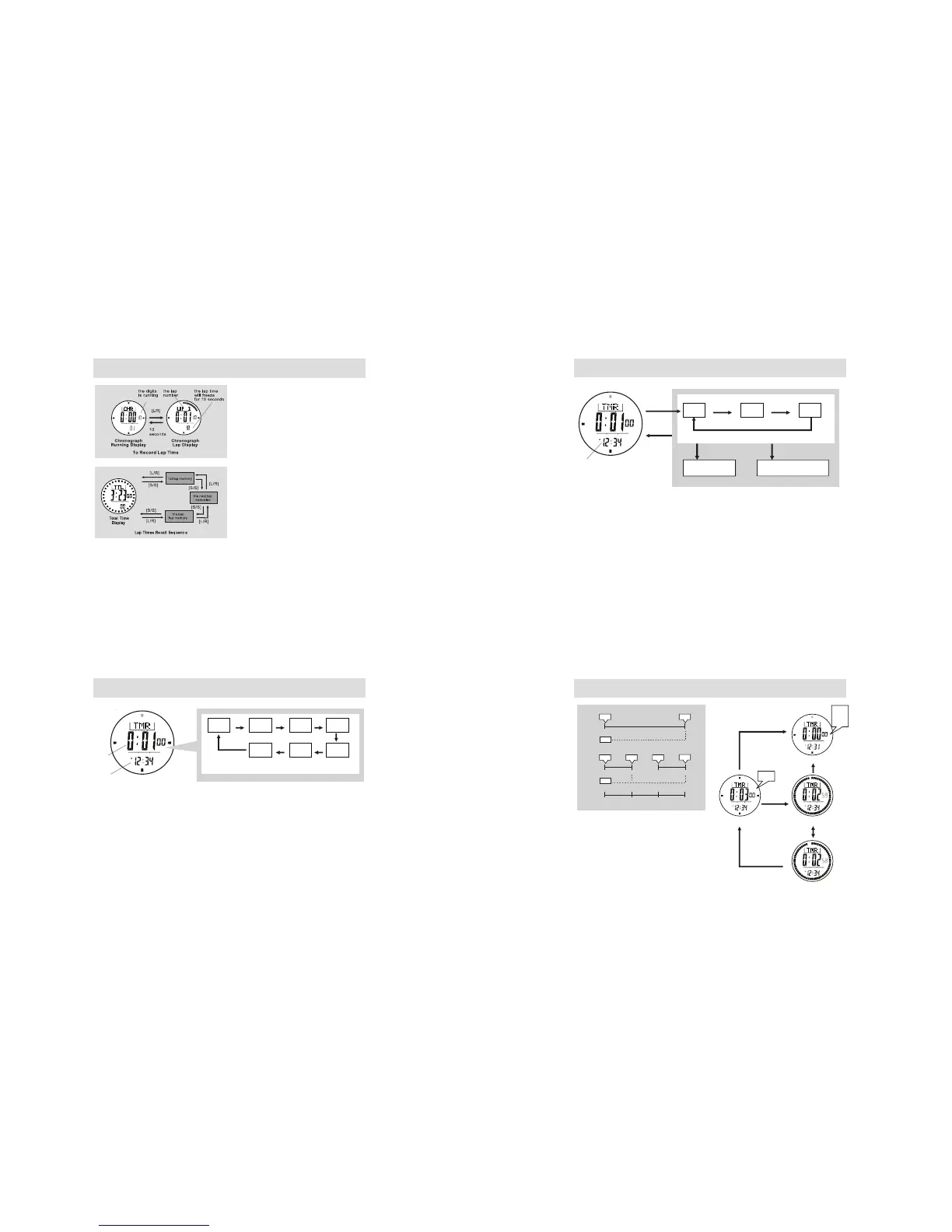
10.0 Timer Mode - Setting the Target Time
NOTE:
- The Timer starts counting from the Target Time to zero.
- The Watch includes 6 Quick-Set-Values : 1,3, 5, 10, 15 and 45 minutes setting the Target Time faster.
- The User Target Time can be set by user, see 10.1 for the details of the setting.
Timer Mode
Target Time Setting Sequence
Preset
Timer
Current
Time
[L/R]
1 min 3min
[L/R] [L/R]
[L/R]
[L/R][L/R]
[L/R]
5min 10min
15min45min
User
Defined
10.1 Timer Mode - Setting the User Target Time
NOTE:
- The setting range is up to 99 hours 59 minutes 59 seconds.
Current
Time
Timer Mode
User Target Time Setting Sequence
[M] [M]
Hold
[M]
Hold
[M]
Hour Minute
[M]
Second
[S/S] / [L/R]
Increase/Decrease
the number
Increase/Decrease the
number at a higher speed
Hold [S/S] / [L/R]
10.2 Timer Mode - Using the Countdown Timer
NOTE:
- The Watch will prompt (during the counting) as follows:
a) Beep once every minute for the last 10 minutes, i.e 10'00",
9'00" and etc.
b) Beep once every 10 seconds for the last minute, i.e 0'50",
0'40" and etc.
c) Beep once every seconds for the last 5 seconds.
d) Beep for 30 seconds when timer reaches zero (Press any
button CAN stop the beep instantly).
- The Target Time will be reloaded automatically.
time
(minute)
[S/S]
[S/S] [S/S] [S/S] [S/S]
03
123 2
2. Multiple Countdown
1. Single Countdown
3 2 1 0
Single and Multiple Countdown
[L/R]
[L/R]
3
3
Target Time
Zero
Counting
Stop Counting
[S/S]
[L/R]
[S/S]
Beep
Beep
Beep
Beep
9.1 Chronograph Mode - Recording and Recalling Lap Time
How to Record Lap Time
• The chronograph can measure elapsed time
without stopping the counting - Lap time.
• The Chronograph Mode allows recording lap time
up to 100 laps.
• When the chronograph is counting, press the [L/R]
button once to record a lap time (this key
operation will not affect the counting).
• The lap number and lap time will appear on the
display for 10 seconds, and it returns to counting
display automatically.
• Repeat the steps mentioned above to get another
lap time.
How to Recall Lap Times
• To recall lap times, hold the [M] button in the
Chronograph Display (not counting).
• When the Total Time Display is appeared, press
the [S/S] or [L/R] button to check the next /
previous lap time.
• Hold down the [M] button any time to back to the
Chronograph Display.
How to Reset Lap Times
• To record a new set of lap times, hold the [L/R]
button for 2 seconds in the Chronograph Stop
Display.



 To Next Page