EasyManua.ls Logo

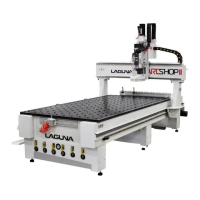
laguna Smart Shop M2 - User Manual

laguna Smart Shop M2
75 pages
Print Icon
To Next Page IconTo Next Page
Loading...
Owner's Manual
Laguna Tools
744 Refuge Way Grande Prairie, TX
Service: +1 (800) 234 1976
Email: customerservice@laguantools.com
Updated December 2021
Smart Shop:
Smart Shop "M" Maker 2 - 3 Phase Power
Copyright Laguna Tools 2021
User Guide for the Smartshop Machines equipped with the RichAuto B57E (HHC) Handheld Controller
Basic Operations, Quick Start, Multi
Tool Programs, Creating a G Code File with
V-Carve, Maintenance & Trouble Shooting, Installation Online, Default Settings.

Questions and Answers

Summary

Machine Safety Guidelines

Safety Introduction and Warnings

Essential safety guidelines and warnings for machine operation.

General Safety Rules and Precautions

Crucial safety rules, general precautions, and hazard warnings.

Electrical Safety and Grounding

Detailed information on grounding methods and electrical safety.

Machinery Safety Rules

Comprehensive safety rules for safe machinery operation.

Machine Setup and Overview

Product Specifications

Technical specifications and features of the machine.

Machine Overview and Components

Visual guide identifying key machine parts.

Receiving and Inspecting Your Machine

Procedures for delivery inspection and documentation.

Unboxing the Smart Shop Machine

Step-by-step guide for safely unpacking the machine.

Machine Placement Guidelines

Requirements for selecting an appropriate installation location.

Operation Instructions

Machine Set-up Procedures

Pre-operation steps for efficient setup and training.

Establishing Machine Home Position

Process for setting the machine's home position.

Basic Handheld Controller Button Functions

Explanation of primary button functions.

Securing the Workpiece to the Table

Methods for securely mounting the workpiece.

Tool Changing Procedure

Instructions for performing tool changes.

Tool Changer Air Pressure Setup

Setting and verifying air pressure for the tool changer.

Multiple Tool Program Setup

Workflow for programs involving multiple tools.

Transferring G-Code Programs

Instructions for transferring G-code files to the controller.

Loading Programs for Cutting

Steps to load a selected program for cutting.

Setting XY Work Origin

Procedure for setting X and Y work origin points.

Setting Z Work Origin

Method for setting the Z-axis zero position.

Understanding Work Coordinate Systems

Explanation of machine and workpiece coordinate systems.

Adding Tools and Touching Off

Guide to adding tools and performing touch-off procedures.

Setting Tool Offsets

Process for setting and verifying tool offsets.

Run Program

Steps for initiating and running a cutting program.

Maintenance and Troubleshooting Guide

Guidance on routine maintenance and troubleshooting.

Resetting Tool Locations

Procedures for resetting tool locations and TTO.

Setting Z Work Origin and Tool Adjustments

Adjusting "ToolSettingZ" parameter.

Appendix and Support Information

Appendix Overview

Supplementary information and technical details.

Installation Outline

Step-by-step guide for physical installation.

Default Machine Settings Protocols

Recommended default machine parameters.

Schematics and Diagrams

Electrical schematics and wiring diagrams.

Creating G-Code with V-Carve Programming

Guide on using V-Carve for G-code creation.

Dealer Machinery Warranty

Information on dealer machinery warranty terms.

CNC Limited Warranty Details

Details on the limited warranty for CNC machines.

Maker Cheat Sheet (Quick Reference)

Quick reference for procedures and common errors.

Contact Information and Support

Contact details for customer service and support.

laguna Smart Shop M2 Specifications

General IconGeneral
Brandlaguna
ModelSmart Shop M2
CategoryIndustrial Equipment
LanguageEnglish

Related product manuals