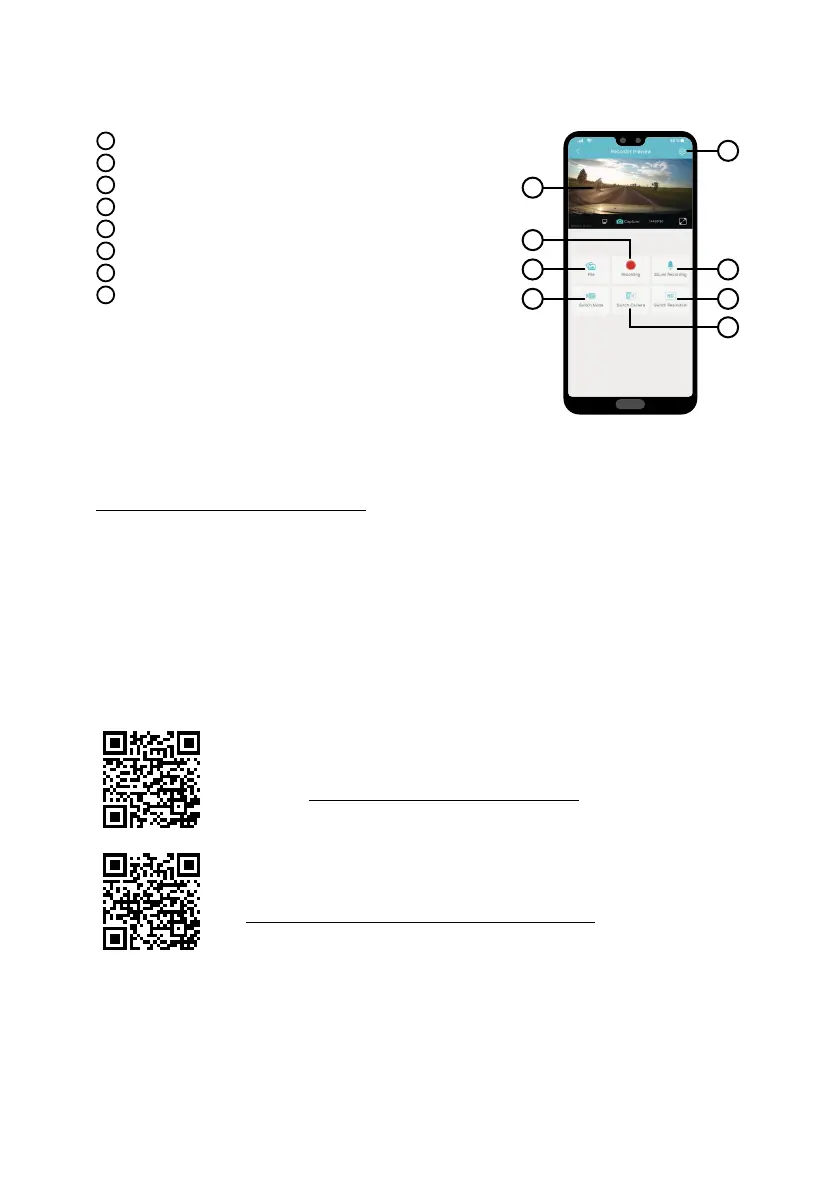
I
Camera settings
J
Front/Rear camera view
K
Files in the camera
L
Start/Stop recording
M
Audio recording ON/OFF
N
Switch photo/video mode
O
Switch front/rear camera
P
Resolution settings
I
J
K
L
N
M
P
O
The latest camera firmware can be found in the „Downloads“ section of the product website.
1) Prepare a microSD by formatting it on a PC / Mac.
2) Download and open the .zip file containing the “SD_CarDV.bin” file. Do not change the file name.
3) Copy the file “SD_CarDV.bin” to the formatted microSD card.
4) Insert the microSD card into the switched-off camera. Plug the dashcam into the power supply and making
sure the dashcam is powered throughout the update process. The update should begin automatically on
start-up.
5) Wait for the update to complete. Then format the memory card in the camera itself.
To find complete instructions and up-to-date speed camera databases and firm-
ware, visit
Do not forget to register your product on our website:
As soon as the firmware or speed camera database is updated, we will inform you immediately! By registe-
ring, you will also have access to news and information about great discounts!



 To Next Page