You can use the functions
Duration and End at the
same time to set the time for
how long the appliance should
operate and when the appliance
should deactivate. This lets you
activate the appliance with a
delay in time. First set the
Duration and then the End
.
Setting the clock functions
For Duration and End , set an oven
function and temperature of cooking. This is
not necessary for the Minute Minder .
1.
Press again and again until the
indicator for the necessary clock
function starts to flash.
2.
Press
or to set the time for the
necessary clock function.
The clock function operates. The display
shows the indicator for the clock function
you set.
For the Minute Minder function
the display shows the time left.
3. When the time ends the indicator of the
clock function flashes and an acoustic
signal sounds. Press a button to stop
the signal.
4. Turn the knob for the oven functions
and the knob for the temperature to the
off position.
With the Duration and End
functions, the appliance
deactivates automatically. The
functions work only for the main
oven.
Cancelling the clock functions
1. Press the again and again until the
necessary function indicator flashes.
2. Press and hold
.
The clock function goes out after some
seconds.
USING THE ACCESSORIES
WARNING! Refer to Safety
chapters.
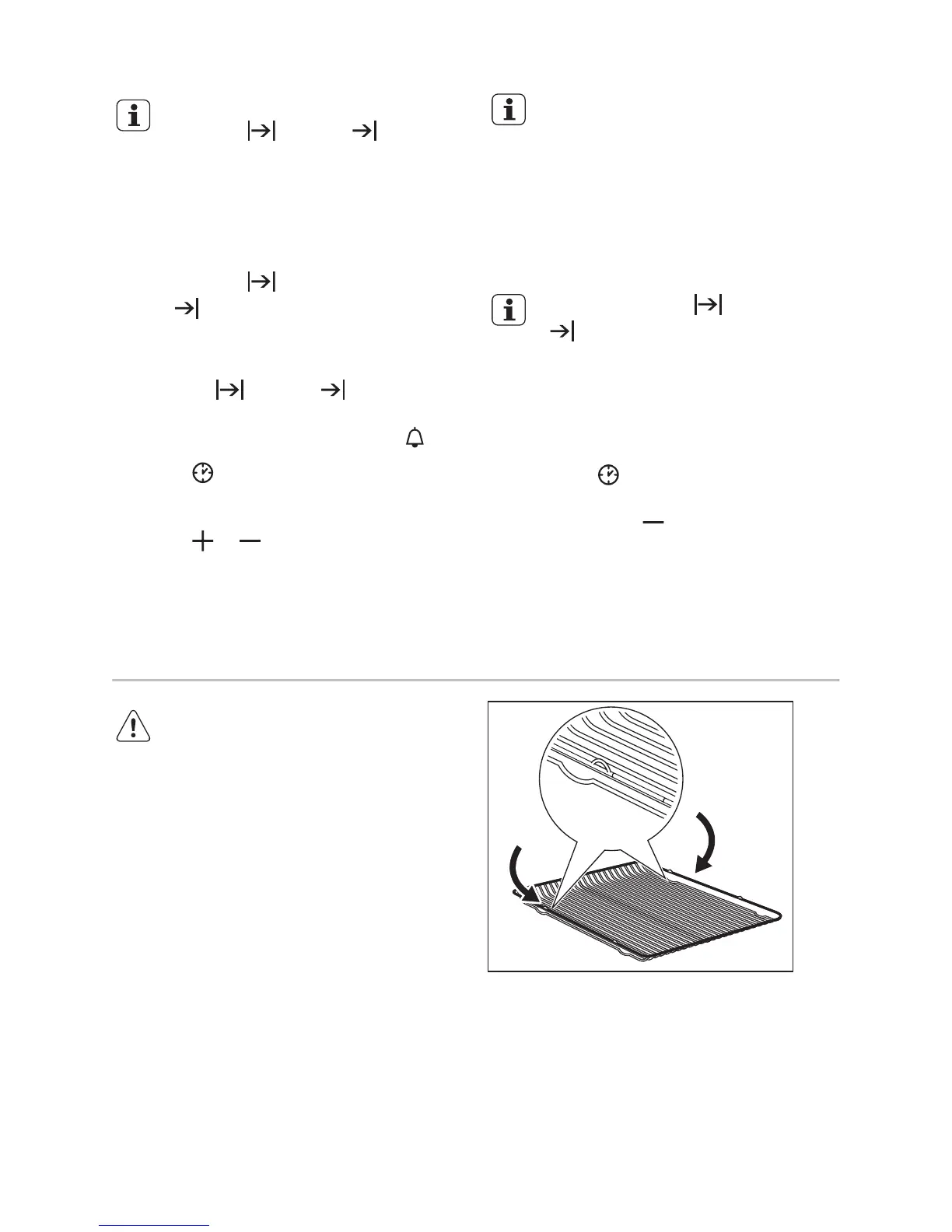
Inserting the accessories
Wire shelf:
Push the shelf between the guide bars of
the shelf support and make sure that the
feet point down.
Deep pan:
Push the deep pan between the guide bars
of the shelf support.
9


 To Next Page