20
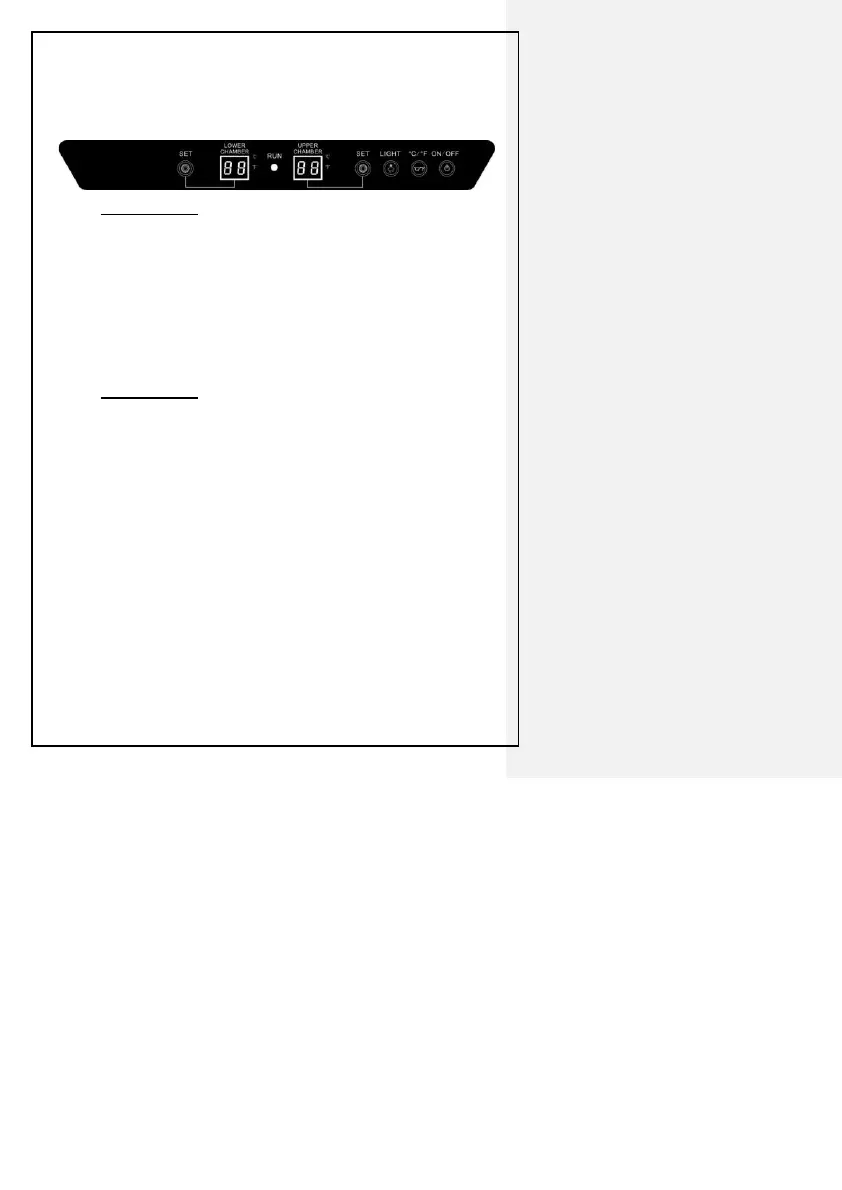
4.5 Control Panel Below (LW28D/LW46D/LW72D/LW142D/
LW165D/LW306D):
◎ Display Windows
· RUN light:Indicator light of compressor working. While the compressor operating,
the red light is on. While it stops operating, the red light is off.
· UPPER CHAMBER:Display of the actual temperature of the upper chamber. The
range is 0℃~37℃ or 32℉~99℉.
· LOWER CHAMBER: Display of the actual temperature of the lower chamber; The
range is 0℃~37℃ or 32℉~99℉.
· ℃/℉ light:When the ℃ light is on, it indicates Celsius temperature; When the ℉
light is on, it indicates Fahrenheit temperature.
◎ Button Operation
· SET Button:Temperature setting button; Once you press the button, the
temperature increased 1℃ or 1℉. Detail temperature setting range as
following:
For LW28D/LW46D/LW72D/LW142D/LW165D/LW306D is between:
5℃~12℃ or 41℉~54℉for upper zone, 12℃~18℃ or 54℉~64℉ for lower zone;
· LIGHT Button:Cabinet light control button; Note: Once the light is turned on, it will
automatically shut off after 10 minutes in order to protect the wines inside.
· ℃/℉ Button:Celsius and Fahrenheit conversion button;
· ON/OFF button:Power on and off button; Press the button for 3 seconds, to start;
press it 3 seconds again, to stop.


 To Next Page