OPERATING INSTRUCTIONS
4-23
TABLE OF CONTENTS
Remote Control (Option)
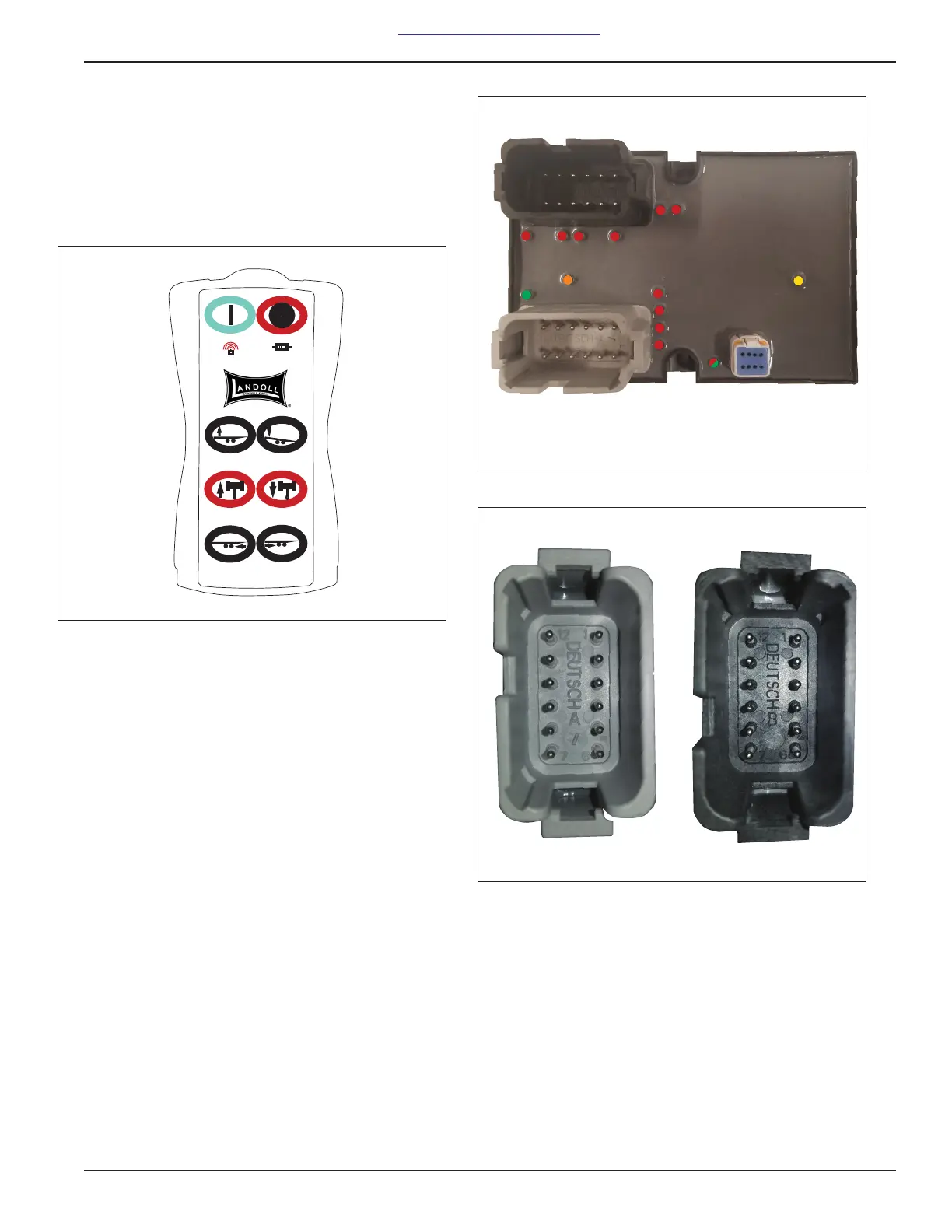
1. A wireless six function radio remote control is
available (See Figure 3-12.)
2. The wireless radio remote has six momentary push
button switches that operate the functions as labeled
on the hand held remote.
Figure 3-12: Remote Control Receiver
3. TO OPERATE THE REMOTE:
a. Press and hold the POWER button for at least 2
seconds and release.
b. There are multiple LEDs on the back of the
sealed body on the transmitter. Each LED
corresponds to a proper function or a fault. See
Page 5-9 for troubleshooting faults.
Synchronizing transmitter to
receiver:
c. Power cycle the receiver OFF and then ON.
d. On the Transmitter press and hold the Red OFF
button.
e. At the same time press and hold the Green ON
button for approximately 10 seconds.
f. Steps must be complete within ten (10) seconds
of the receiver power cycle.
g. The wireless activity LED indicator should flash
Orange three (3) times for a successful pair.
h. A hard reset can be performed on the transmitter
by holding the Red Off button for 15 seconds.
Figure 3-13: LED indicator lights (transmitter)
Figure 3-14: Deutsch A and B Pin locations
1
12
2
3
4
5
6
7
8
9
10
11
1
12
2
3
4
5
6
7
8
9
10
11



 To Next Page