44
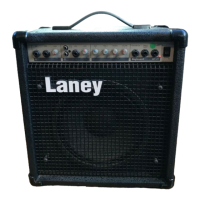
Laney
KC series manual
2222
2020
1515
1313
1414
1212
1010
1111
1919
2121
55
88
66
77
99
LINE: Jack input for line level input instruments such as keyboard/ Drum machine.
GAIN: Adjusts channel level. Enables the user to balance gain levels across each
channel.
BASS: Adjusts the bass response of the amplifier.
TREBLE: Adjusts the channels high frequency response.
REVERB: Controls the overall amount of reverb.
VOLUME: Controls the overall output level of the amplifier.
FOOTSWITCH: Socket for the connection of an Laney FS1 footswitch(optional)
allows the remote switching of reverb.
DIRECT INJECT: Jack socket for the provision of a line level output signal for
connecting to a mixing desk or power amplifier for further sound reinforcement.
HEADPHONES: Headphone output for silent practice. Plug headphones into this
socket and play as normal.
HI: Controls the channels high frequency response.
REV: Assigns reverb to individual channel.
MIC: XLR Mic input.
MDDLE: Controls the channels mid frequency response.
FX: Assigns FX Loop (21-22) to individual channel.
PRESENCE: Controls the overall high frequency content of the amplifier.
SEND & RETURN: SEND and RETURN sockets for the buffered FX loop. Effects
units connected to these sockets can be channel assigned using FX switch (19).
SPEAKER: Onboard speaker input jack socket. The onboard speaker must be
disconnected in order to use an external speaker cabinet (Min 4 Ohms).
LINE OUT: Socket for the provision of line level output signal for connecting to a
mixing desk or power amplifier for further sound reinforcement.
1818
1616
1717
EXPLANATIONS OF TERMS


 To Next Page