
 Need help?
Do you have a question about the Langjushan-Tech RTU5024 and is the answer not in the manual?
Guidelines for safe initial operation and use of GSM equipment.
Information on potential interference with network signals and performance.
Instructions on avoiding use near flammable materials or in hazardous locations.
Advises against using the device in or near blasting areas due to regulations.
Recommendations for proper installation and avoiding signal shielding.
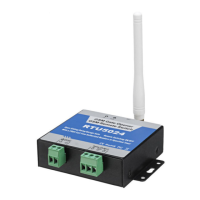
Diagram and description of the GSM Gate Opener RTU5024 control unit's components.
Explanation of the status indicators (LEDs) on the GSM Gate Opener unit.
Instructions for changing the default password using SMS commands.
Procedure to add authorized phone numbers for gate access via SMS.
How to check which phone numbers are configured for access.
Steps to delete authorized phone numbers from the system.
Configuration to permit any incoming call for access.
Enables access only for numbers in the authorized list.
Customizing how long the relay remains activated after a command.
Command to monitor the strength of the GSM network signal.
Setting to receive SMS alerts for relay actions (ON/OFF).
Direct commands to switch the relay ON or OFF remotely.
Wiring instructions for connecting the gate lock or other equipment.
Guidance on physically mounting and positioning the main unit.
 General
| Brand | Langjushan-Tech |
|---|---|
| Model | RTU5024 |
| Category | Gate Opener |
| Language | English |

 To Next Page