During Playback press the Power button to stop playback and enter
standby mode. Press the Power button again to resume playback.
Program the Title and Chapter order of
Search the Chapter & time to play from specific point.
Selects the Subtitle Displayed during DVD playback
Change the camera angle if available
Enter the main Setup Menu
Mutes the audio during playback
Rewinds Playback in 2, 4, 8 & 20 times normal speed
Forwards Playback in 2, 4, 8 & 20 times normal speed
Changes source between DISC and USB device
Zooms picture in or out 2,3,4, 1/2, 1/3 , & 1/4
Clears entries made in program and search fields
Displays On Screen Display
Repeats Chapter, Title or ALL
Turns Menu Playback ON or OFF
Increases the Volume level
Skips to Next Chapter/File
Skips to Previous Chapter/File
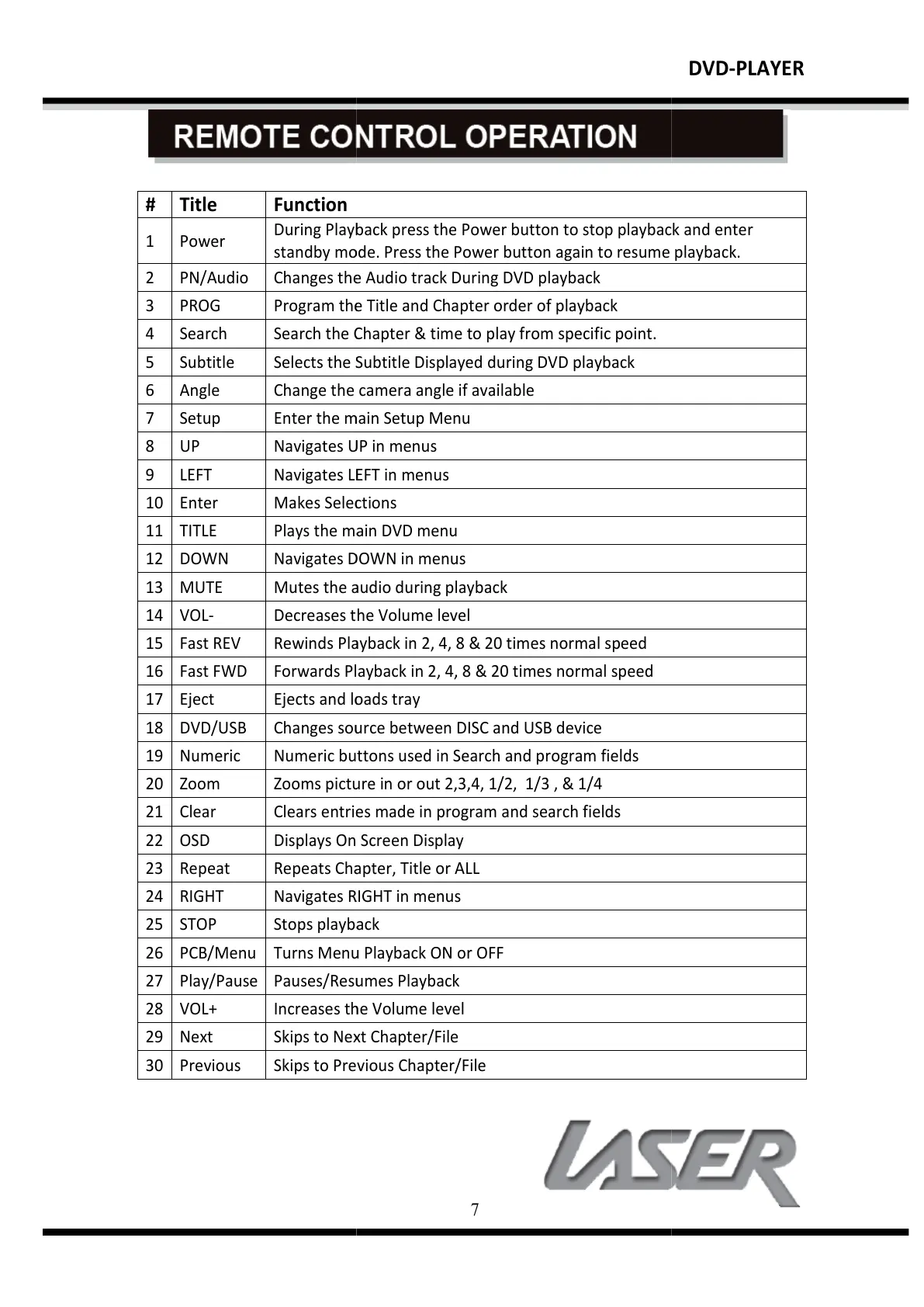
During Playback press the Power button to stop playback and enter
standby mode. Press the Power button again to resume playback.
Program the Title and Chapter order of
Search the Chapter & time to play from specific point.
Selects the Subtitle Displayed during DVD playback
Change the camera angle if available
Enter the main Setup Menu
Mutes the audio during playback
Rewinds Playback in 2, 4, 8 & 20 times normal speed
Forwards Playback in 2, 4, 8 & 20 times normal speed
Changes source between DISC and USB device
sed in Search and program fields
Zooms picture in or out 2,3,4, 1/2, 1/3 , & 1/4
Clears entries made in program and search fields
Displays On Screen Display
Repeats Chapter, Title or ALL
Turns Menu Playback ON or OFF
Increases the Volume level
Skips to Next Chapter/File
Skips to Previous Chapter/File
During Playback press the Power button to stop playback and enter
standby mode. Press the Power button again to resume playback.
All manuals and user guides at all-guides.com


 To Next Page
 Loading...