1. same folder as the music file and have the same name as the music file e.g. Track1.MP3 and
Track1.LRC
2. Volume control: Press the “VOL” button and then short press “VOL-“, to decrease volume;
short press “VOL+” to increase volume. The display will revert to playback mode after a few
seconds from the last button pressed or by pressing the “Menu” button.
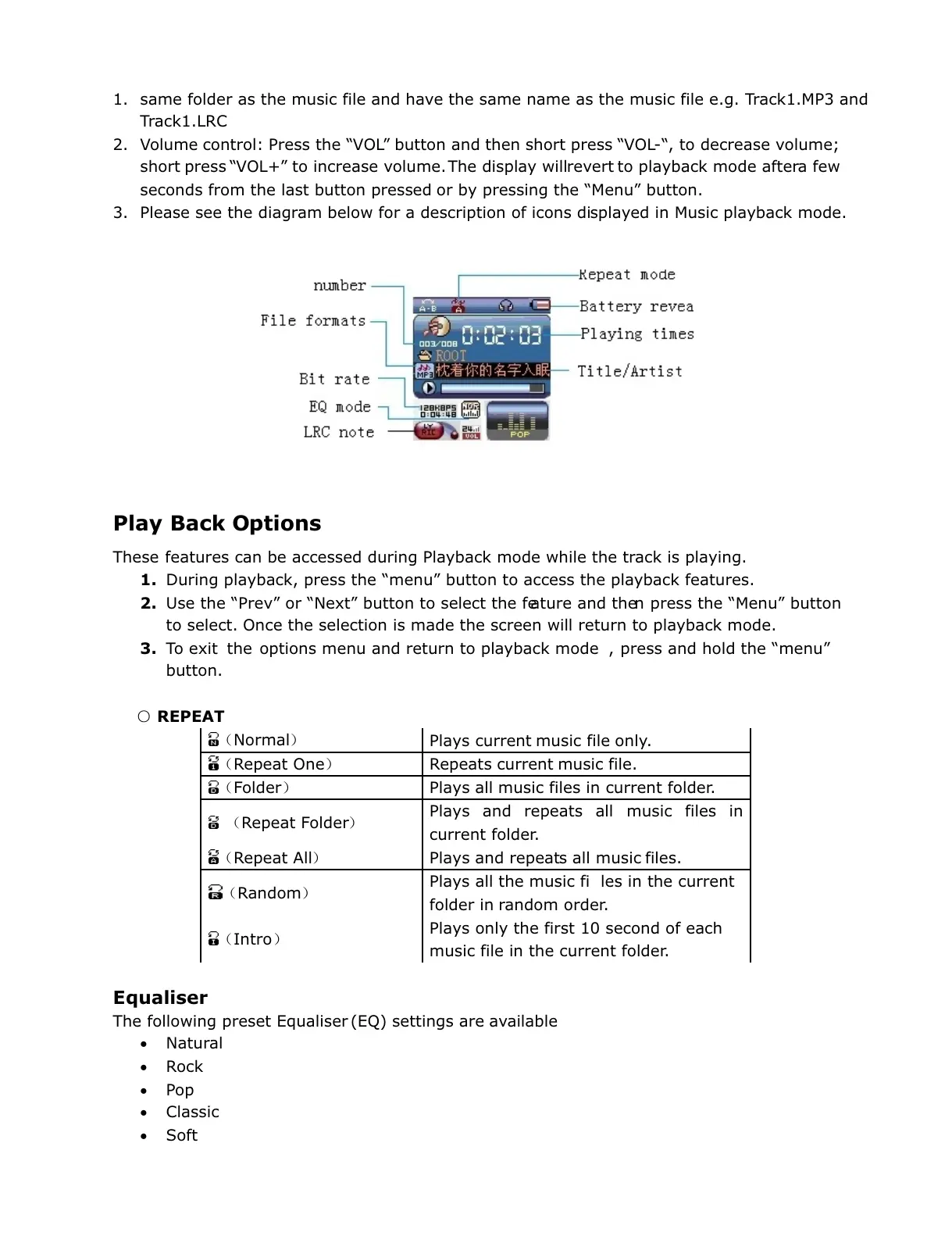
3. Please see the diagram below for a description of icons displayed in Music playback mode.
Play Back Options
These features can be accessed during Playback mode while the track is playing.
1. During playback, press the “menu” button to access the playback features.
2. Use the “Prev” or “Next” button to select the feature and then press the “Menu” button
to select. Once the selection is made the screen will return to playback mode.
3. To exit the options menu and return to playback mode , press and hold the “menu”
button.
○ REPEAT
(Normal)
Plays current music file only.
(Repeat One) Repeats current music file.
(Folder) Plays all music files in current folder.
(Repeat Folder)
Plays and repeats all music files in
current folder.
(Repeat All) Plays and repeats all music files.
(Random)
Plays all the music fi les in the current
folder in random order.
(Intro)
Plays only the first 10 second of each
music file in the current folder.
Equaliser
The following preset Equaliser (EQ) settings are available
Natural
Rock
Pop
Classic
Soft


 To Next Page
 Loading...