I
BASIC CONNECTIONS
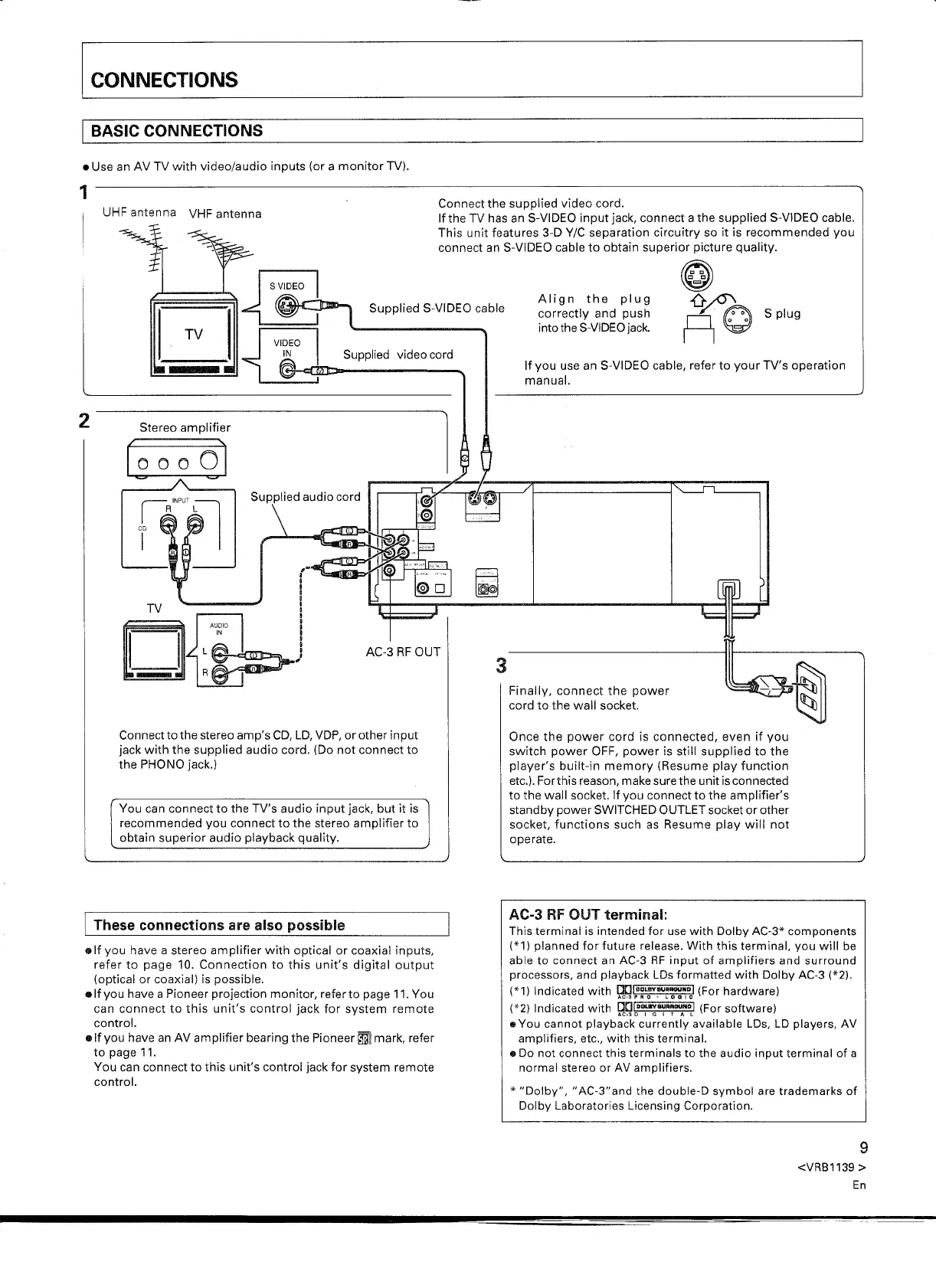
Connect the supplied video cord.
Ifthe TV has an S-VIDEO input jack, connect a the supplied S-VIDEO cable.
This unit features 3-D
YIC
separation circuitry so it is recommended you
connect an S-VIDEO cable to obtain superior picture quality.
Stereo amplifier
rOOO OJ
<::>
m
~RINPUT~
CD
I
R
,.
I
I
,
I
~~)
Connectto the stereo amp's CD, LD,VDP, or other input
jack with the supplied audio cord. (Do not connect to
the PHONO jack.)
You can connect to the TV's audio input jack, but it is
recommended you connect to the stereo amplifier to
obtain superior audio playback quality.
I
These connections
are also possible
elf you have a stereo amplifier with optical or coaxial inputs,
refer to page 10. Connection to this unit's digital output
(optical or coaxial) is possible.
.If you have a Pioneer projection monitor, refer to page 11.You
can connect to this unit's control jack for system remote
control.
.If you have an AV amplifier bearing the Pioneer ~ mark, refer
to page 11.
You can connect to this unit's control jack for system remote
control.
Align the plug
correctly and push
into the S-VIDEOjack.
~
O~A
Splug
R~
If you use an S-VIDEO cable, refer to your TV's operation
manual.
Finally, connect the power
cord to the wa II socket.
Once the power cord is connected, even if you
switch power OFF, power is still supplied to the
player's built-in memory (Resume play function
etc.). Forthis reason, make sure the unit is connected
to the wall socket. If you connect to the amplifier's
standby power SWITCHED OUTLET socket or other
socket, functions such as Resume play will not
operate.
AC-3 RFOUT terminal:
This terminal is intended for use with Dolby AC-3* components
(*1) planned for future release. With this terminal, you will be
able to connect an AC-3 RF input of amplifiers and surround
processors, and playback LDs formatted with Dolby AC-3 (*2).
(*1) Indicated with gmD~':'~~':::~Dcl(For hardware)
(*2) Indicated with gmD~~.~NDLI (For software)
III
You cannot playback currently available LDs, LD players, AV
amplifiers, etc., with this terminal.
• Do not connect this terminals to the audio input terminal of a
normal stereo or AV amplifiers.
*
"Dolby", "AC-3"and the double-D symbol are trademarks of
Dolby Laboratories Licensing Corporation.
9
<VRB1139
>
En


 To Next Page
 Loading...