1
2
3
EN
Read the operating instructions and the enclosed brochure
„Guarantee and additional notices“ completely. Follow the
instructions they contain. This document must be kept in a
safe place and passed on together with the device.
!
Function / Application
The device is used to measure relative humidity and ambient
temperature and to display the calculated dew point. Humidity
and temperatures are measured by means of high-speed sensors
integrated in the tip of the probe. Thanks to its low power con-
sumption, the device can also be used for long-term measurements.
The integrated min/max function allows the lowest and highest
measured values to be shown.
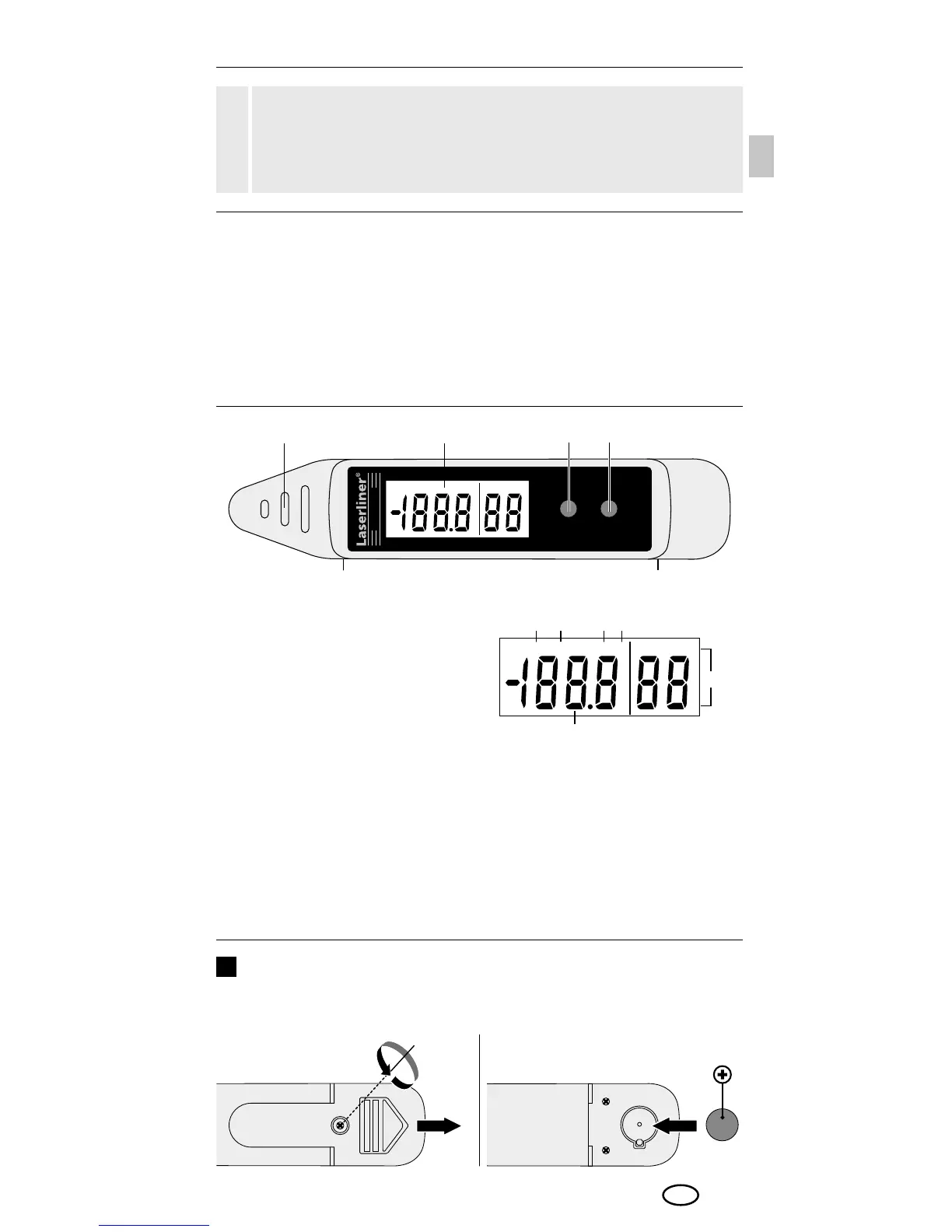
Sensor
LC display
Toggle measurement
in °C / °F
Toggle temperature /
dew point display
Switch on MAX/MIN values
On/off button (rear)
Battery compartment
(rear)
Display of MAX values
Display of MIN values
Measurement in °F
Measurement in °C
Relative humidity in %rH
Room temperature /
dew point display
1
2
3
4
5
6
a
b
c
d
e
f
Inserting battery
Open the battery compartment and insert battery according
to the symbols. Be sure to pay attention to polarity.
1x LR44 button cell



 To Next Page