28
EN
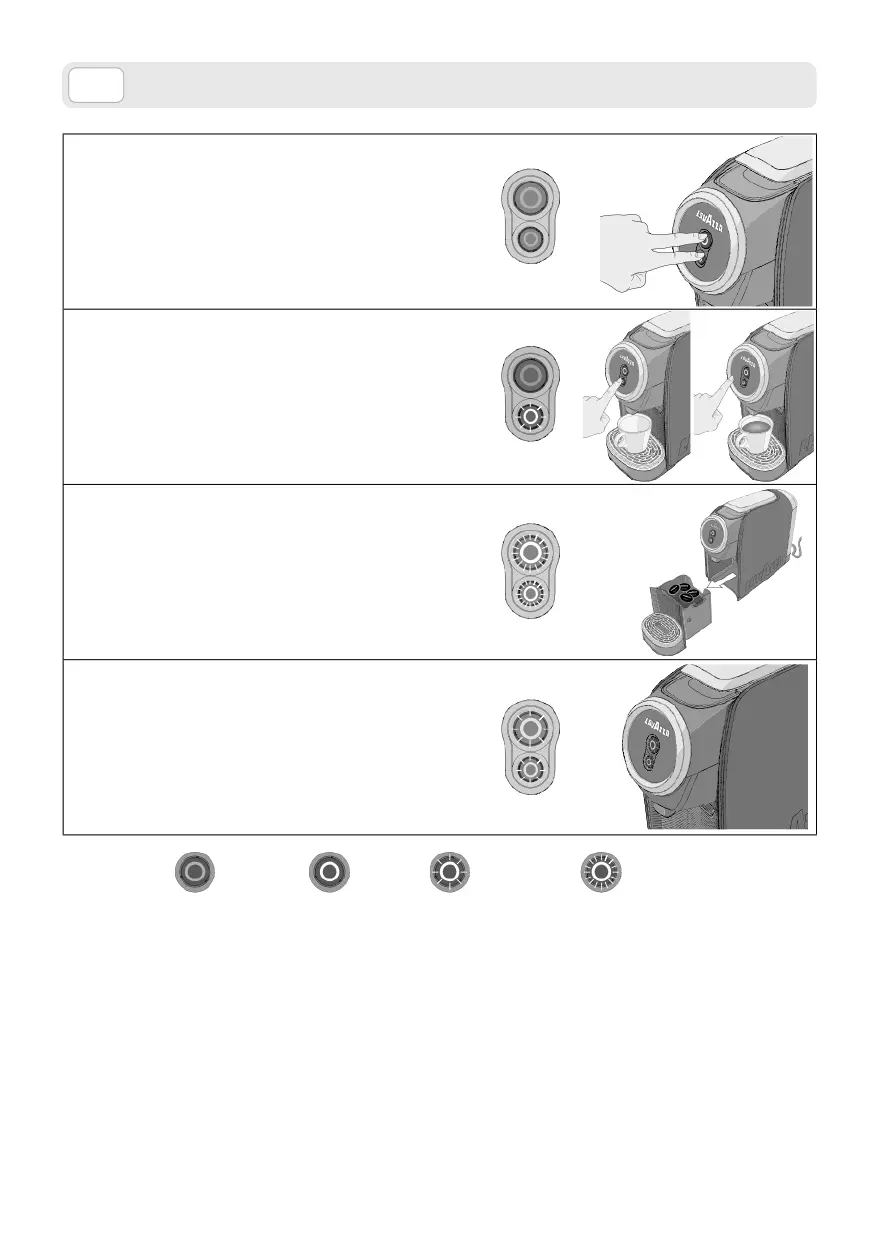
Stand-by
Stand-by mode after 9 minutes.
• The machine can be set to the stand-by mode manually,
first of the 9 minutes’ time, by keeping both buttons
pressed down for at least 3 seconds.
Coee dose programming
1. Press and hold one of the two coffee delivery buttons
for at least 3 seconds.
2. The selected button will flash.
3. Once the desired amount of coffee has been obtained,
stop supply by releasing the button.
Used capsule drawer filled
1. Switch-on/supply buttons lights onwith white light
and blinking fast.
2. Empty the spent capsule drawer and press one of the
power on/supply buttons to reset the machine
Machine broken
1. Red flashing lights.
2. Contact Lavazza Customer Service
INDICATOR LIGHTS
On
O
Flashing
Flashing
quickly
Red
Red



 To Next Page