35
EN
MACHINE SETUP
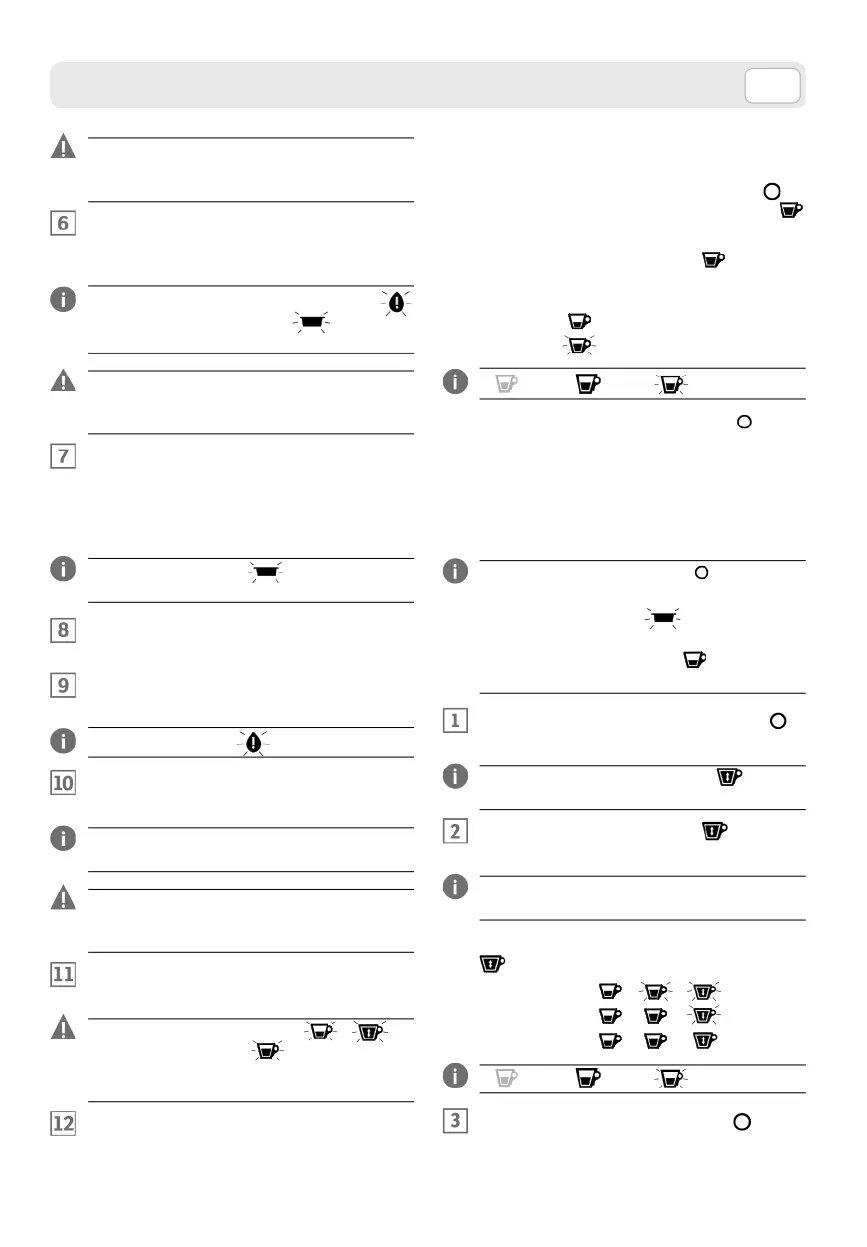
Do not drink the descaling solution and prod-
ucts dispensed until the completion of the cycle.
Never use vinegar as a descaling solution.
Insert the water tank with the descaling solution.
The machine will start automatically the descaling
cycle
.
During the descaling cycle, the water tank
warning light and the pod drawer warning light
flash alternately.
During the descaling cycle the machine per-
forms automatically pauses to allow emptying
of the container.
At the end of dispensing the decalcification solu-
tion, the cycle is temporarily suspended.
Remove the drop drawer and the exhausted pod
drawer, then empty the container used for the
descaling solution
.
Capsule drawer warning light ON with red
light flashing.
Fit the drawers inside the machine and position
the container under the spout
.
Remove the water tank, rinse and wash it accurate-
ly. Fill it with fresh still mineral water
.
Water tank warning light ON with light flashing.
Insert the water tank. The machine will start auto-
matically the rinse cycle
.
To finish the rinse cycle, it is necessary to dispense a
minimum amount of water, refill the tank if necessary.
During the rinse cycle, the machine sets auto-
matically in pauses to allow emptying the con-
tainer.
At the end of the delivery, the rinse cycle is
completed.
The flashing of the dispensing / al-
ternate with the button indicates the pres-
ence of the water filter in the tank. Insert the
filter and press a delivery key to confirm.
Remove the drop drawer and the exhausted pod
drawer, then empty the container used for rinsing.
ENABLE DISABLE TANK FILTER
PRESENCE
Press the MULTIFUNCTION button to
switch to the LONG ESPRESSO button ,
which lights up
Press LONG ESPRESSO button again to ac-
cess the function and subsequently enable or dis-
able the filter presence.
Filter ON :
Filter OFF:
= Off = On = Flashing
Press the MULTIFUNCTION button to save
the changes and exit the sub-menu.
SETTING THE TEMPERATURE
The MULTIFUNCTION button slights up to a
steady, white light.
The capsule drawer lamp lights up with red-
eye light.
The ESPRESSO supply button is lit with white
light.
Press twice the MULTIFUNCTION button in
the machine menu.
The FREE DOSING supply button is lit with
white light.
Press the FREE DOSING button to open the
temperature setting menu.
The machine as default value is set at low tempera-
ture.
Press the FREE MEASURE DELIVERY button
to select the machine temperature.
• Low:
• Normal:
• High:
= Off = On = Flashing
Press the MULTIFUNCTION button to save
temperature setting and exit the menu.



 To Next Page