33
TROUBLESHOOTING
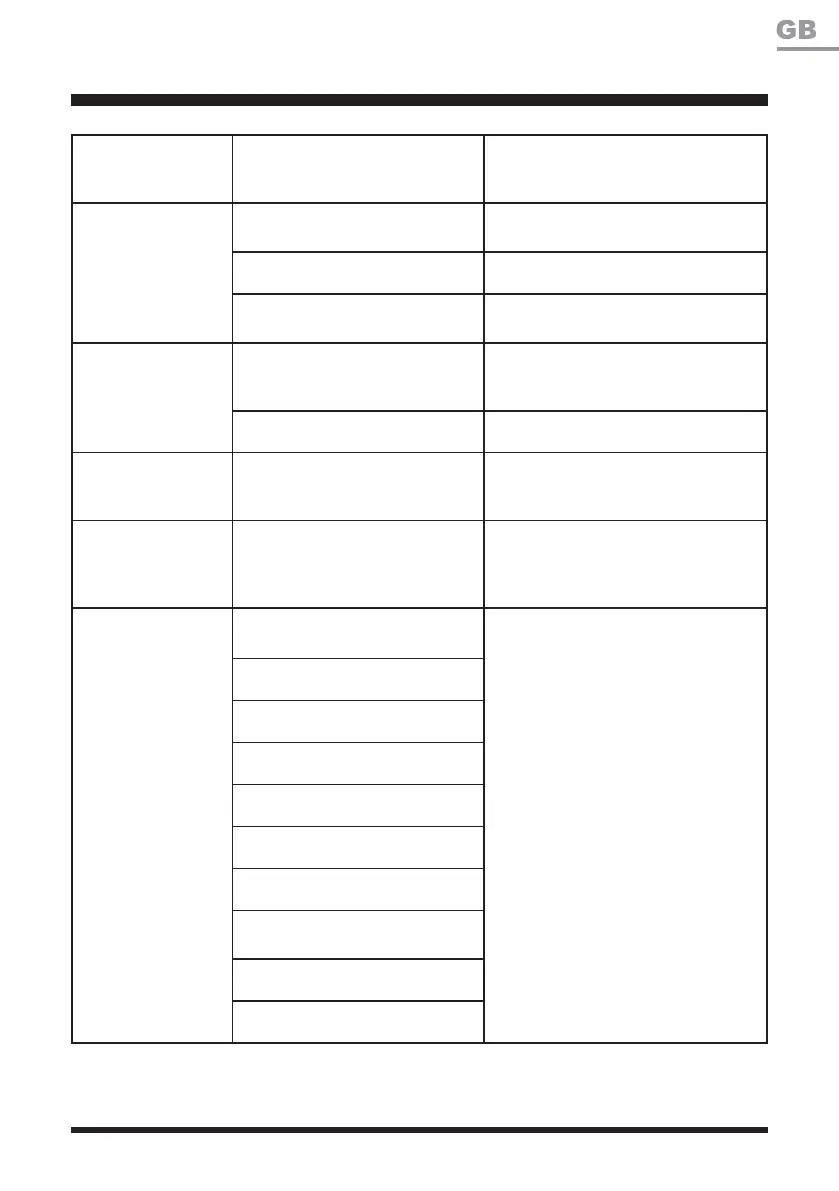
Socket outlet, fuse, mains cable
or base station is defective.
Check the mains voltage and fuse,
if necessary have the base station
FKHFNHGE\TXDOL¿HGSHUVRQQHO
Area of cut (battery
duration) is not large
enough.
Height of cut is too low, or the
grass is too high.
Increase the height of cut.
The grass is wet or damp. Wait until the grass is dry.
The grass is dense.
Increase the height of cut and add
more working time.
The cutting blade is
not rotating while the
mower is switched
on.
The cutting blade is obstructed.
Switch off the mower and clear
obstruction (always wear gardening
gloves).
The blade screw is loose. Tighten the blade screws.
LED on the base
station does not turn
on.
No power supply.
Check the power adaptor, cord,
breakers, and fuses.
LED on the base
VWDWLRQLVÀDVKLQJ
red.
Power adaptor is connected
successfully, while the boundary
wire is connected unsuccessfully
to the base station.
Check the boundary wire for correct
connection to the base station.
Error indicator is red
continuous.
Lift sensor fault.
Switch off the mower. Restart the
mower. If the problem remains,
contact the After Sales Helpline.
Drop sensor fault.
Boundary sensor fault.
Bump sensor fault.
STOP button fault.
Control panel fault.
Security self-test program fault.
Battery pack voltage is lower than
critical voltage.
Left or right wheel motor fault.
Blade motor fault.







 To Next Page