3.Troubleshooting
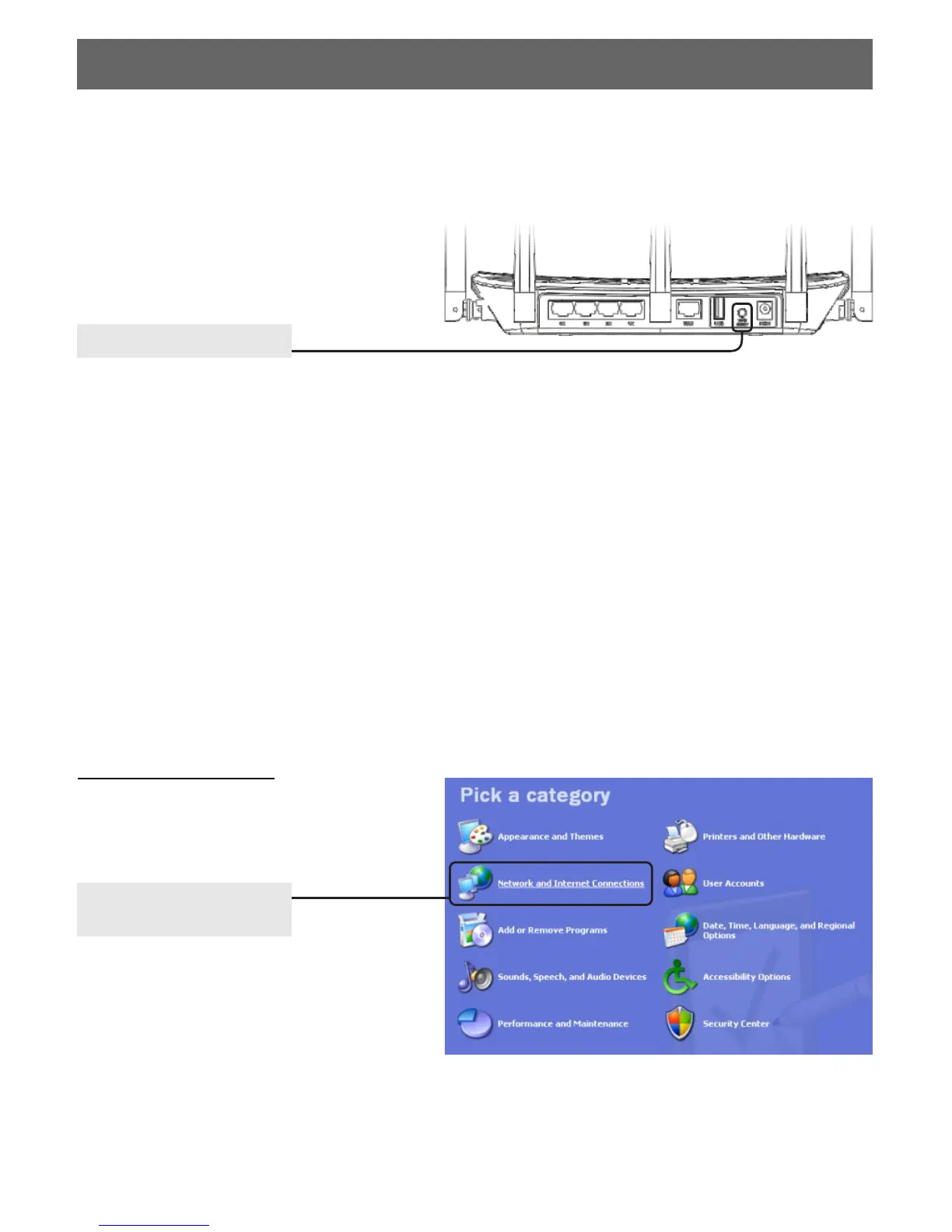
FAQ1: What should I do if I forget the user name and password?
(How to restore the router 's configuration to its factory default settings.)
Answer: If you forget the user name and password, the only way to solve this problem is to
reset the router. Press and hold the RESET button on the rear panel for 5 to 8 seconds before
releasing it.(when it is power on)
FAQ2: What can I do if I cannot access the Internet?
Hold for 5 to 8 seconds
FAQ3: How to configure the IP address of the computer?
For Windows XP OS
Go to Start > Control Panel,
you will then see the following
page.
Click Network and
Internet Connections
6
2.Unplug the router then connect the computer directly into the Modem. If it still does not work,
please contact your ISP or your Modem manufacturer. If it works, please reconnect your Modem,
router and your computer. Next steps might help you.
3.Make sure that you are connected to the Router with the computer that was originally
connected to your modem, then login to the web-based management page and browse to
"Network Setting > MAC Clone", click "Fill my MAC" and then click "Apply". Reboot the Router
and try to access the Internet from your computer.
1.Check whether each of the connections including the telephone line, Ethernet cables and
power adapter is well performed.


 To Next Page