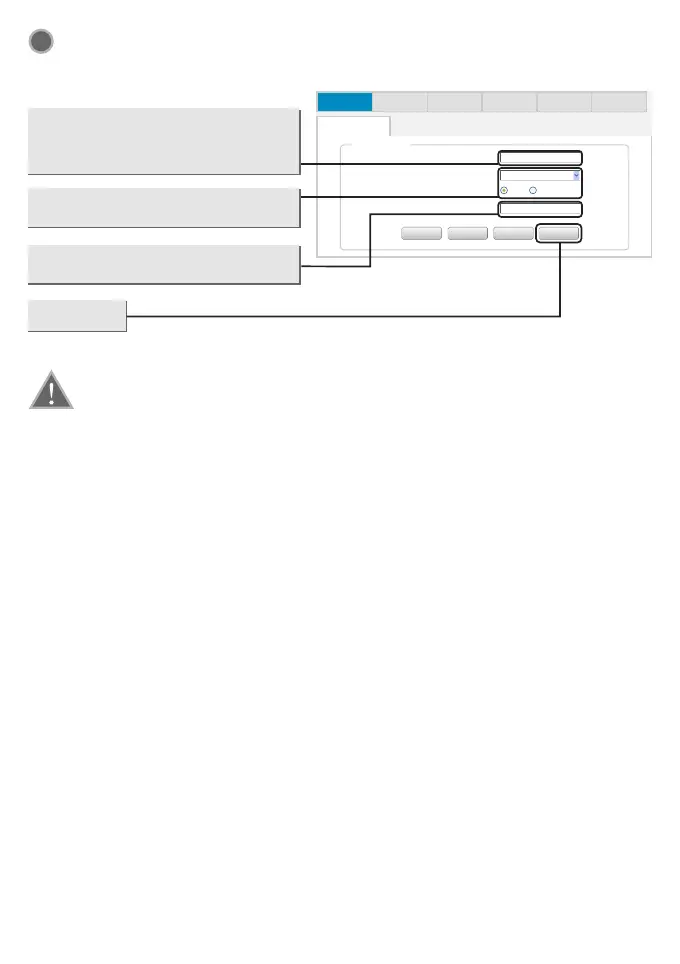
Wireless Settings Configuration
This page will then display
Note: The basic setting for your Router is completed. You will be able to access to the
Internet, if not, please refer to the troubleshooting
3
Network Wireless Firewall Virtual Server QOSQuick Setup
Quick Setup
Qucik Setup
Network n ame (SSID)
Securit y
WPA Al gorithms
Key
Back
Back
Cancel
Cancel
Apply
Apply
AES T KIP&AES
Next
Next
B-LINK_ 90E09F
WPA2-PSK
Create a unique and easy-to-remember
name for your wireless network.You can
also keep default settings without the
device being affected.
Select Security and WPA Algorithms,
Suggest to choose “AES”.
Set up a wireless Key,the length is
more than 8 characters.
Click Apply
5


 To Next Page