Need help?
Do you have a question about the Leak STEREO 230 and is the answer not in the manual?
Covers electrical shock, opening the unit, general handling, and symbol explanations.
Provides advice on ventilation, heat sources, water proximity, cleaning, and power cord safety.
Details precautions for polarized plugs, earthing terminals, and specific marked terminals.
A list of the main technical features and capabilities of the amplifier.
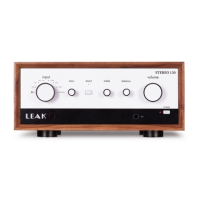
Identifies and explains the buttons, knobs, and LEDs on the front of the amplifier.
Details all the connection terminals for inputs and outputs on the rear panel.
Explains the specific function of each button on the provided remote control.
Details how to connect loudspeakers and headphones to the amplifier.
Managing power states, including entering standby and setting auto-standby timers.
Detailed technical data including dimensions, weight, power, and input/output specifications.
The LEAK STEREO 230 is a high-performance, high-fidelity integrated amplifier designed for audio enthusiasts, serving as a central hub for various audio sources to deliver high-quality sound through loudspeakers and headphones. It supports both analogue and digital inputs, making it versatile for modern audio setups.
The LEAK STEREO 230 operates as an integrated amplifier, providing amplification for your audio signals. It features a built-in Moving Magnet (MM) phono pre-amplifier, allowing direct connection to turntables. For AV applications, it includes HDMI ARC connectivity, enabling high-quality audio from ARC-compliant TVs. The device also functions as a high-fidelity Digital Audio Converter (DAC), processing digital audio signals from various sources.
Bluetooth 5.0 with aptX / aptX HD codec support allows for wireless streaming of CD-quality audio from compatible devices like smartphones and portable music players. A PC USB port facilitates stereo playback from a computer, and the unit includes MQA full decoding capabilities for PC USB, coaxial SPDIF, and optical SPDIF inputs, ensuring the playback of master quality authenticated audio files. It is also Roon Tested for PC USB, indicating compatibility with Roon software for an enhanced music experience.
The amplifier features a dedicated current-feedback headphone amplifier for private listening and offers a pre-amplifier output for connecting to external power amplifiers or associated equipment. It provides two sets of loudspeaker outputs for stereo sound. Additionally, it includes 12V trigger input and output for system integration with other components.
Upon powering on, the LEAK STEREO 230 enters standby mode, indicated by a dark red Power LED. It can be brought out of standby by pressing the Standby button on the front panel or the remote handset. The device offers an 'auto standby' function, which can be configured for 20 minutes, 1 hour, or never, by pressing and holding the Standby button on the front panel.
Volume control can be adjusted using the knob on the front panel or the volume buttons on the remote control. The volume level is retained from the last setting when the unit enters standby. A MUTE mode is available via the remote control, indicated by a flashing input indicator.
For analogue music playback, connect your source unit to the AUX1 or AUX2 RCA inputs and select the corresponding input using the INPUT selector on the front panel or the remote control. Similarly, for digital music, connect coaxial SPDIF or optical (TOSlink) outputs from your source to the COAX or OPT inputs on the rear panel and select the respective input.
To play music via USB, connect a Windows computer (after installing the necessary USB driver) or a Mac to the type-B USB interface on the rear panel. Select the USB input, and the unit will become the playback output device on your computer.
Bluetooth connectivity allows wireless audio streaming. The Bluetooth input indicator flashes when not connected and illuminates when a device is paired. To connect, select 'LEAK STEREO 230 BT' from your device's Bluetooth menu and enter '0000' if prompted. Bluetooth automatically disconnects after 1 minute if another input is selected or if the source device is out of range or turned off. To manually disconnect, press and hold the Play/Pause button on the remote control for 3 seconds.
The amplifier includes BASS and TREBLE controls on the front panel, allowing for adjustments within a range of -6dB to +6dB. These controls can be used to fine-tune the sound, especially for older recordings or to compensate for room acoustics. The BALANCE knob on the front panel adjusts the sound output balance between left and right speakers. Turning it fully left or right will silence the opposite channel.
The DIRECT function, activated by pressing the Direct button on the front panel, bypasses certain amplifier circuits to reduce noise and electronic interference, aiming for the purest sound reproduction. When Direct mode is active, the bass, treble, and balance controls are unavailable.
The LEAK STEREO 230 is protected by a thermal switch that interrupts the AC power supply if the amplifier is overloaded for an extended period. To restore operation after a protection event, simply press the Standby button on the front panel. This protection mechanism safeguards against gross overload and short-circuited outputs.
For firmware upgrades, the unit provides a type-A USB port. The upgrade method involves placing the upgrade file on a USB disk, plugging it into the UPDATE USB interface, and then pressing and holding the STANDBY button on the front panel while switching on the rear panel POWER switch. The amplifier will automatically upgrade. After upgrading, unplug the USB disk and power on the amplifier for normal use. Windows drivers and firmware updates are available for download from the LEAK website.
The grounding terminal on the rear panel is used to reduce noise when connecting with other associated equipment that has a separate ground lead, particularly for turntables and turntable amplifiers that are double insulated. This helps eliminate residual hum by grounding the machine's metal housing.
For cleaning, only use a dry cloth. Ensure ventilation openings are not blocked and install the unit according to the manufacturer's instructions, away from heat sources. Protect the power cord from being stepped on or pinched. Unplug the apparatus during lightning storms or when unused for long periods. All servicing should be referred to qualified service personnel.
 General
| Input Impedance | 47kΩ |
|---|---|
| Total Harmonic Distortion | 0.005% |
| Type | Integrated Amplifier |
| Inputs | 2 x RCA |
| Outputs | Speaker outputs, headphone output |
| Digital Input Sample Rate | 44.1kHz-192kHz |
| Bluetooth | Yes (aptX) |
| Frequency Response | 20Hz-20kHz (+/-0.5dB) |

 To Next Page