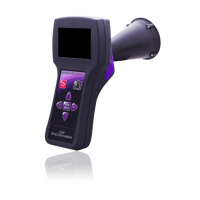
The LEAKSHOOTER LKS1000 is a portable ultrasonic detection camera designed for the ultimate detection of gas leaks, specifically compressed air or other gases under pressure or depression. This device allows users to hear, measure, view, and store information related to leaks, making it a comprehensive tool for leak detection in industrial environments.
Function Description:
The core function of the LEAKSHOOTER LKS1000 is to detect and localize ultrasound generated by gas leaks. When gas moves from a high-pressure state (e.g., compressed air in a pipe at 6 bar) to a low-pressure state (e.g., a leak in a pipe with external atmosphere pressure), a depression phenomenon creates turbulence. This turbulence generates noise with a large frequency spectrum, including ultrasound, due to the friction of molecules (like air) through the orifice. Since human hearing typically extends only up to 20 kHz, these ultrasounds (which start at frequencies above 20 kHz) are inaudible to humans. The LKS1000 utilizes a very sensitive ultrasonic detector and heterodyne technique, often centered around 40 kHz, to make these inaudible sounds detectable and audible.
The device offers several key functions:
- Detection and Localization: It uses an automatic dynamic target on the screen to pinpoint the exact location of the ultrasound source, indicating the leak.
- Audible Listening: The heterodyne technique converts the high-frequency ultrasound (40 kHz) to a lower, audible frequency (2.5 kHz), allowing users to listen to the leak through headphones.
- Real-time Measurement and Display: It measures and displays Real-Time RMS (Root Mean Square) and Max RMS values on a colored bargraph, providing an indication of the leak's severity.
- Visual Confirmation: The screen visualizes the presence of ultrasonic waves, helping to confirm the exact location of the leak.
- Data Recording: The device can record numbered and timestamped bitmap images of the scene, including all ultrasonic information, for documentation and analysis.
Important Technical Specifications:
- Ultrasonic Detection Frequency: The device is designed to detect ultrasound around 40 kHz.
- Heterodyne Conversion Frequency: Converts 40 kHz ultrasound to an audible 2.5 kHz.
- Measurement Gain: The device operates with an automatic gain adjustment, typically between 70 dB and 110 dB in auto mode. In manual mode, the gain can be adjusted from a maximum of 110 dB down to a minimum of 50 dB.
- Battery: Equipped with a Lithium-Ion battery, providing approximately 6 hours of operation, depending on usage (e.g., camera activation, screen backlight).
- Charging: Charges with the provided universal battery charger kit (5V DC, 2A). Full charging time is around 5 hours.
- Connectivity: Includes a USB PC port for data transfer and a jack for audio headphones. An additional jack for an external probe is located on top of the device.
- Display: Features a color screen that shows the camera's real-time view, dynamic target, RMS values, photo number, and timestamp.
- Detection Frequency (Mixer): The frequency mixer is variable from 34 to 46 kHz, allowing for fine-tuning of signal results and efficiency for headphone listening, adapting to different leak applications.
Usage Features:
The LEAKSHOOTER LKS1000 is designed for ease of use and accessibility.
Keyboard Controls:
- On/Off Button: Powers the device on and off. A quick press turns it on (1-2 seconds for initialization), while a lengthy press (1-2 seconds) turns it off. If the battery is fully empty, the device may not switch on until charged.
- Photo Capture Button: Used to take and store photos of the leak.
- Menu Settings & Validation Button: Accesses the menu and confirms selections.
- Up/Down Arrows: Navigate through menus and adjust settings (e.g., headset volume, measurement gain).
- Left Arrow (Escape): Used to escape from menus or cancel actions.
- Right Arrow (Increase Measurement Gain): Increases the measurement gain.
- Minus Button (Decrease Measurement Gain & Escape): Decreases measurement gain and also functions as an escape button.
- Plus Button (Increase Headset Volume): Increases the headset volume.
- Minus Button (Decrease Headset Volume): Decreases the headset volume.
Leak Detection Search Procedure (Scanning Method and Cone):
- Scanning: The recommended method is to scan the measurement scene quietly and conscientiously (e.g., left to right, high to low).
- Dynamic Target: A dynamic target on the screen indicates the leak's location. It appears yellow for approaching leaks and turns red with a cross inside when directly facing the leak.
- Auto Gain Mode (Default): Ideal for small and medium leaks. The gain automatically adjusts based on ultrasonic severity. RMS values are calculated with compensation for accurate readings. The Max Value is frozen on screen for a few seconds (indicated by a vertical black line in the bargraph) when detected, helping to pinpoint the leak.
- Manual Gain Mode: Used for big leaks or ultrasonically saturated zones. Users start at 110 dB and decrease the gain (minimum 50 dB) until the automatic target shrinks, ignoring high saturated ultrasonic noise. Lower gain improves directivity for large leaks.
- Headphone Use: Headphones provide an audible indication of the leak, with the noise becoming louder as the user approaches or faces the leak. Volume can be adjusted (0-10). Users are cautioned against prolonged listening at high volumes to prevent hearing problems. The device's dynamic target and RMS values can reduce the continuous need for headphones.
Flexible Sensor Option:
- A flexible 400 mm sensor is available for detecting leaks in very small connectors or areas with difficult access. It can be used in both auto and manual gain modes. The best practice is to use the flexible sensor to find the leak, then position the camera to take a picture.
Measurement Screens:
The device provides different screen indications based on leak presence and proximity:
- No Leak: Real-time RMS is approximately equal to Max RMS and displayed in green. No noise in headphones.
- Near a Small Leak: Real-time RMS is less than (Max - 3dB) and displayed in yellow. A yellow target indicates approaching the leak. Light leak noise in headphones.
- Face to a Small Leak: Real-time RMS is greater than (Max - 3dB) and displayed in yellow. A yellow target with a centered cross indicates the exact leak location. Leak noise in headphones.
- Near an Important Leak: Real-time RMS is less than (Max - 3dB) and displayed in red. A red target indicates approaching the leak. Heavy leak noise in headphones.
- Face to an Important Leak: Real-time RMS is greater than (Max - 3dB) and displayed in red. A red target with a centered cross indicates the exact leak location. Very heavy leak noise in headphones.
Menu and Settings:
Accessible via the "Valid. Menu" button, allowing access to:
- Measurement Settings:
- Detection Freq.: Adjusts the frequency mixer (34 to 46 kHz) for optimal signal and headphone listening.
- Stored Photos: Allows review of photos stored in memory.
- Screen Brightness (0-10): Adjusts display brightness.
- Camera Brightness (0-10): Adjusts camera brightness.
- Camera Use: Activates/deactivates the camera to save battery energy.
- Setup:
- Battery Level: Shows battery voltage and approximate remaining usage time.
- Date/Time: Sets the device's date and time.
- USB Link: Prepares the device for USB connection with a PC.
- Auto Power Off Delay: Sets the time delay for automatic device shutdown.
- Language: Selects the interface language (French, English, Deutsch).
Photo Management:
- Catching and Storing Photos:
- When facing a leak (target and cross on screen, Real-time RMS=MAX), click the photo capture button once to freeze the picture.
- To store, click the photo capture button again. The picture will be numbered (default or user-set between 000-999) and timestamped.
- Click the "Valid. Menu" button to confirm and store the photo.
- To escape without storing, click the escape (left arrow) button.
- Deleting Photos:
- Delete All Photos: Navigate to a stored photo, press the "+" button for 2 seconds, then validate the deletion.
- Delete One Photo: Navigate to the desired photo, click the photo capture button, then confirm with the "Valid. Menu" button when "DELETE THIS PHOTO?" appears. If no photos are in memory, "NO PHOTO" appears.
Maintenance Features:
- Battery Charging: The device should be charged using the provided universal battery charger. It is recommended to charge the battery only when a low battery message appears on the screen to optimize charging time and battery capacity.
- Software: Includes software for PC ("LKS PC VIEWER") for viewing recorded data.
- User Manual: A user manual is provided on CD.
The LEAKSHOOTER LKS1000 kit includes:
- Aluminum Transport Case (LKS CASE)
- Ultrasonic Detection Camera (LKS 1000)
- Headset with Jack Cable (SNR 31) (LKS EAR)
- Universal Battery Charger (LKS POWER)
- USB Cable for PC (LKS USB)
- User Manual on CD (LKS MANUAL)
- Software for PC (LKS PC VIEWER)

 Need help?
 General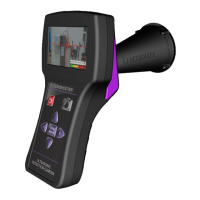

 To Next Page