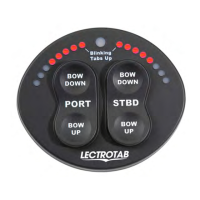
9
Oval Programming Chart for SETR-61 Series
Enter/Adjust/Exit Program Mode:
To enter program mode main power must be on and aux 12vdc must be off.
Press and hold key noted in "Enter" column (see chart below) for more than 2 seconds, then apply 12vdc to Aux terminal. Release the button.
Press "STBD BOW UP or DOWN" to change the value as per Programming Details and chart below.
Press and hold "PORT BOW UP" for more than 2 seconds to exit program mode.
Program Mode Sequence
Function Enter Adjust Exit Range Default
Timing PORT BOW DOWN
STBD BOW
DOWN/UP PORT BOW UP 4 - 12sec 8sec
LED's On/Off PORT BOW UP
STBD BOW
DOWN/UP PORT BOW UP On/Off On
Swap LED's STBD BOW DOWN
STBD BOW
DOWN/UP PORT BOW UP
LED's
Opposite of
key/same
side key
LED's
Opposite of
key press
Programming Details:
Timing: #LED's lit corresponds to the #seconds in actuator stroke time i.e. 8 LED's = 8 seconds, 4 LED's = 4 seconds
(Actuator's A and B series = 8 seconds, C and D series = 4 seconds and S series = 6 seconds)
LED's On/Off: 8 LED's lit on right side = LED On state, 1 LED lit on right side = LED Off state
Swap LED's: 1 LED on right and left side = LED lights opposite side of key press, 8 LED's on right and left side = LED lights same side
as key press
LECTROTAB ● Linear Devices Corporation ● 11126 Air Park Rd., Suite G ● Ashland, VA 23005 Phone: 804-368-8428, Fax: 804-368-8438,
www.lectrotab.com
Lit # J1107
Revised January 2014


 To Next Page
 Loading...