changes to ON, then press the OK button to confirm.
the holiday mode. OFF appears, press up or down
Vacation mode
Long press 3/5 seconds for setting
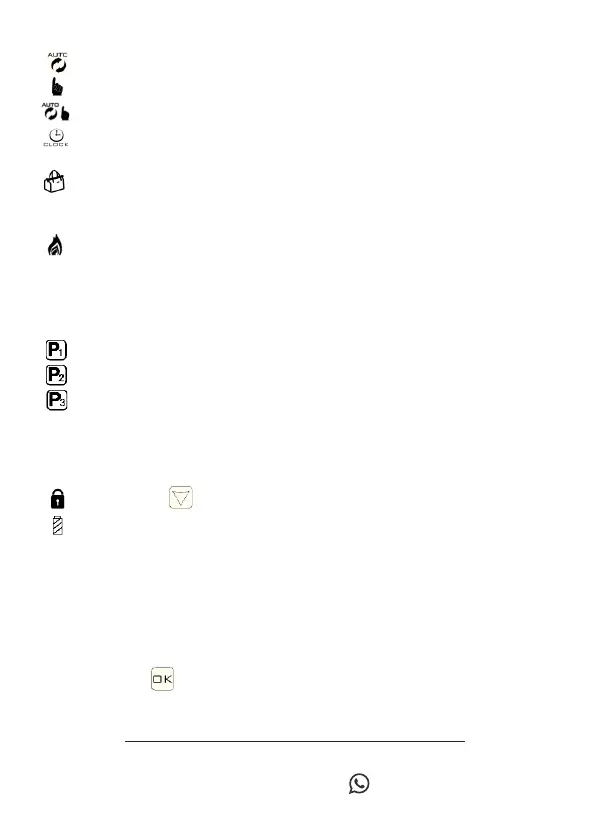
Description Icons
- Automatic mode: runs the preset program
- Manual mode
- Temporary manual mode
- Clock
- Vacation Mode: Vacation days and
temperature can be set for
running in countdown mode;
- Heating, make it disappear to stop the
heating
- Program running mode
P1 carries out the weekly programming at six
periods;
P2 carries out the weekly programming at six
periods 6/1;
P3 runs seven days and six time periods
programming;
P1, P2, P3 are selected in advanced option A7,
P1 (default)
- Child lock, lock / unlock long press
- Battery power warning icon
For any need
+ 39 3343516911
A2Z World Srl - Via Giorgio Stephenson 32/E - 20019 Settimo Milanese (MI)
www.ledlux.it
SKU: LL0250
A simple click on the OK button will allow us to enter the time
modification mode, 3 steps: 1st click minutes, other click
hours and finally last click day of the week
Time setting


 To Next Page