ALL PRIMERS ARE DANGEROUS and it should be anticipated that the primers in the tray could explode through accident, misuse or spontaneously. Should
an explosion occur, our tests have demonstrated that safety glasses will normally prevent serious injury to the user. Primers are capable of exploding with
sucient force to seriously injure the user, or persons nearby. When loading primers—safety glasses and hearing protection must be used.
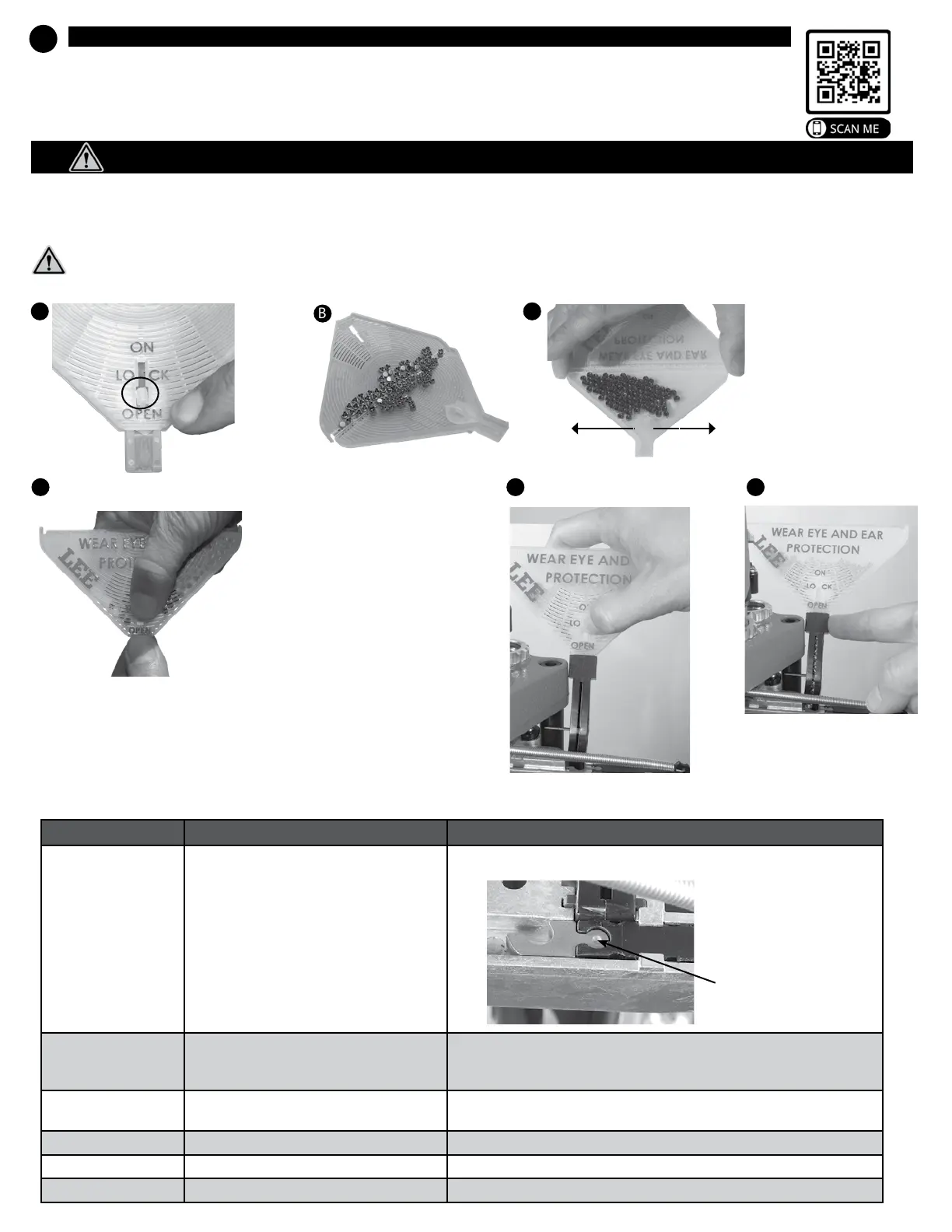
Slide the flow
control to
OPEN.
Lift tray so output spout
touches table, shake tray
side to side to upright all
the primers. Allow cover to
naturally fold up, notice how
the primers glide across hinge
upright themselves and work
their way towards the outlet.
Fold cover over, slide the flow control to
LOCK position, feel for the detent. Grasp
the top and bottom of the flow control valve
using your thumb and index finger above
and below tray.
NOTE: make sure it is in the LOCK detent
position, or else primers may spill.
Slide the tray into the trough. Slide
the flow control to the ON position.
A
B
C
D
E
WARNING: Handling live primers and spent primers may expose you to lead or other chemicals, which are known to the State of
California to cause reproductive harm and cancer. For more information, go towww.P65Warnings.ca.gov.
Randomly
deposit
primers.
Don’t let the primer level fall below the tray level. Once the last primer has exited the folding tray, replenish the primer
supply, or else you will be loading cases without primers.
DANGER: Primers can explode with sucient force to seriously injure the user or persons nearby.
IMPORTANT - Fill the primer feed tray. View help video for loading primers into tray:
TROUBLESHOOTING
PROBLEM CAUSE REMEDY
Primers will not feed
properly
• Wrong primer guide is installed or the primer
guid is installed upside down. The S and L must
be installed facing down. See Remedy >
• Install appropriate primer guide with letter facing down.
Primer doesn’t feed onto
priming punch
• Oil in trough
• Primer trough not full
• Remove all oil with solvent or blow out powder or dust with compressed air
• Always keep primer trough full, there must be a minimum of 5 primers in the
trough to feed properly
Primer doesn’t enter case
• Primer crimp not removed
• Wrong size primer
• Ream or swage primer pocket
• Caution, some 45ACP cases now have small primer pockets
Tipped primers • Case not fully in shell plate • Adjust case retainers
Cases don’t eject • Case ejector • Verify case ejector is installed
Shell plate does not index • Driver clutch missing or damaged • Rotate 90 degrees and re-install, or replace part # PR3691.
Large Primer Guide
# 91981
Small Primer Guide
shown installed.
Notice dimple on
attach boss.
# 91980
Tap the trough several times
to fill.
6
Install primer feeder
F
7


 To Next Page
 Loading...