EasyManua.ls Logo

LEGRAND tynetec Touch 2 - User Manual

LEGRAND tynetec Touch 2
3 pages
Print Icon
To Next Page IconTo Next Page
Loading...
Tynetec, a business unit of Legrand Electric Ltd
Cowley Road, Blyth Riverside Business Park, Blyth, Northumberland, NE24 5TF.
Tel: +44 (0) 1670 352371 www.tynetec.co.uk
Trusted Technology
Caring for People
869MHz
Touch 2 Pendant
_________________________________________________________________________
________________________________________________________________
Doc No. FM0828 V1.04 Page 1
Portable alarm trigger device
Compatible with Reach IP, Advent XT2 & Carer Response
Complies with BS EN 50134-2:2017
IP68: fully sealed against immersion in water
Red alarm transmit reassurance LED
Green alarm received reassurance LED
TPU neck cord with anti-ligature safety break
TPU wrist strap with aluminium stud
ABS belt clip
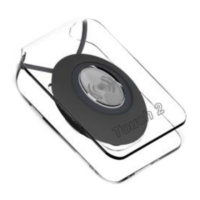
Suction cup for fixing to a hard surface
5 year Lithium battery (typical)
Low battery warning
Telecare Transceiver: 869.2125MHz Class 1.5
Digital Heartbeat
Operating Temperature: -10
o
C to +55
o
C
Weight: 12 grams (exc. wearing option)
Dimensions: 45mm x 30mm x 14mm (HxWxD)
Product Code: ZXT800
The Touch 2 Personal Pendant can be worn by the user
either around the neck, on the wrist or on a belt to allow
an emergency alarm call to be made from anywhere in or
around the home. In residential housing, calls can be
made from anywhere on the scheme.
Optional Dexterity Aid
When fitted to a standard
Touch 2 pendant this elegantly
designed adapter provides a
much larger surface area
for button activation.
This enables those with limited
dexterity to easily make a call
should they require assistance.
Adapter Part No. E00520.
Emergency Alarm Call
An alarm call is made by simply pressing the button once,
no further action is required. The button will flash red to
indicate a call has been transmitted, it will then flash green
as reassurance that the call has been received by the
Reach IP or Advent XT2 it does not flash green when
used with a Carer Response.
Low Battery Condition
A low battery condition will be reported automatically to
the Alarm Receiving Centre (ARC) or the local Manager.
The pendant should be replaced as soon as possible within
30 days.
Out of Range Notification (Reach IP)
The Reach IP can monitor all radio peripheral devices to
determine whether they have been damaged or removed
from an installation. Should the Reach IP be unable to
detect a device’s heartbeat it will automatically generate a
“radio out of range” notification. Firstly, investigate if
there’s a genuine reason for the alert, if not, arrange for
the peripheral device to be replaced immediately.
The “Radio out of range timer” can be set from 30 hours to
99999 hours in Pulse CMP. “Radio supervision” can be
disabled by unchecking the tick box associated with each
peripheral device in Pulse CMP.
Maintenance
Test the pendant once every month.
Clean with a damp cloth, do not use solvents or cleaners
on the pendant or wearing accessories.
Disposal
Waste electrical products should not be disposed
of with normal household waste. The pendant is
ideally suited for disposal within the waste
electronic and electrical equipment (WEEE)
recycling scheme. Please recycle where facilities exist.
Check with your local authority or contact your supplier for
recycling/disposal advice.
Warning
The pendant contains a Lithium battery. If tampered with
the battery may be damaged and create a fire hazard.
No attempt should be made to remove or replace the
battery. Do not incinerate.
Anti-ligature Safety Break
The pendant includes an anti-ligature safety break in the
neck cord. Should excessive force be applied the cord will
part - it can be simply clipped back together.
Question and Answer IconNeed help?

Do you have a question about the LEGRAND tynetec Touch 2 and is the answer not in the manual?

Overview

The Tynetec Touch 2 Pendant is a digitally enabled, portable alarm trigger device designed for personal safety and assistance, compatible with Reach IP, Advent XT2, and Carer Response systems. It complies with BS EN 50134-2:2017 and features an IP68 rating, ensuring it is fully sealed against immersion in water.

Function Description

The primary function of the Touch 2 Pendant is to allow users to make an emergency alarm call from anywhere within or around their home or scheme. This is achieved by simply pressing the button once. Upon activation, the button flashes red to indicate that a call has been transmitted. It then flashes green as reassurance that the call has been received by a Reach IP or Advent XT2 system. When used with a Carer Response system, it does not flash green.

The pendant also includes a low battery condition reporting feature. When the battery is low, this condition is automatically reported to the Alarm Receiving Centre (ARC) or the local Manager. Users are advised to replace the pendant within 30 days of this notification.

For Reach IP systems, the pendant supports an "Out of Range Notification" feature. The Reach IP unit monitors all radio peripheral devices, including the pendant, to detect if they have been damaged or removed from an installation. If the Reach IP cannot detect the pendant's heartbeat, it generates a "radio out of range" notification. Users should investigate the reason for the alert and, if necessary, arrange for the peripheral device to be replaced immediately. The "Radio out of range timer" can be adjusted from 30 to 99,999 hours in Pulse CMP, and "Radio supervision" can be disabled for individual peripheral devices in Pulse CMP.

Important Technical Specifications

  • Compatibility: Reach IP, Advent XT2, Carer Response
  • Compliance: BS EN 50134-2:2017
  • Ingress Protection: IP68 (fully sealed against immersion in water)
  • LED Indicators: Red for transmit reassurance, Green for received reassurance (Reach IP/Advent XT2 only)
  • Power Source: 5-year Lithium battery (typical)
  • Telecare Transceiver: 869.2125MHz Class 1.5
  • Digital Heartbeat: Yes
  • Operating Temperature: -10°C to +55°C
  • Weight: 12 grams (excluding wearing option)
  • Dimensions: 45mm (H) x 30mm (W) x 14mm (D)
  • Product Code: ZXT800
  • Radio ID: 10-digit code printed on the label on the back of the pendant.

Usage Features

The Touch 2 Pendant offers multiple wearing options to suit user preferences and needs:

  • Neck Cord: A TPU neck cord with an anti-ligature safety break is included. This break ensures that if excessive force is applied, the cord will part, preventing injury. It can be easily clipped back together. The cord is fitted by lying it through one of the grooves on the rear of the pendant and sliding the neck cord attachment into place.
  • Wrist Strap: A TPU wrist strap with an aluminium stud is provided. The wrist strap is fed through two slots in the wrist strap attachment, ensuring the attachment pip aligns with the center strap hole. A fixing stud is then pushed through the hole at the end of the strap.
  • Belt Clip: An ABS belt clip allows the pendant to be clipped onto a belt. A suction cup can also be fitted to the belt clip to stick the pendant to a tiled wall.

Optional Dexterity Aid: For users with limited dexterity, an optional adapter (Part No. E00520) is available. This elegantly designed adapter provides a much larger surface area for button activation, making it easier to make a call.

Registration: The pendant can be registered with various systems:

  • Reach IP: Login to Pulse CMP, enter the Reach IP Serial No. in the ALARM UNIT view, press Accessories, enter the Radio ID code, Location, and Equipment type. Save and Synchronize. Alternatively, in normal operating mode, access the Power button on the Reach IP unit, enter Control Mode, press and hold the button until "add radio device" is announced, confirm, and then press the pendant.
  • Advent XT2: From the Manager's Panel Home page, press Settings, then Manager (or Engineer), enter the password, and press Programming. Select Program Radio Devices, enter the Flat ID (e.g., 0014), Radio ID, and select "no location" for Room Locations. Press Send to update the system.
  • Carer Response: Refer to the Carer Response user manual for button functions. From the Main menu, select Programming, then Add transmitter. Activate the transmitter by pressing the pendant. The Carer Response will beep, and the display will show the Add transmitter menu with "No ID." Navigate to Room, enter the room number (e.g., 0000), select the alarm type (None, then Trigger), and then Save.

Maintenance Features

  • Testing: The pendant should be tested once every month to ensure proper operation.
  • Cleaning: The pendant and its wearing accessories should be cleaned with a damp cloth. Solvents or harsh cleaners should not be used.
  • Battery: The pendant contains a Lithium battery. It is not user-replaceable, and no attempt should be made to remove or replace it, as this can damage the battery and create a fire hazard. The pendant should not be incinerated.
  • Disposal: Waste electrical products, including the pendant, should not be disposed of with normal household waste. The pendant is suitable for disposal within the Waste Electrical and Electronic Equipment (WEEE) recycling scheme. Users should check with their local authority or supplier for recycling/disposal advice.

The device is manufactured by Tynetec, a business unit of Legrand Electric Ltd, and carries declarations of conformity with relevant UK and European legislation.

LEGRAND tynetec Touch 2 Specifications

General IconGeneral
BrandLEGRAND
Modeltynetec Touch 2
CategoryPersonal Care Products
LanguageEnglish

Related product manuals