Need help?
Do you have a question about the Leica CS35 and is the answer not in the manual?
Details the requirement of an internet connection to the Leica Geosystems License Server for license activation.
Explains the Entitlement ID as the key for initial license activation and reordering software options or CCP.
Lists registered trademarks like Microsoft Windows and Bluetooth, and notes others are property of their respective owners.
Illustrates the physical setup and connection of the CS35 tablet with a Total Station (TS).
Illustrates the physical setup and connection of the CS35 tablet with a GNSS (GS) receiver.
Lists the components of the Leica Image, including special Windows settings, drivers, and activation tools.
Details special Leica Windows settings like desktop, keyboard, and network configurations for the CS35.
Explains user responsibility for changes to the Leica Image and potential impact on operation and support.
Describes the initial wizard for setting language, PC name, password, and Windows configuration upon device delivery.
Guides through the process of activating software licenses and trial periods using Entitlement IDs.
Refers to the Technical Reference Manual for details on connecting the CS35 to Leica GNSS or Total Station sensors.
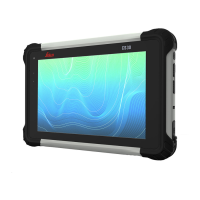
The Leica CS35 is a robust tablet designed for field use, running a customized version of Microsoft Windows with the Leica Captivate field software. This device serves as a control unit for Leica Geosystems' surveying equipment, including GNSS sensors, total stations, and multi-stations. Its primary function is to facilitate data collection, processing, and management in various surveying applications.
The CS35 tablet integrates a standard Microsoft Windows operating system with a specialized Leica Image, which includes tailored settings and essential software components. The Leica Image ensures optimal performance and compatibility with Leica Captivate, a comprehensive field software for surveying. Key components of the Leica Image include:
The CS35 is designed to be the central hub for surveying workflows, allowing users to control instruments, visualize data, and perform calculations directly in the field. Its ability to connect to Leica GNSS sensors, total stations, and multi-stations makes it a versatile tool for various surveying projects.
The CS35 is delivered in a wizard mode, guiding the user through initial setup steps such as language selection, PC name, password configuration, and Windows settings. This ensures a smooth first-time experience.
While the CS35 runs a standard Microsoft Windows version, the Leica Image includes specific considerations for maintenance and system integrity.
The Leica CS35 is designed for reliability and ease of use in demanding field environments, with a focus on maintaining system stability through its customized Leica Image and clear guidelines for usage and maintenance.
 General
| Processor | Intel Core i5 |
|---|---|
| RAM | 8 GB |
| Internal Storage | 256 GB SSD |
| Display Size | 10.1 inches |
| Display Resolution | 1920 x 1200 pixels |
| Touchscreen | Yes |
| Connectivity | Wi-Fi, Bluetooth |
| Ports | USB-C |
| Camera | 8 MP rear, 2 MP front |
| Expandable Storage | MicroSD card slot |

 To Next Page