16 17
7
Mounting of
cable
Kabelmontage
安装电缆
PROFIBUS
CANopen
DeviceNet
1)
2)
3)
4)
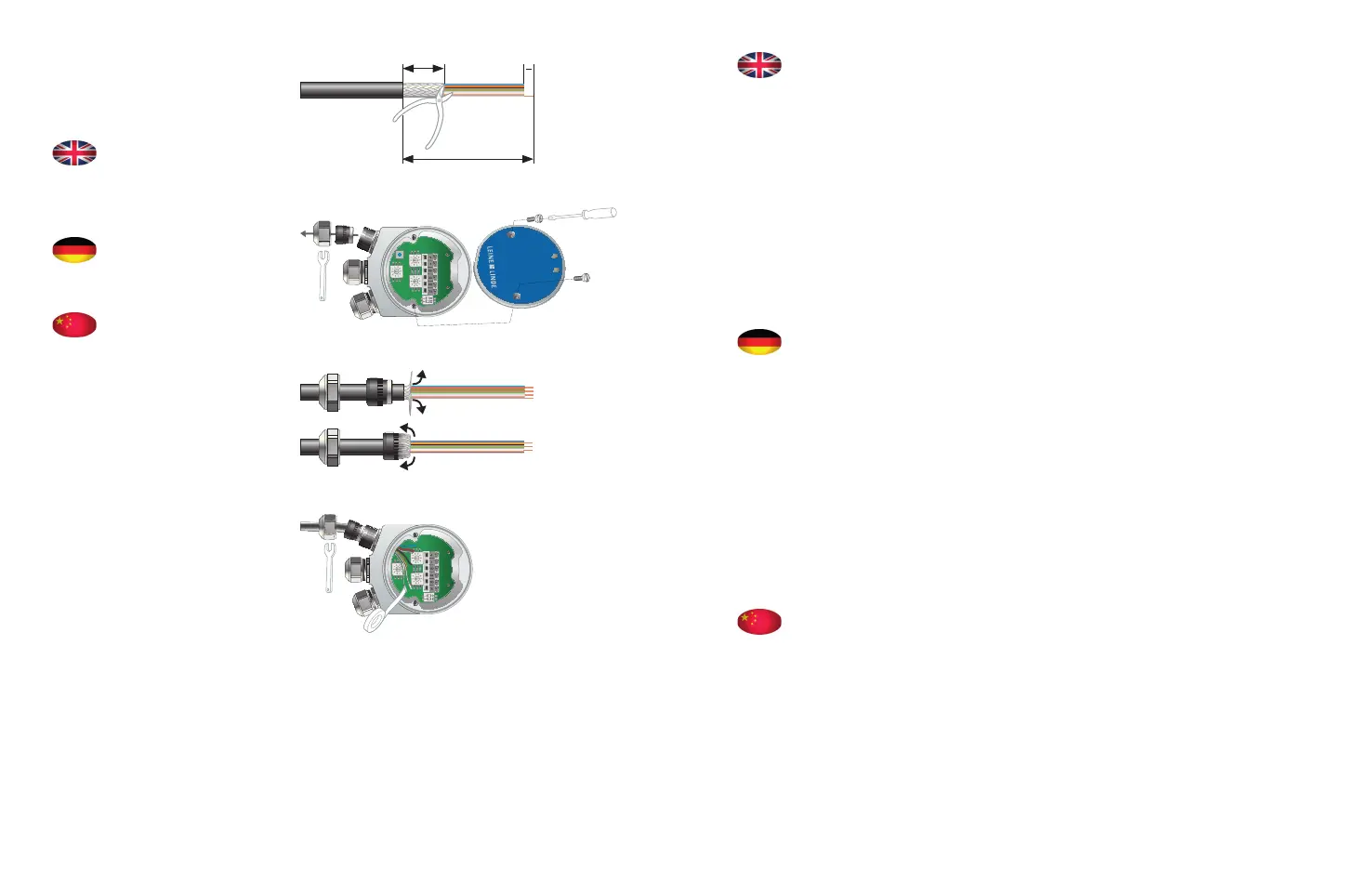
10 mm
8 mm
100 mm
Fit cable*, using the following steps:
Step 1. Strip the cable according to the dimensions
in the illustration.
Step 2. Open the terminal cover and unscrew the
cable bushing.
Step 3. Fold the cable shield backwards over the
shell ring.
Step 4. Connect the wires according to the product
label.
Insulate any wire that is not being used.
Tighten all terminal screws (including any
unused ones).
* Does not apply to models with pre-installed cable
or connector.
Die elektrische Montage des Kabels*:
Schritt 1. Kabel gemäß den Maßangaben in der
Abbildung abisolieren.
Schritt 2. Klemmendeckel öffnen und Kabeldurch-
führungen aufschrauben.
Schritt 3. Kabelschirm über den Mantelring nach
hinten biegen.
Schritt 4. Leitung gemäß der Belegung wie auf dem
Etikett angegeben anschließen.
Nicht verwendete Leiter isolieren.
Sämtliche Klemmenschrauben anziehen
(auch die nicht verwendeten).
* Gilt nicht für Modelle mit vormontiertem Kabel
oder Anschlussstecker.
通过下列步骤安装电缆*:
第1步: 按照图示尺寸剥开电缆。
第2步: 打开后盖,拧下电缆密封接头。
第3步: 将电缆屏蔽层向后对折包在环箍上。
第4步: 按照产品标签所示意接线。
并对未使用导线进行绝缘处理。
拧紧所有的接线端子螺丝 (包括所有未使
用的螺丝)。
* 不适用于预安装了电缆或连接器的型号。


 To Next Page