555
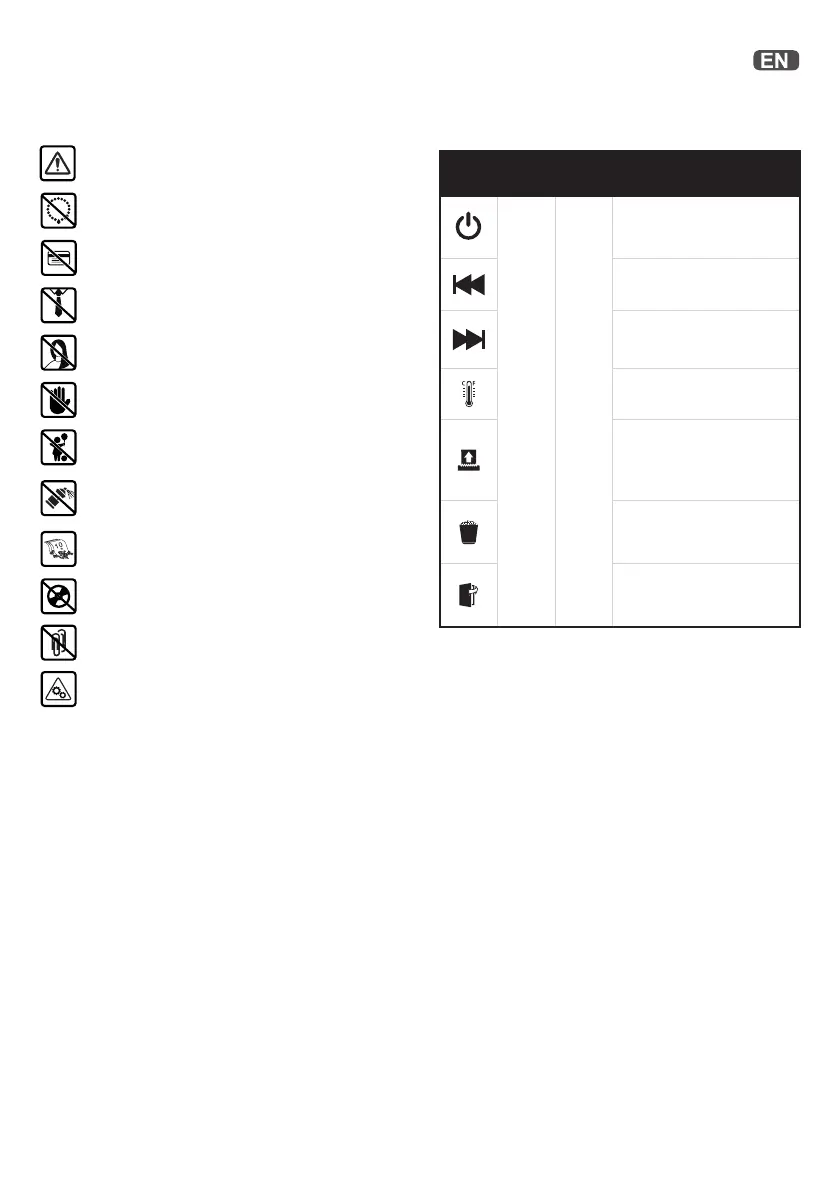
Icon Type Models Button /
indication & action
Control buttons
11,12,13
Auto-start and stand-by
button
(press one time)
Manual reverse button
(hold down)
Manual forward run button
(hold down)
Over-heated indication
(allow to cool)
Over loaded / Jam
indication
(Reduce sheets /
remove jam)
Bin full indication
(open door or lift o head
& empty the bin)
Door open or shredder
head removed indication
(close door firmly)
Controls and IndicationsWarning symbols
No credit cards
Keep loose jewellery clear
Ties and loose clothing hazard
Keep long hair clear
Do not reach into opening
Warning symbols
Max sheet capacity
No heavy duty staples above 26mm
No CDs
Warning: moving parts
This equipment is not intended for use by
children
No aerosols. Do not use spray cleaners or
lubricants, as these may present a risk of flash
fire.
Accessories
Only use Leitz accessories:
Oil Sheets - 8007 00 00


 To Next Page