
 Need help?
Do you have a question about the LEMEGA CR2 and is the answer not in the manual?
Provides essential safety guidelines for using the CR2 portable clock radio, emphasizing precautions against water, heat, and damage.
Details the key functionalities and modes of the CR2, including DAB/DAB+, FM, Bluetooth, and Aux-in capabilities.
Lists all items included in the product packaging, such as the CR2 unit, power adapter, and owner's manual.
Identifies necessary external items for operating the CR2, including a power source and a Bluetooth-capable smart device.
Explains the symbols and terminology used throughout the manual for clarity and consistent understanding.
Details the primary physical buttons and their functions for operating the CR2, including power, source selection, and navigation.
Describes the available input/output ports on the CR2, such as DC power, USB charging, and Aux-in.
Explains the different types of screens and information displayed by the CR2, including standby, playing, and menu modes.
Guides on how to set the clock to display time in either a 12-hour or 24-hour format.
Explains the procedures for manually or automatically setting the current time and date on the CR2.
Describes how the clock time is automatically updated using signals from DAB or FM radio broadcasts.
Details the process for manually inputting the time and date if automatic updates are not used.
Covers tuning into DAB/DAB+ digital radio stations, scanning for channels, and understanding playback information.
Explains how to perform a full scan to find available DAB stations or update the station list.
Details how to manually tune to specific DAB channels or frequencies for optimal reception.
Describes the information displayed during DAB playback, including station name, track details, and slideshow images.
Explains additional settings for DAB mode, such as Dynamic Range Compression (DRC).
Guides on how to tune into FM radio stations, scan for frequencies, and view RDS information.
Explains how to scan for FM stations or manually tune frequencies for reception.
Describes the information displayed during FM playback, including frequency, RDS data, and RadioText.
Covers scan settings and audio settings like stereo/mono for FM radio mode.
Explains how to connect a Bluetooth-capable device to use the CR2 as a wireless speaker.
Describes the screen messages indicating Bluetooth pairing status or successful connection.
Details how to connect external audio sources via the Aux-in port for playback.
Explains the display information shown when using the Aux In mode, typically showing 'Auxiliary Input'.
Covers setting up and managing dual independent alarms, including source, duration, and volume.
Explains how to temporarily silence a sounding alarm and the available snooze intervals.
Guides on setting a sleep timer to automatically turn off the system after a specified period.
Allows customization of audio output by adjusting treble, bass, and loudness settings.
Enables creation of custom equalizer profiles by adjusting bass and treble bias and loudness.
Details settings for time/date format, auto-update options, and clock style.
Covers adjusting backlight brightness and setting a timeout delay for dimming the display.
Instructions on how to change the user interface language for the CR2.
Explains how to restore the device to its original default settings, clearing user configurations.
Lists common error messages for DAB and FM modes, with their descriptions and potential causes.
Provides solutions for common problems like signal issues, intermittent cut-outs, and 'no stations available' messages.
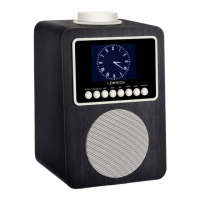
The CR2 Portable Clock Radio is a versatile audio device offering a range of listening modes and convenient features, designed for ease of use and portability. It supports DAB/DAB+ digital radio, FM radio with RDS, Bluetooth connectivity, and an Aux-in mode for external audio sources.
The primary function of the CR2 is to provide high-quality audio playback across multiple platforms. In DAB/DAB+ digital radio mode, users can access a wide selection of channels with digital quality sound, broadcast free-to-air. The device displays station and program information, including Dynamic Label Segment (DLS) text and slideshow images, offering a rich visual experience. For FM radio, it receives analogue broadcasts and displays RDS (Radio Data System) information such as station name and RadioText, where available.
Beyond radio, the CR2 acts as a Bluetooth wireless speaker, allowing users to stream audio content from Bluetooth-capable smart devices. This transforms the unit into a personal sound system for music, podcasts, and other audio from a smartphone or tablet. Additionally, the Aux-in mode enables connection to external audio sources like MP3 players, expanding its utility for non-Bluetooth devices.
A key feature of the CR2 is its clock radio functionality. It includes a clock with auto-update capability, ensuring accurate timekeeping. Dual independent alarms can be set, offering flexibility for different wake-up times or users. The alarm sound can be a buzzer or a selection from the available audio sources (DAB or FM radio), with adjustable volume that gradually increases for a gentle wake-up. A snooze function provides temporary silence for sounding alarms, with selectable snooze periods. A sleep function allows users to set a time interval after which the unit will automatically switch to standby mode, ideal for falling asleep to music or radio.
The device also features a TFT color display, which enhances the user experience by providing clear information display, easy option selection, and the ability to show DAB slideshow images. This display is crucial for navigating menus, viewing station information, and setting up various functions.
Operating the CR2 is designed to be intuitive. The main controls include a SELECT/VOLUME/MUTE/SNOOZE button, SOURCE button, BACK/MENU button, Previous and Next track buttons, Play/Pause button, ALARM button, SLEEP button, and PRESET button.
The SELECT/VOLUME/MUTE/SNOOZE button is multi-functional:
The SOURCE button allows users to cycle through the different operating modes: DAB, FM, Bluetooth, and Aux. The BACK/MENU button serves two purposes: a short press returns to the previous screen, while a longer press displays the menu for the current mode. Pressing it again returns to the now playing screen.
For navigation within tracks or stations:
The Play/Pause button is primarily used in Bluetooth mode. In DAB mode, pressing and holding it displays a full-screen slideshow image.
Alarm settings are accessed via the ALARM button, which displays Alarm 1 and Alarm 2 options. Users can then rotate and press the SELECT button to configure their alarms, including wake-up time, frequency (daily, once, weekends, weekdays), source, duration, and volume.
The SLEEP button opens the sleep menu, allowing users to set a time interval (15, 30, 45, 60, or 90 minutes) before the unit enters standby.
The PRESET button is used for managing favorite stations. A long press saves the current station to one of 10 available preset slots, while a short press allows users to select a favorite station from the preset list.
The CR2 offers various system settings to customize the user experience. These include an equalizer with preset options (Normal, Classic, Jazz, Pop, Rock, Speech) and a "My EQ" setup for custom treble, bass, and loudness adjustments. Time and date settings allow for manual or automatic updates, with options for 12/24 hour display and various date formats. The backlight can be adjusted for brightness (High, Mid, Low) and timeout duration, controlling how long the display remains at the "On level" before dimming. Multiple operating languages are also available.
The CR2 is designed for straightforward maintenance. The manual emphasizes several safety instructions that contribute to the longevity and proper functioning of the device. Users are advised to keep the product away from water and moisture and to clean it only with a dry cloth. Unplugging the product from the wall outlet before cleaning is a standard safety practice.
Proper placement is also highlighted: the unit should be on a solid surface and not in an enclosed space that could obstruct ventilation openings, preventing overheating. Users are cautioned against installing it near heat sources.
Protecting the power cord from being walked on or pinched is important for preventing damage. In case of damage, servicing should only be performed by authorized personnel; users are warned against attempting to service the product themselves due to the risk of dangerous voltages.
To prevent electrical hazards, users should avoid overloading wall outlets, extension cords, or integral convenience receptacles. Objects or liquids should not be allowed to enter the product. Finally, using proper power sources as described in the operating instructions or marked on the product is crucial for safe and effective operation.
The manual also provides troubleshooting tips for common issues such as poor FM reception (hissing, burbling) or DAB reception (intermittent cut-out, "No stations available" message). Solutions often involve checking and moving the antenna, repositioning the radio, rescanning for stations, or verifying local digital radio coverage. Error messages displayed on the screen are explained, helping users understand and address problems like "Service not available" or "Signal error" in DAB mode, or "No Radio Text" in FM mode.
The CR2's design, with its robust features and clear operational guidelines, aims to provide a reliable and enjoyable audio experience with minimal maintenance requirements.
 General
| Type | Clock Radio |
|---|---|
| Alarm | Yes |
| USB Charging | Yes |
| Alarm Type | Buzzer, Radio |
| Radio Tuner | DAB/DAB+/FM |
| Power Source | AC Power |
| Connectivity | Bluetooth |
| Features | Sleep Timer |
| Audio Output | 3W |
| Radio Band | FM, DAB, DAB+ |

 To Next Page
