Need help?
Do you have a question about the LEMEGA DTS2 and is the answer not in the manual?
Key safety guidelines to prevent hazards like fire, electric shock, and damage.
Instructions for dealing with product malfunctions, including a temporary power cycle.
Lists all items included in the product package for user verification.
Explains various icons and indicators shown on the LCD screen, such as mode, alarm, and charging status.
How to power on the device and switch between Bluetooth, FM, and sleep music modes.
Instructions for adjusting the volume up or down using dedicated buttons.
How to navigate tracks in Bluetooth/music modes and stations in FM mode.
Setting a timer for automatic shutdown after a specified period.
Detailed steps for setting an alarm, including source and volume.
How to set the clock time (12/24H) and adjust LCD brightness levels.
Operating the device's light features, including color and brightness.
How to use wireless charging and the snooze function for alarms.
Steps to enter FM mode, tune stations, and auto-scan for signals.
Instructions for connecting a device via Bluetooth and playing music.
Technical details including model, power, dimensions, and weight.
Details on FCC rules compliance, interference, and user guidance for radio communications.
Compliance with FCC limits for radio frequency exposure in uncontrolled environments.
Information on responsible product disposal and recycling according to EU standards.
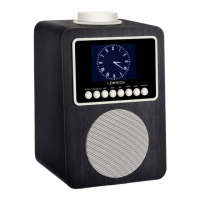
This document outlines the features and operation of the LEMEGA DTS2 Clock Radio, Charger, and Lamp, a versatile device designed to enhance your daily life with its integrated functionalities. The DTS2 combines a clock radio, a wireless charger, and an ambient lamp, all within a sleek and user-friendly design.
The LEMEGA DTS2 serves as a multi-functional hub for your bedside or living space. At its core, it's a digital clock radio, displaying the time clearly and offering alarm capabilities. Beyond timekeeping, it integrates a wireless charging pad, allowing you to conveniently power up compatible smartphones without the need for cables. The device also features an adjustable lamp, providing ambient lighting for various moods and tasks. For audio entertainment, the DTS2 includes an FM radio and Bluetooth connectivity, enabling you to stream music from your smartphone or other Bluetooth-enabled devices. Additionally, it offers a soothing sleep music mode, designed to help you relax and fall asleep.
To power on the DTS2, plug it into the mains power or switch the power switch to "ON" at the rear panel. The unit will automatically enter Soothing sleep music mode upon startup. You can cycle through FM mode, Bluetooth mode, and Soothing music mode by briefly pressing the "M" button. To enter Standby mode, press and hold the "M" button.
Adjusting the volume is straightforward. Briefly pressing the "VOL-" button decreases the volume one step at a time, while pressing and holding it decreases the volume quickly. Similarly, briefly pressing the "VOL+" button increases the volume one step, and pressing and holding it increases the volume quickly.
In Bluetooth or Soothing sleep music mode, you can navigate tracks using the "previous track" and "next track" buttons. A brief press of the "previous track" button goes to the previous song, and a brief press of the "next track" button goes to the next song. For FM radio, a brief press of the "previous track" button moves backward by 0.1MHz frequency, and pressing and holding it for 2 seconds auto-scans backward stations. A brief press of the "next track" button moves forward by 0.1MHz frequency, and pressing and holding it for 2 seconds auto-scans forward stations. The "Play/Pause" button (►II) functions differently across modes. In Bluetooth mode, it plays or pauses the current track. In FM mode, pressing this button auto-scans all good stations. After scanning, you can use it to switch between saved stations from low to high frequency.
The DTS2 includes a sleep timer function, allowing you to set the device to stop playing after a specified duration. Press the "Sleep" button to cycle through 15 minutes, 30 minutes, 60 minutes, or Sleep Off. This feature is available in FM, Bluetooth, and Soothing sleep music modes.
Setting an alarm is intuitive. Press the "Alarm" button to activate or deactivate the alarm. When activated, an alarm icon will appear on the display. To set the alarm, press and hold the "Alarm" button. The hours will flash, allowing you to adjust them using the "previous track" and "next track" buttons. Confirm the hour by pressing the "Alarm" button, then repeat the process for the minutes. For the alarm source, press the "previous track" or "next track" buttons to select from 9 available soothing music sources. Confirm your selection by pressing the "Alarm" button. Finally, set the alarm volume using the "previous track" and "next track" buttons and confirm with the "Alarm" button to complete the alarm setup. If the alarm rings, you can temporarily mute it for 5 minutes by pressing any button on the top of the unit or on the remote control (if applicable). To cancel the alarm setting, briefly press the "Alarm / Sleep" button.
The "CLOCK / DIM" button allows you to adjust the LCD brightness, cycling through High, Mid, and Low settings with a brief press. To set the time, press and hold the "CLOCK / DIM" button. The display will prompt you to select 12H or 24H format using the "previous track" or "next track" buttons, confirming with the "CLOCK / DIM" button. Then, adjust the hours and minutes similarly, confirming each step with the "CLOCK / DIM" button. If the time stops flashing during setting, you'll need to repeat the steps.
The integrated lamp offers adjustable lighting. Briefly press the "Light Mode" button to enter light mode. Press it again to switch between warm light, cool light, and to turn the light off. To adjust the brightness level of the light, press and hold the "Light Mode" button.
The DTS2 features a wireless charging pad. Ensure your phone has wireless charging capability. Place your phone on the wireless charging indicator area to begin charging. If your phone does not support wireless charging, you can use the 5V 1A USB Port for charging.
In this mode, you can select from various soothing sounds to aid relaxation. Briefly press the "previous track" or "next track" buttons to cycle through Lullaby, Rain, Running Water, Birds chirping, Insect Sound, Frog croaks, Ocean Waves, Thunder, and Campfire.
To connect your smartphone, press the "M" button to enter Bluetooth mode. Your smartphone will display "LEMEGA DTS2" as a Bluetooth device. Select it to pair. Once paired, you can play music tracks from your device and adjust the volume directly on your phone.
The device should be cleaned only with a dry cloth. Avoid using wet cloths or cleaning solutions that could damage the electronics.
It is crucial to follow all safety instructions to ensure the longevity and safe operation of the DTS2. Read all instructions carefully and keep them for future reference. Heed all warnings. Do not expose the apparatus to rain or moisture to reduce the risk of fire or electric shock. Only use attachments and accessories specified by the manufacturer. Unplug the apparatus during lightning storms or when unused for long periods. Keep the product a safe distance from naked flames, such as lit candles. The apparatus should not be exposed to dripping or splashing liquids, and no objects filled with liquids, such as vases, should be placed on it. Avoid pressing more than one key at the same time. In case of malfunction, unplug the unit for 3 seconds and then plug it back in.
For optimal FM radio reception, ensure the FM antenna wire is hung up and positioned appropriately. Moving the antenna wire around can help achieve better reception.
The package includes one power adapter, one owner's manual, one warranty card, and two FM wire antenna clips.
 General
| Type | Clock Radio |
|---|---|
| Bluetooth | Yes |
| Alarm Function | Dual Alarm |
| FM Radio | Yes |
| USB Charging Port | Yes |
| Presets | Yes |
| Display | LCD |
| Connectivity | Bluetooth |
| Features | Snooze Function, Sleep Timer |


 To Next Page