9
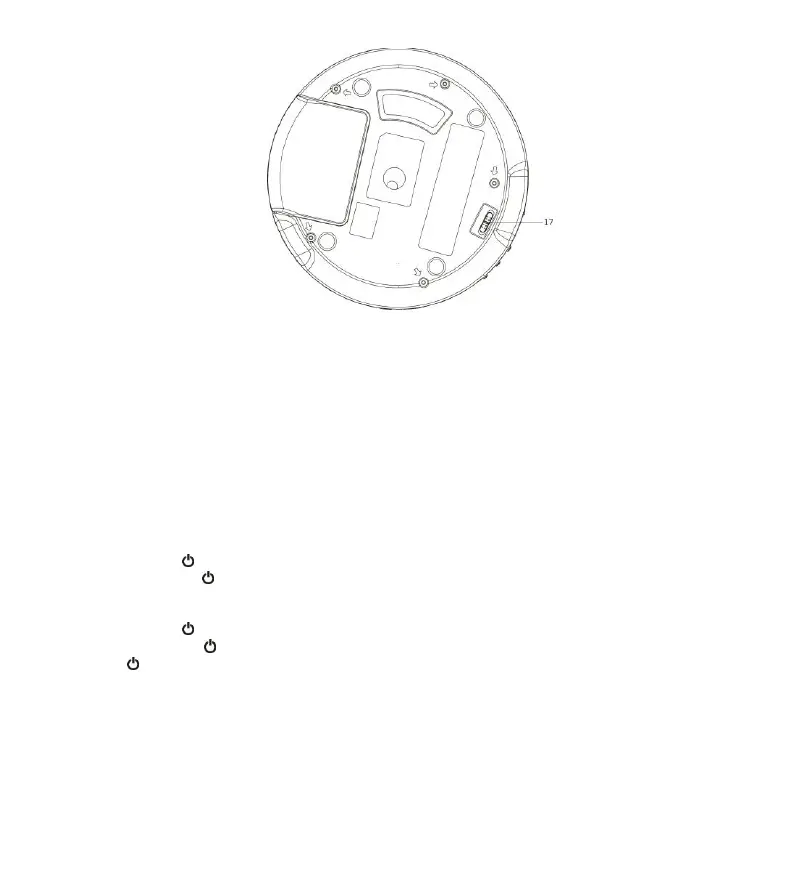
BOTTOM
17. HOLD ON / OFF SLIDE SWITCH
To avoid any accidental button press during opeation, the unit has a function of button hold. Set the HOLD
SWITCH to ON position. To release the button lock, slide it to OFF position
CHARGING THE UNIT
Before using, it is recommended to charge unit for at least 2 hours.
BASIC OPERATION
Connect the earphone (included) into the EARPHONE OUT on the side of the unit.
AC/DC Adaptor (Not Supplied) Operation
Press the STANDBY button to turn on the unit. To turn off to the Standby mode (with display of time and date), press
and hold the STANDBY button.
Built-in Battery Operation (AC/DC Adaptor NOT Connected)
Press the STANDBY button to turn on the unit. To turn off to the Standby mode (with display of time and date), press
and hold the STANDBY button. To turn the unit to OFF mode for power saving (without display), press and hold the
STANDBY button again.
DAB / FM / CD
Press the MODE button to select between different sources.



 To Next Page