22
Step 1. Add your new device to the same WiFi network as your phone,
tablet or PC (see product user instructions for details).
Step 2. Open the Spotify app on your phone, tablet or PC, and play any
song.
Step 3. If you’re using the app on a phone - tap the song image in the
bottom left of the screen. For tablet and PC move to step 4.
Step 4. Tap the Connect icon
Step 5. Pick your device from the list. If you can’t see it, just check it’s
connected to the same WiFi network as your phone, tablet or PC.
All done! Happy listening.
Licenses
The Spotify Software is subject to third party licenses found here:
www.spotify.com/connect/third-party-licenses.
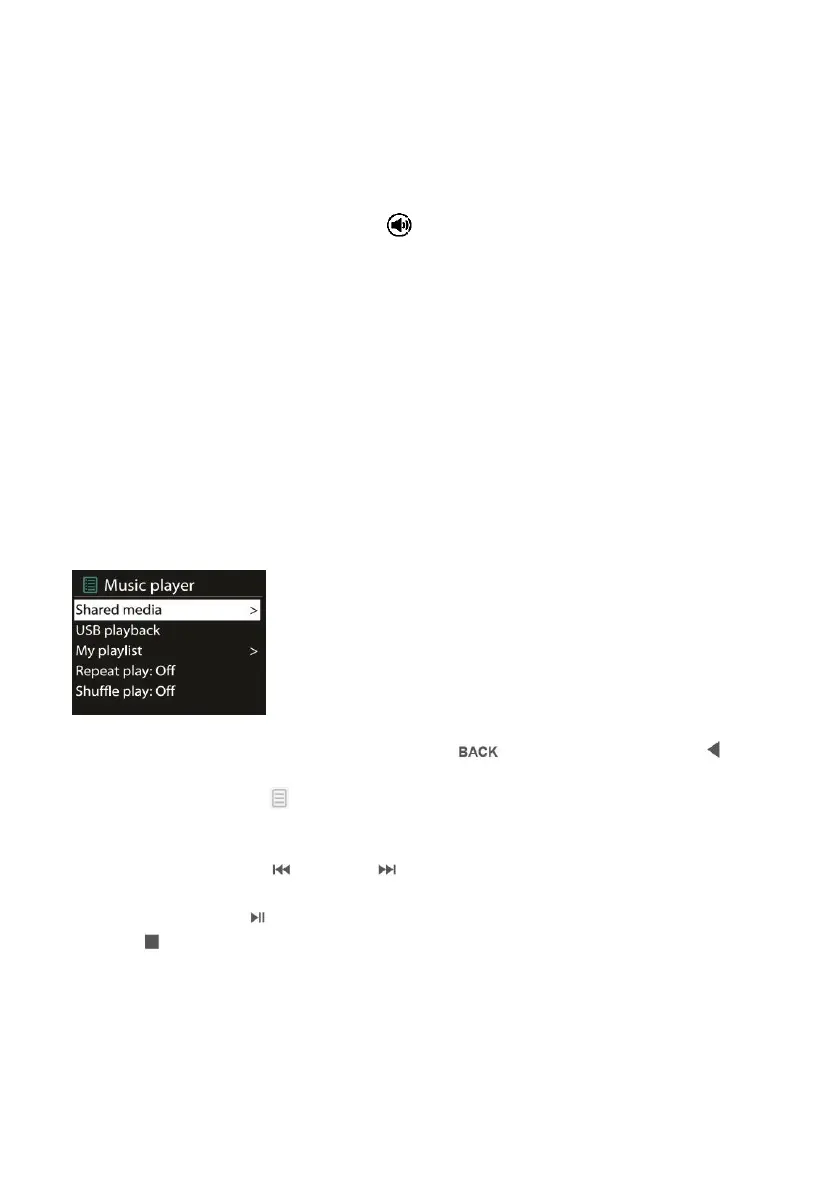
5.5 Music Player
Music player mode plays audio files in MP3, WMA, WAV or AAC format
from a computer on the local network.
While playing music, you can press on the device or on
the remote control. You may also press and hold MENU/INFO on the
device or press on the remote control to quickly return to the last
visited branch of the menu tree.
You can use or on the remote control to play the
previous or next track, press and hold to rewind or fast forward (x1, x2,
x4). Press on the remote control to play or pause. Press
on the remote control to stop playback and return to the music
list.



 To Next Page