9
Set time and date
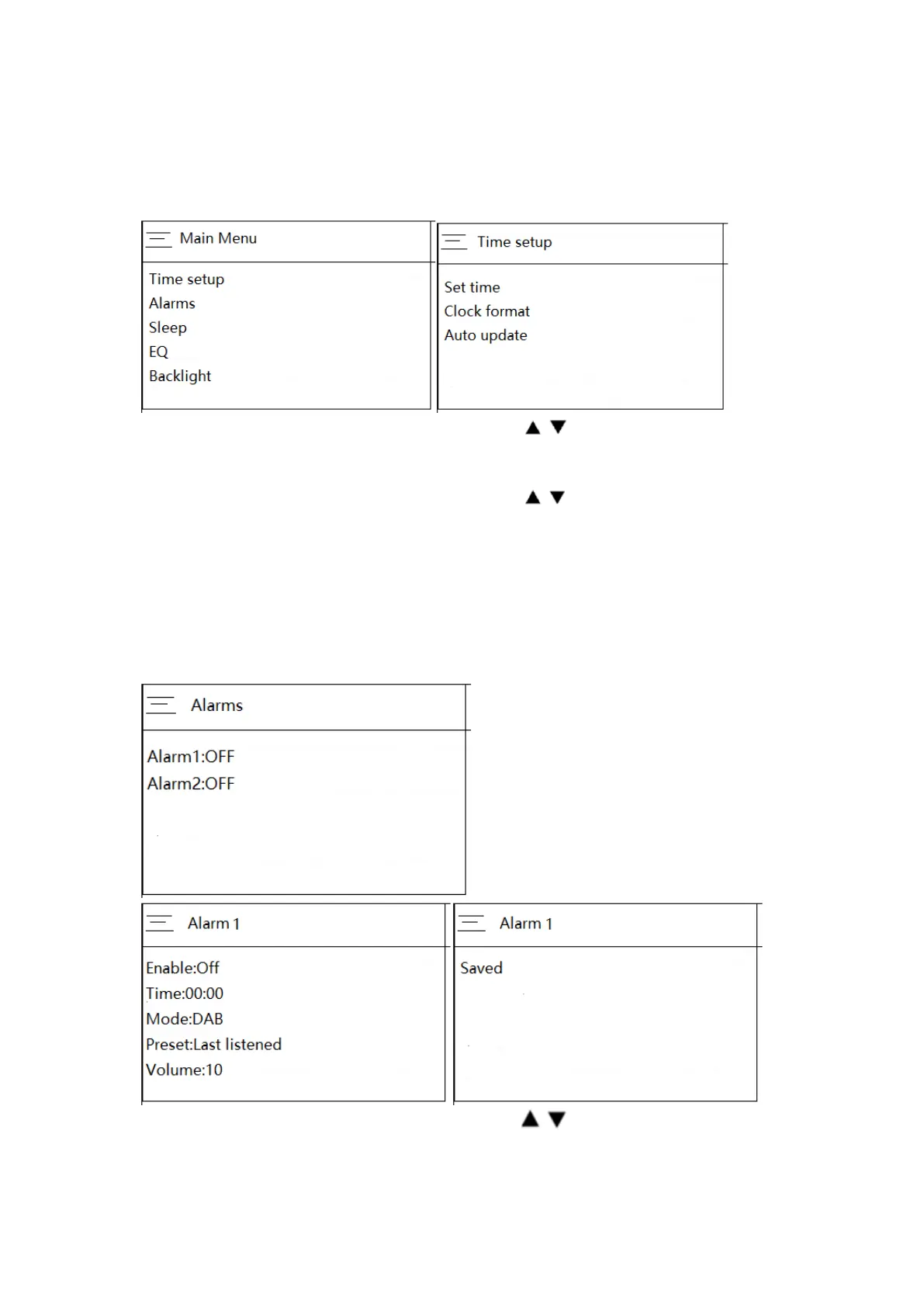
Should you need to set the time & date manually follow the below steps.
1. Press and hold the ‘Menu’ button (In Bluetooth/AUX in mode, you only need to press
the MENU button to enter the MENU settings), the screen will appear as below.
2. Turn the ‘Prev/Next’ knob on the unit or press the button on remote control to
highlight the desired time setup, then press the OK knob on the unit or press the OK
button on remote control to continue.
3. Turn the ‘Prev/Next’ knob on the unit or press the button on remote control to
set the digit to the correct date/time, then press the OK knob on the unit or press the
OK button on remote control to confirm.
Set Alarms
Should you need to set the Alarms manually follow the below steps.
1. Press and hold the ‘Menu’ button (In Bluetooth/AUX in mode, you only need to press
the MENU button to enter the MENU settings), the screen will appear as below.
1. Turn the ‘Prev/Next’ knob on the unit or press the button on remote control to
highlight the desired Alarm setup, then press the OK button on the unit or press the OK
button on remote control to continue.


 To Next Page