2.1 Select Version and press Play button to display the information of the photo
2.2 Select Save As Background and press Play button to save the photo as start-up logo
2.3 Select Delete and press Play button to delete the photo
2.4 Select Zoom and press Play button to zoom in or out the photo
2.5 Select Rotate and press Play button to rotate the photo by 90°/180°/270°/360°
2.6 Select Exit and press Play button to return to thumbnail
3. When a SD/MMC/MS card is inserted, press Exit then a photo thumbnail shall appear, press
Setup button to set up the functions:
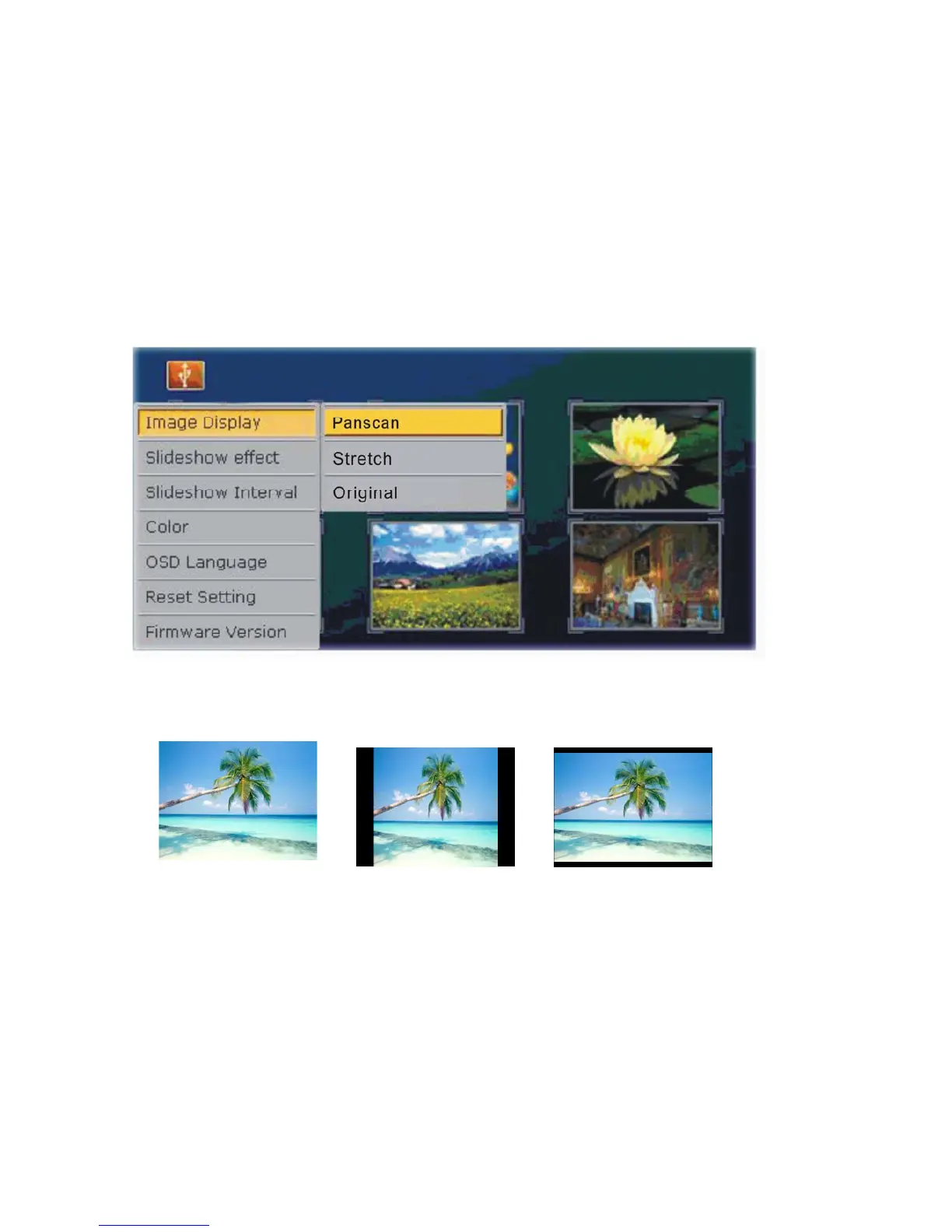
Select Image Display and then press Play button to show “Stretch/Panscan/Original
options, use Left/Right arrows to select desired photo display option and press Play button to
confirm selection:
Panscan Original Stretch
Select Slideshow Effect and then press Play button to show all slideshow effect options, use
Left/Right arrows to select desired slideshow effect and press Play button to confirm
selection:
Select Slideshow Interval and then press Play button to show slideshow interval options:
3S/10S/1Minute/10Minute.Pls use Left/Right arrows to select desired slideshow interval and
press Play button to confirm selection
Select Color and then press Play button to show options of color properties:
Brightness/Contrast/Saturation/Hue. Use Left/Right arrows to select desired option and press


 To Next Page