27
alarm can be set in a particular mode.
Select Alarms in the Main menu or press Alarm on the remote control
to set or change an alarm.
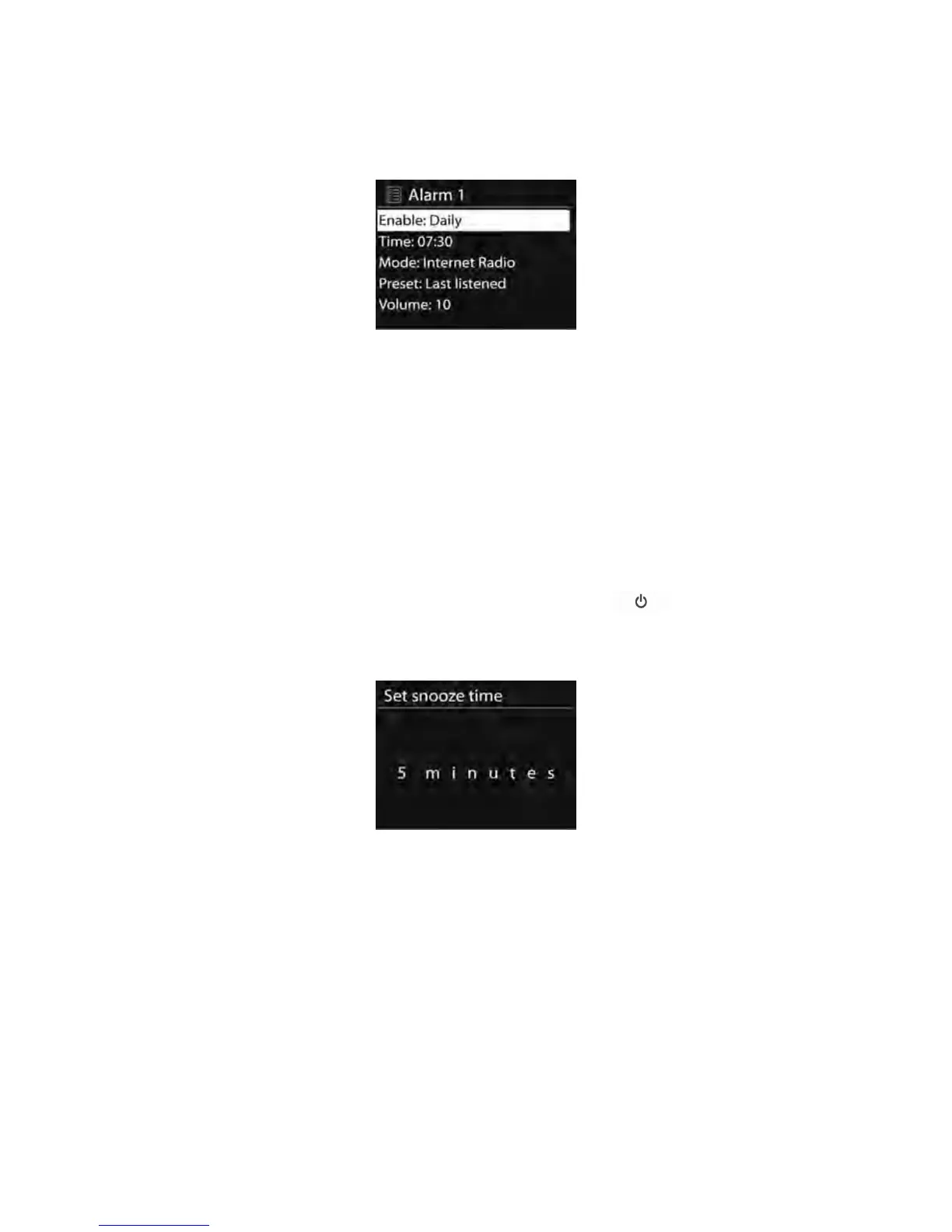
Select the alarm number (1 or 2) then configure the following
parameters:
o Enable: on/off,
o
Frequency: Daily, Once, Weekends or Weekdays,
o Time,
o Mode: Buzzer, Internet Radio, DAB or FM,
o
Preset: Last listened 1-10,
o Volume: 0-20
To
activate the new settings, scroll down and select Save.
The screen shows active alarms with an icon at the bottom left.
When the alarm sounds, press any keys (except or Alarm) on the
device or remote control to temporarily switch off the alarm for a set
period of time. The snooze icon will flash to indicate that snooze is on.
5.11.
5.11.
5.11.
5.11. Extra
Extra
Extra
Extra Features
Features
Features
Features
5.11.1. Audio out socket
It allows you to connect an audio cable from the device to your own
HiFi speaker system to enhance sound performance.
5.11.2. Earphone out socket
It allows you to connect an audio cable from the device to your
earphone



 To Next Page