10
Connections
100-240V ~
50/60Hz
100-240V ~
50/60Hz
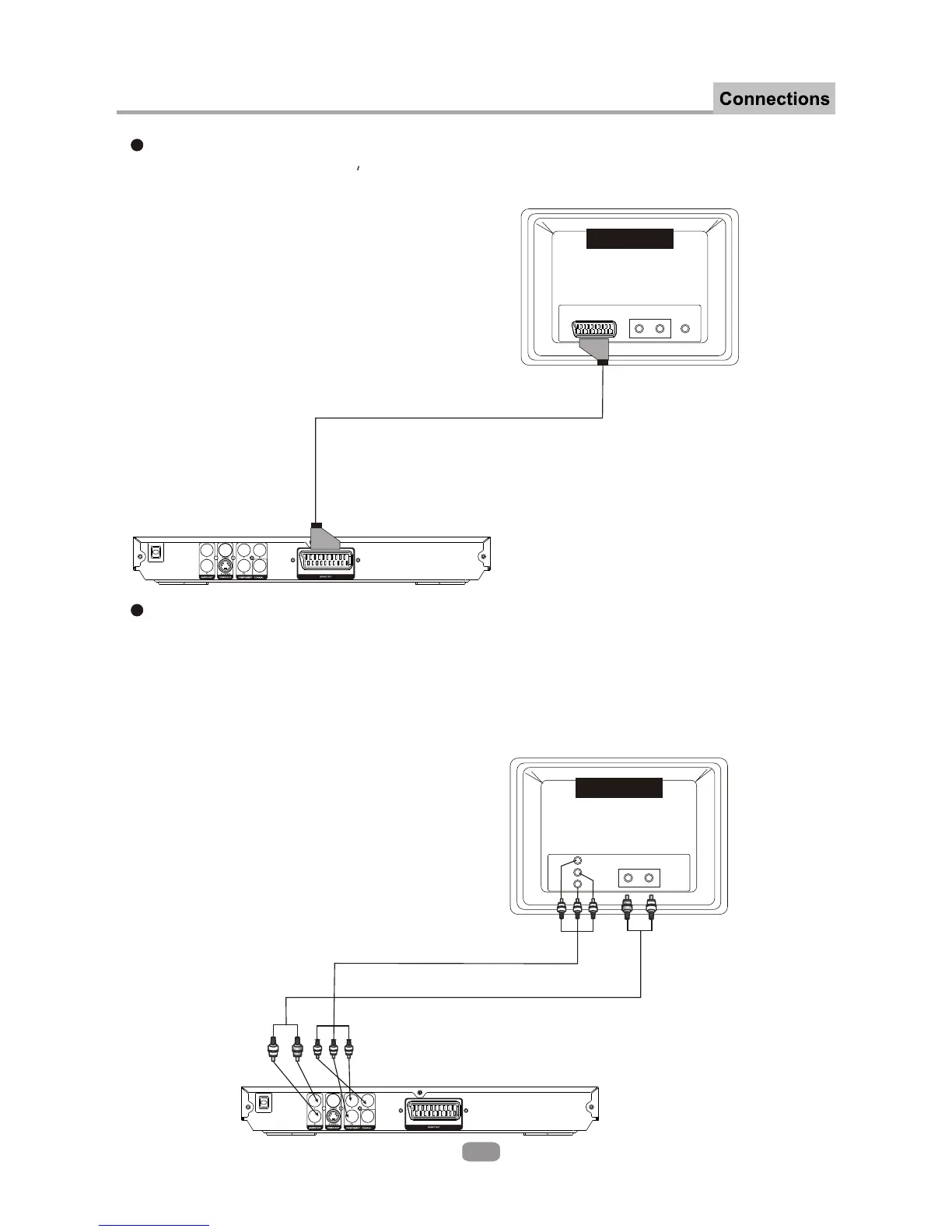
CONNECTING THE DVD PLAYER TO THE TV USING A SCART CABLE
Use the SCART cable (not supplied) to connect the DVD player and your TV.
Set the [Video Type] to [TV-RGB].
CONNECTING THE DVD PLAYER TO THE TV USING A Y/Pb/Pr CABLE
Use the COMPONENT Cable(not supplied) to connect the DVD player to your
TV. Set the [Video Type] to [YUV]. For Progressive Scan, set to [Y,Pb,Pr].
The [YUV] and [Y,Pb,Pr] signal is transfered through the same leads. If the TV
set supports P-scan, you can set [Video Type] to [Y,Pb.Pr]. If not, set [Video
Type] to [YUV].
AUDIO
IN
L R
TV
AUDIO
IN
L R
VIDEO
IN
Scart
TV
Y
Pb
Pr
Component Cable
Audio cable
Use a standard stereo Phono lead (not supplied) to connect the audio.


 To Next Page