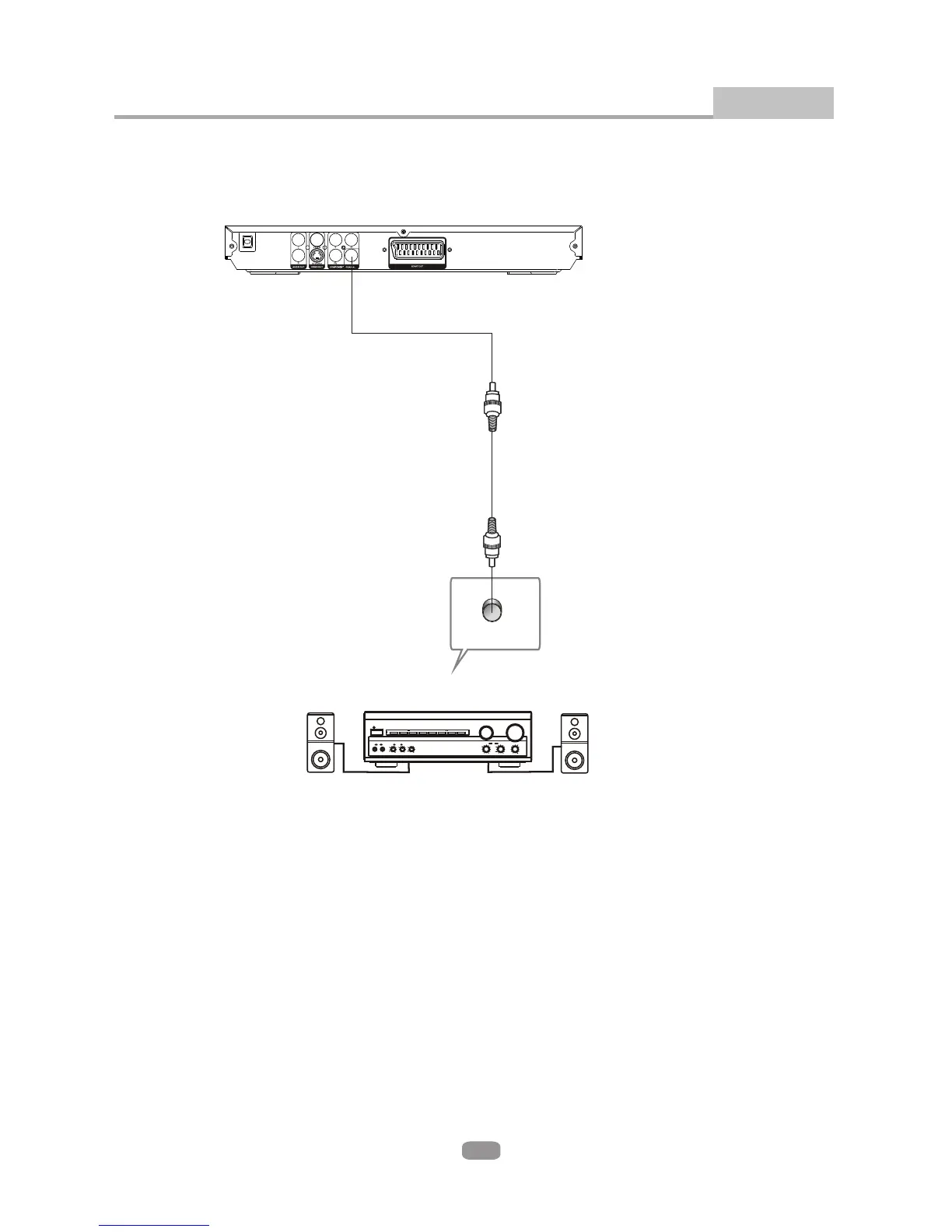
Connecting to an AV Amplifier with Digital Audio Input
Connections
11
100-240V ~
50/60Hz
BASS
TREBLE
ECHO
DOWN UP
VOLUME
INPUT SELECTOR
MUTE
KARAOKE
CHANNEL
TEST
MODE
3 STEREO
PRO LOGIC
BYPASS
EXCITE
POWER
MIC
2
1
1
MIC VOL
2
MIC
Notes:
1. Select the Coaxial digital audio output.
2. Set the player's Audio out to Raw or PCM mode .
3. Connect the Digital audio output of the DVD player to the Digital audio input on the
amplifier.
Digital Amplifier
Coaxial
Coaxial cableCoaxial cable
Use a standard Digital audio coaxial cable (not supplied)
(See the instructions supplied with your amplifier)


 To Next Page