Remote Control Preparation
Other
27
OKOKOK
ENTER
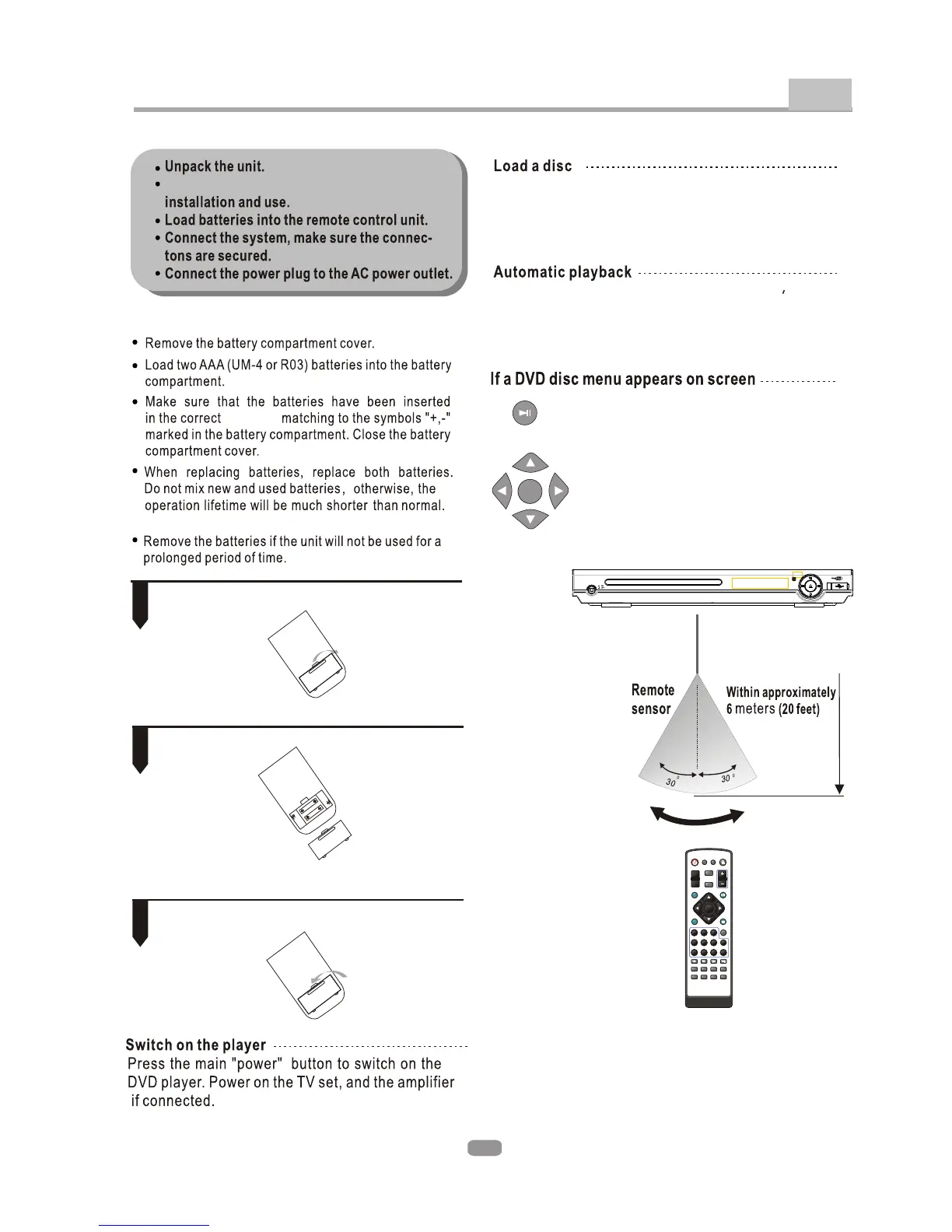
2. Insert batteries.
1. Open the cover.
3. Close the cover.
Make sure to match the "+" and "-" of the batteries
with the marks inside the battery compartment.
1
2
3
ENTER
SUBTITLE LANGUAGE
ANGLE
VOL+
VOL-
PROG
TITLE
MENU
SETUP
PLAY/
PAUSE
L/R
STOP
10+
1 2 3
4 5 6
7 8 9 0
REV PREV NEXT
PBC DISPLAY ZOOM USB
MUTE A-B REPEAT VIDEO/
MODE
GOTO
FWD
OPEN/
CLOSE
STANDBY
Read this owner s manual thoroughly before
Loading batteries into the remote control
direction
Press the OPEN/CLOSE button on the remote control
(or front panel) to eject the disc tray. Load a disc, label
side up, into the disc tray and press the OPEN/CLOSE
button.
The unit will take a few seconds to load the disc s initial
data, display the disc type logo on the left upper corner
on screen, and then it will start playback the disc
automatically.
Press the PLAY button on the remote( or
on the unit) to start playing.
Press the Direction buttons to select
the desired feature in the menu and
then press the ENTER button to confirm
the selection in the menu.


 To Next Page