21
Advanced Features
0-10+ keys0-10+ keys
A-BA-B
These keys are used to manualy enter the time, as well as the title, chapter and
track numbers.
These keys are used to manualy enter the time, as well as the title, chapter and
track numbers.
When a numeric item is displayed on the screen, press the 0-10+ keys to
select the desired entry, press SELECT to confirm.
When a numeric item is displayed on the screen, press the 0-10+ keys to
select the desired entry, press SELECT to confirm.
During playback, press the A-B button to select point A.During playback, press the A-B button to select point A.
Press it again to select point B. The player will repeat the section from A to
B automatically.
Press it again to select point B. The player will repeat the section from A to
B automatically.
Press the A-B button a third time to cancel A-B repeat and clear points A and B.Press the A-B button a third time to cancel A-B repeat and clear points A and B.
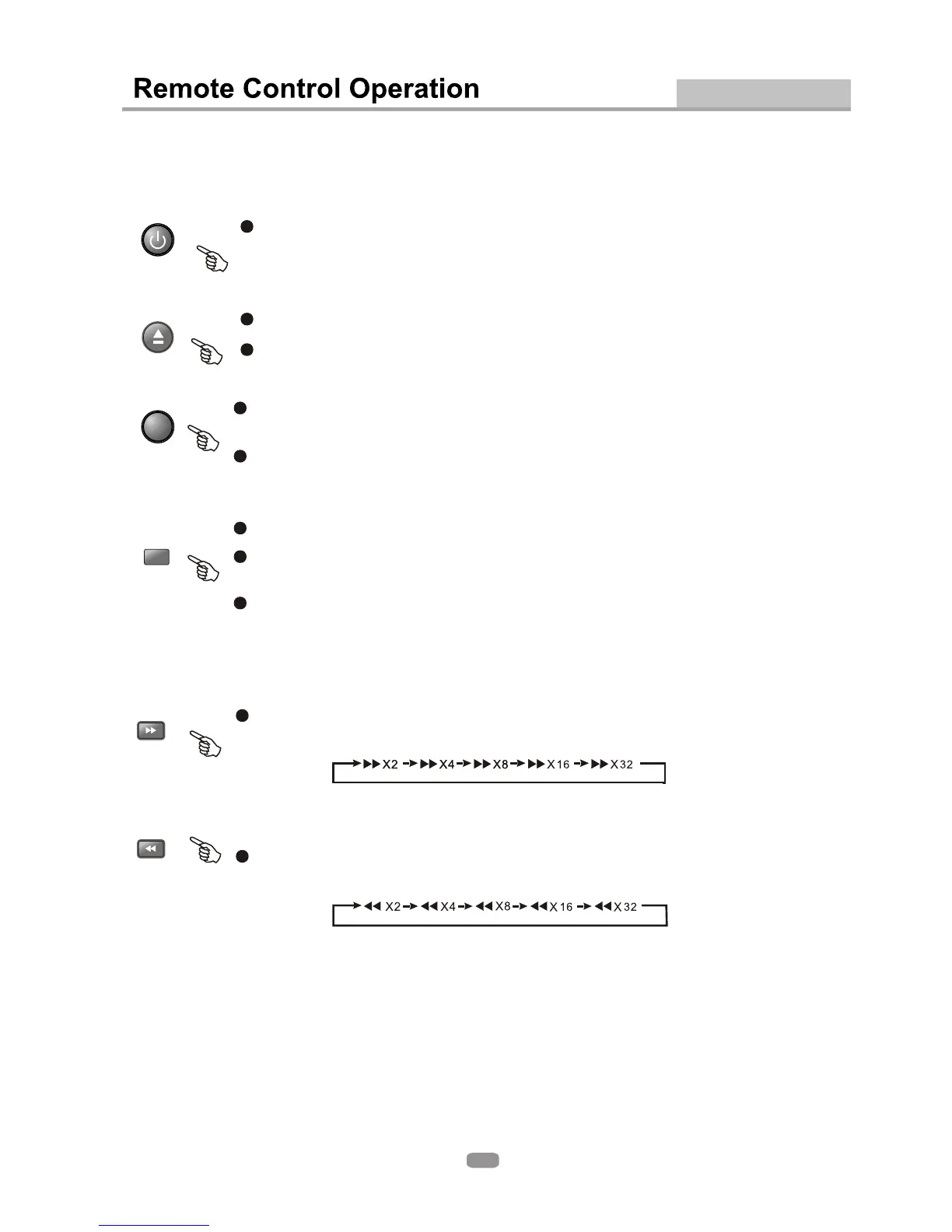
During DVD or CD playback, press and hold to scan forward. The player will
review the disc at 2, 4, 8, 16 and 32 times the normal speed as follows:
During DVD or CD playback, press and hold to scan forward. The player will
review the disc at 2, 4, 8, 16 and 32 times the normal speed as follows:
Press PLAY to resume normal playback.Press PLAY to resume normal playback.
During DVD or CD playback, press and hold to scan in reverse. The player will
review the disc at 2, 4, 8, 16 and 32 times the normal speed as follows:
During DVD or CD playback, press and hold to scan in reverse. The player will
review the disc at 2, 4, 8, 16 and 32 times the normal speed as follows:
Press PLAY to resume normal playback.Press PLAY to resume normal playback.
Note: 1. During CD playback, points A and B must be within the same track.
During DVD playback, points A and B can be selected from different chapters.
2. This function is subject to the disc.
Note: 1. During CD playback, points A and B must be within the same track.
During DVD playback, points A and B can be selected from different chapters.
2. This function is subject to the disc.
F F
REVREV
WDWD
OPEN/
CLOSE
OPEN/
CLOSE
To open the disc tray, press the OPEN/CLOSE button.To open the disc tray, press the OPEN/CLOSE button.
To close the disc tray, press the OPEN/CLOSE button again.To close the disc tray, press the OPEN/CLOSE button again.
Press the STANDBY button to switch between normal mode and standby mode.Press the STANDBY button to switch between normal mode and standby mode.
STANDBYSTANDBY


 To Next Page