EasyManua.ls Logo

LENCO DVP-931 - MPEG4;MP3 Playback

LENCO DVP-931
18 pages
Print Icon
To Next Page IconTo Next Page
To Previous Page IconTo Previous Page
Loading...
11
MPEG4/MP3
PL
A
YBACK
2.4.
4
ANGL
E
MARK
On
and
off
are
the
two
choices
for
this
item.
When
the
content
of
a
disc
is
multi-angle
shot,
and
angle
mark
is
on,
you
may
press
the
ANGLE
button
on
the
remote
control
to
enjoy
the
scene
in
different
angles.
2.4.5
DEFAULT
The
DEFAULT
setup
will
resfore
all
changes
made
to
the
OSD,
back
factory
default.
Select
DEFAULT
with
the
arrow
buttons
and
press the
Right
arrow
button
to
select
READ
and
press
the
ENTER
button
t
o
confirm
.
MPEG4/MP3
PL
A
YBACK
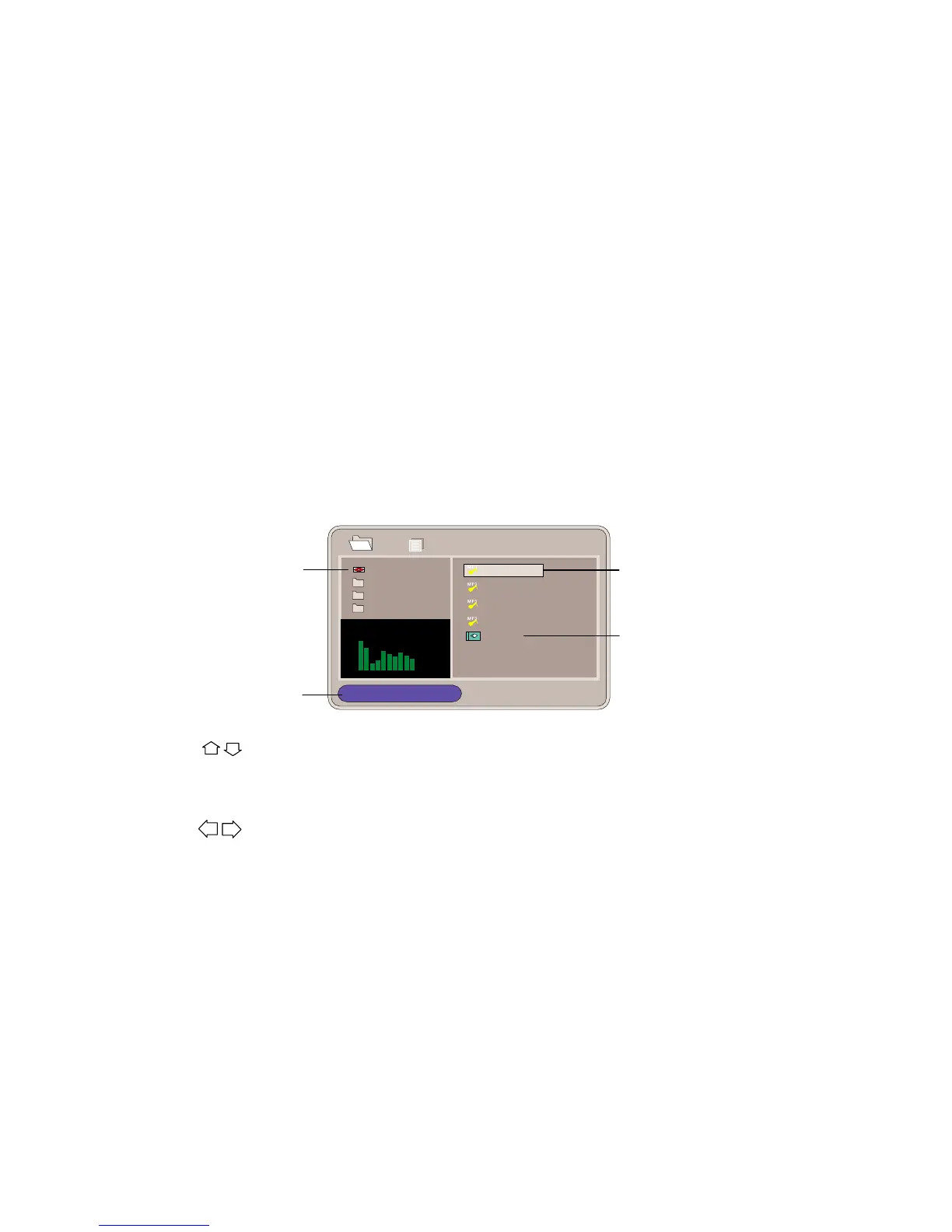
When
an
MPEG
and
an
Mp3
disc
is
loaded,
the
screen
will
be
as
follows:
Current
directory
Que e n
RO O T
CL OU D
1/17
00: 17:00
01.
Was
Bor
02.
Let
me
li
1
2
Th
e
playing
fileis a Mp3
name
Show
files
contents
RO OT
RO OT
44
.1KH
z
128K b p
s
04:49
03
.
Y
o
u
a
r
e
my
04.
Under
pre
001-1
3
4
5
audiofile.
The playing
file is a
JPEG pictur
e
file.
Pres
s
t
o
selec
t
th
e
fil
e
whe
n
th
e
curso
r
appear
s
i
n
th
e
file
windo
w.
Press
select
to
play
the
current
file
selected
by
the
cursor.
Press
to
switch
between
the
directory
window
and
the
file
windo
w.
Note:
During
Mp3
playback,
Forward
Scan
and
Reverse
Scan
are
not
available.
Note:
The
player
will
not
identify
or
play
an
MP3
disc
under
the
following
conditions:
the
recording
format
is
not
supported(make
sure
the
files
are
in
MP3
format),the
disc
is
badly
scratched,
damage
d
o
r
dirt
y
,
th
e
dis
c
i
s
no
t
finalized.

Related product manuals