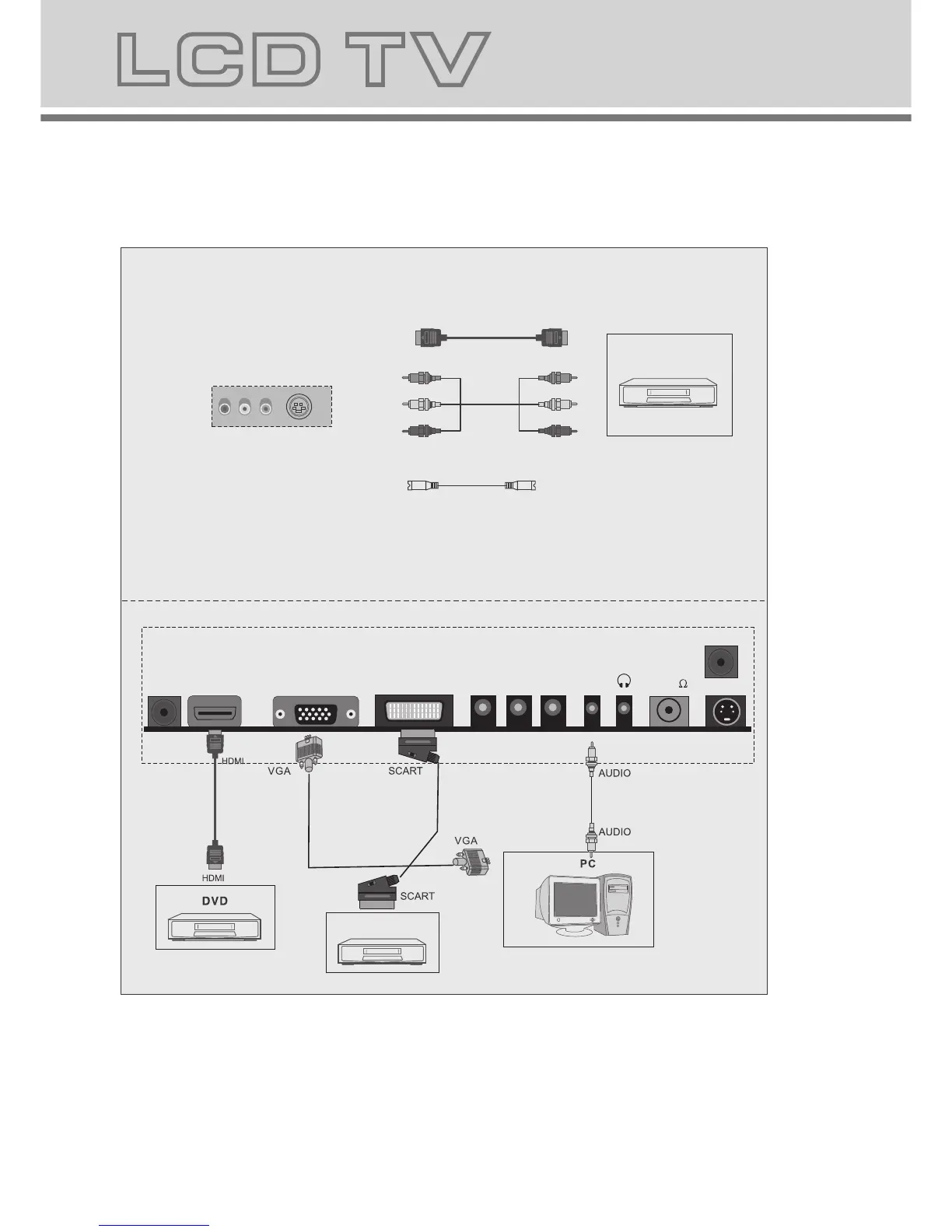
Notes:
1.VGA/YPBPR/ use a common PC Audio in.
2.SCART to SCART from a VCR.
3.YPBPR from a DVD.
4.HDMI signal is from a DVD
S-Video
7.Connecting to external devices
RCA terminal is used to connect the output device of DVD
The rear of TV
YPBPR
DVD
HDMI
8
6.LCD TV panel overview
TV Terminal connections
7
S Video
TV Control Panel
1.On/off button.
2.Selecting exterior signal input.
3.Main menu display and confirm.
4.Channel selecting.
5.Volume adjusting.
6.PLAY/PAUSE
7.OPEN/CLOSE button
L
E
B
A
L
to back
1
2
3
4
6
7
5
Insert DVD with Label to the Back
1. DC 12V power input.
2. HDMI input.
3. VGA input.
4. SCART input terminal ,suitable for a European export machine.
5.
Component input terminal.
6. PC audio input.
7. Headphone output.
8. Antenna input (75 Ohm VHF/UHF).
9. Coaxial audio signal out plug.
10.S-VIDEO input.
VGA
HDMI
RF(75 )
S-VIDEO
DC-12V
PC
AUDIO
COAXIAL
SCART
VCR
Y PB PR
Y PB PR



 To Next Page