18
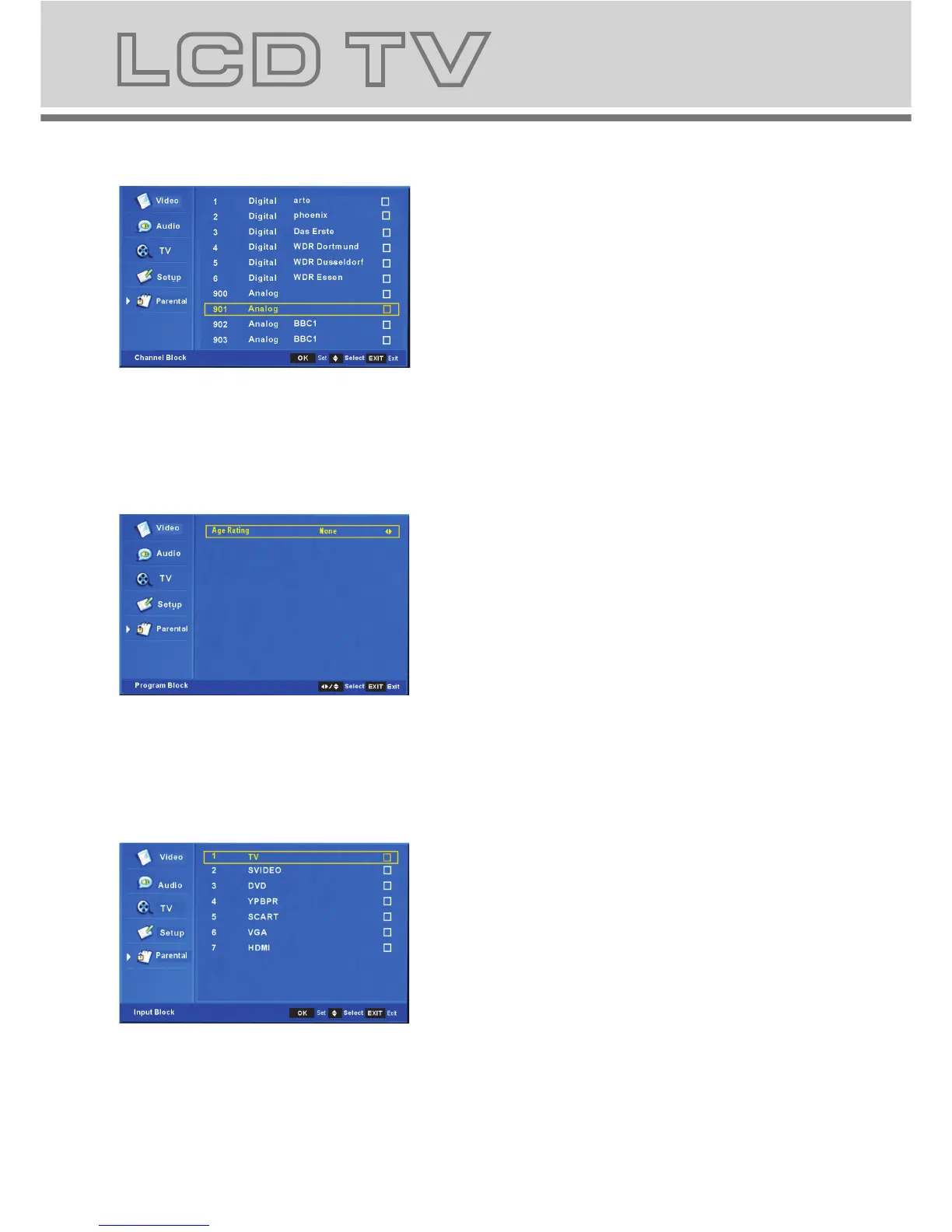
b-2. The submenu of channel block.
If you select any of the channel, the
channel can not receive signal unless
you unblock it.
b-3 . The submenu of program block.
Age Rating: The program will be
blocked if the age you set is below that
the program confine.
b-4. The submenu of input block.
If you select any of the source ,the
source can not be used unless you
unblock it.
17
a. This menu is used to set the block
function.
Password set the child lock password,
the initial password is 0000.
b. The Submenu after You Enter the
Correct Password.
b-1.
b-2. Channel block: block the channel
b-3. Program block: block the program
b-4. Input block: you can block any of
the source.
b-5. Change password: change the
parental password.
b-6. Clean all: restore your set.
Hotel Hotel block
: mode set
5 . Parental menu
b-1. The submenu of hotel block:You can
select the hotel mode by setup below options:
b-1-1: Hotel lock: On/Off
b-1-2: On source: Select your input source
while open the main unit.(TV/SVIDEO/DVD/
YPBPR/SCART/VGA/HDMI)
b-1-3:On channel: Select your TV channel No.
while you open the main unit under TV mode.
b-1-4:Keyboard Lock: lock or unlock your
keyboard.
b-1-5:Max Volume: Setup the maximum volume
level.



 To Next Page