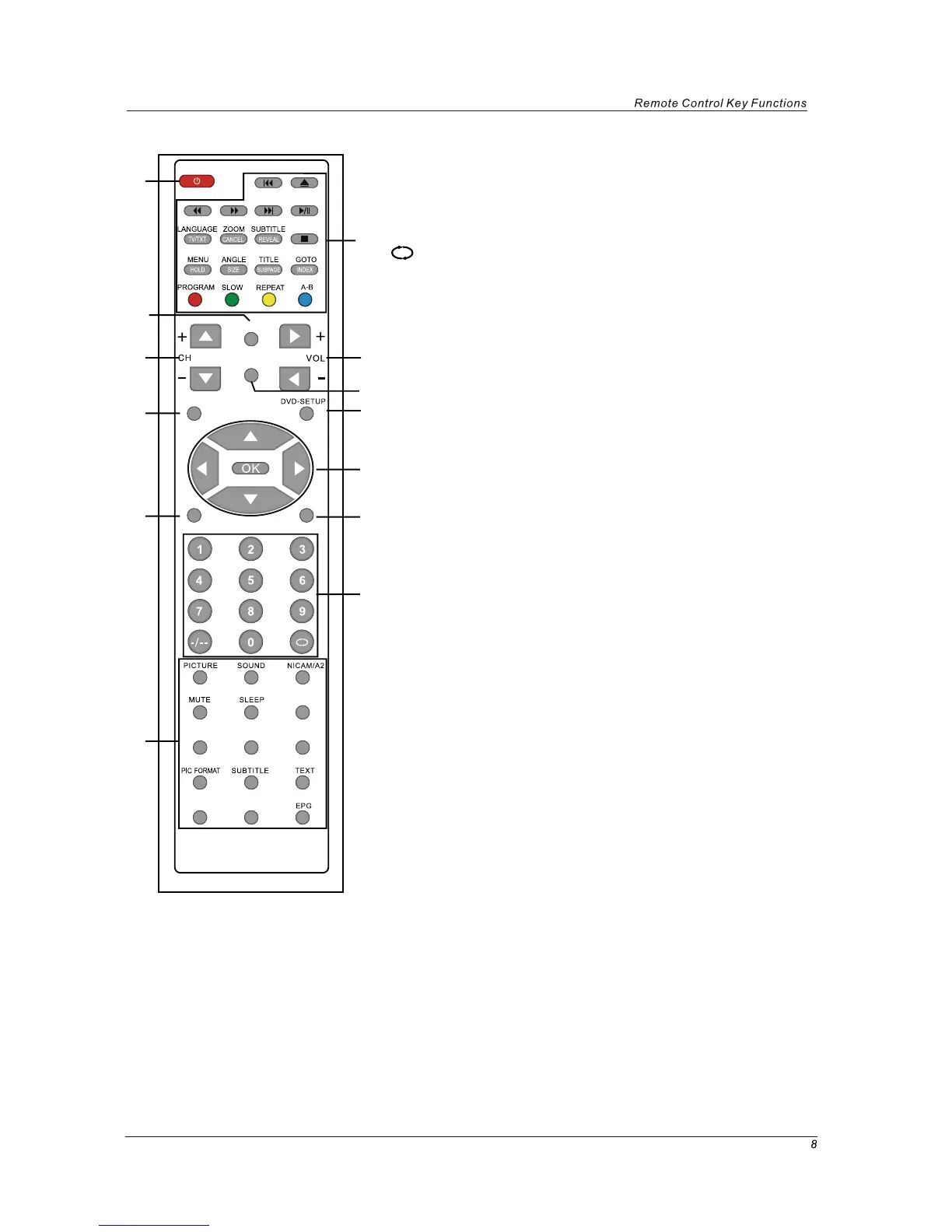
Buttons for DTV function
FAV: Display the favorite program list.
FAV+/-: Favorite program up/down.
PIC FORMAT: Press to change the display mode of the
screen: 4:3, 16:9.etc
SUBTITLE: To switch the dialogue at the bottom of the
screen.
TEXT: To view the teletext broadcasting program.
DISPLAY: Display current mode information.
LANGUAGE: To select audio language.
EPG: To show the Electronic Program Guide during
no-menu state only.
INPUT
SYS-MENU
SYS-EXIT
DVD
DVB
FAV FAV+ FAV-
DISPLAY LANGUAGE
1
3
6
8
4
9
11
12
5
7
10
13
2
10. DVB: switch to DTV
11. SYS-EXIT: Exit the OSD menu.
12. 0-9,-/--
Choose channel directly. Number buttons for DVD.
Returns to the previous channel.
PICTURE: Select the picture mode.
SOUND: Select the sound mode.
SLEEP: Standby Timer
NICAM/A2: Selects Nicam or Mono sound.
MUTE: Mutes the Audio.
TV/RADIO: Disc menu change between TV and Radio.
TV/RADIO
13.



 To Next Page