2
Basic operation
●Power on/off
Power on: Press and hold about 2~3s to power on.
Power off: Press and hold about 2~3s to power off.
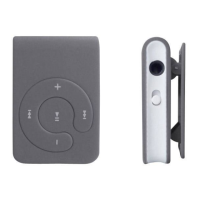
●Press PLAY shortly to play or pause music
●When pause; LED lights constantly; when play; LED flashes.
●Press “ /VOL-” shortly skip to previous song; press “ /VOL+” to skip
to next song.
●Volume adjustment:
Press and hold /VOL- to decrease volume; press and hold /VOL+
to increase volume
●Button R: press R to restore.
●Low power, LED shines slowly
●When charging via USB, LED shines, when full charge, LED lights
constantly.
Using USB disk
The player is a standard USB Disk, supports systems over Windows2000
(it's unnecessary to install the driver), Mac OS X 10.3 and above, Linux
2.4.2 and above.
The player supports USB power supply and Suspend mode.
How to connect with PC
Power on the player, connect the unit to the computer via the supplied
USB cable. The player enters U-disk mode automatically.


 To Next Page