7EN -
LENCO PLAYLINK 6 OPERATION MANUAL
4. Play music
Please make sure your mobile devices and speaker (s) are connected to the same
WiFi network.
4.1 From your mobile phone/ tablet:
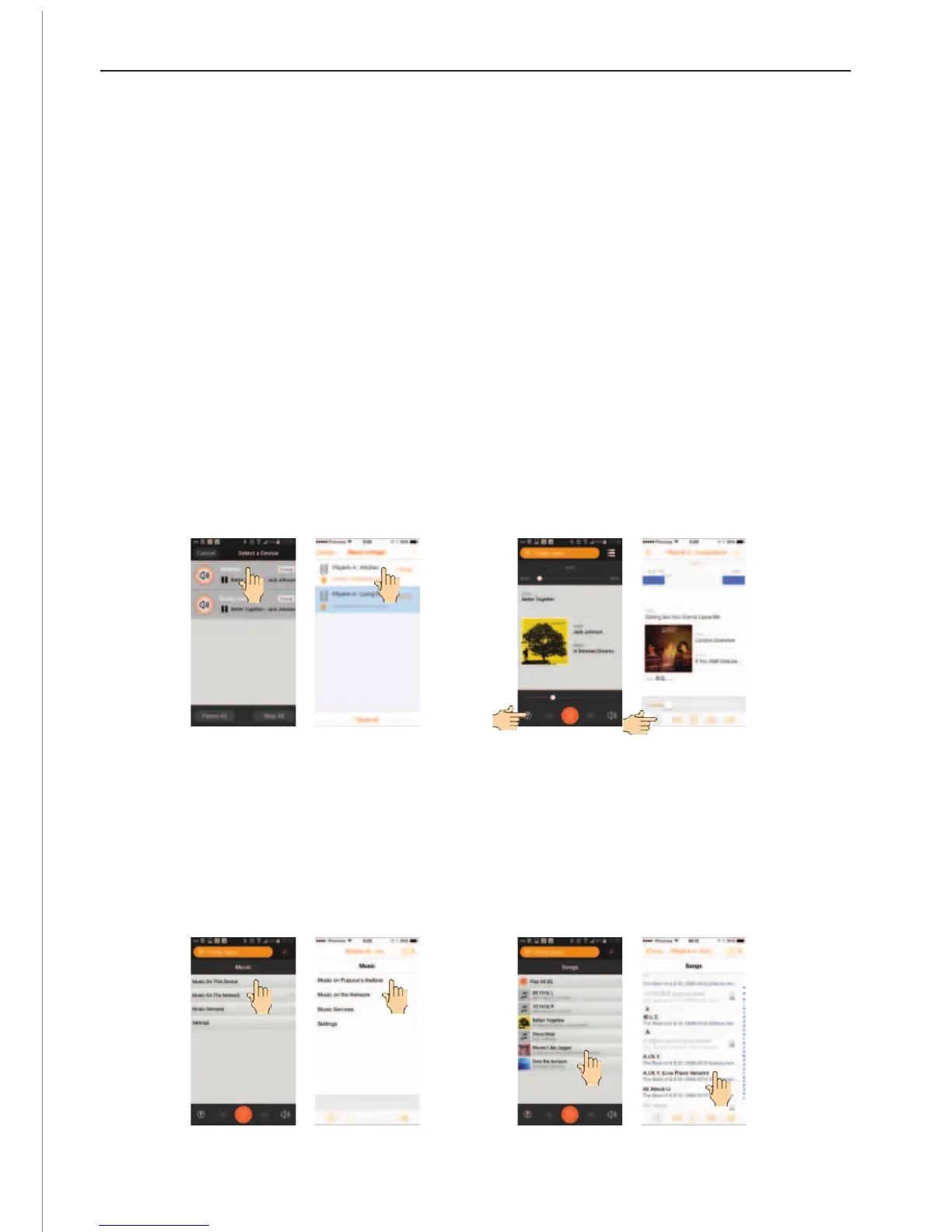
a. Open the LENCO PLAYLINK app on your mobile phone/tablet and wait your speaker to
be displayed (Display “PLAYLINK6-xxxxxx-AJ” or the friendly name if you setup
already).
Note:
1. if you have several speakers connected on your network, it will appear as a list.
2. Depending the speed of the network, the speakers may need up to one minute
to be displayed.
b. Select the speaker on which you want to play, the app asks you to select the source of
the music.
c. Select : “Music on this device”, the songs presents on your mobile phone/ tablet are
displayed.
d. Browse the list and add the songs you want to play on your play list.
ANDROID
ANDROID
IOS
IOS
ANDROID
ANDROID
IOS
IOS


 To Next Page