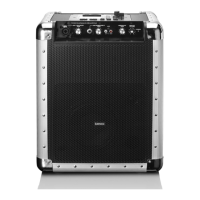
FRONT PANEL
7
17. CHARGING INDICATOR
When the battery is low, the charging light is red. When charging, the light is green
18. AUX AUDIO INPUT JACK
Connect to AUX signal input jack.
19. USB A input jack
20. On AC: CHARGE/STANDBY/NORMAL
A long Press on this key turns on or standby the unit. A short Press on this key turns on the unit to
CHARGE, STANDBY or NORMAL mode
On DC: BAT LEVEL
A Press on this key shows the current battery level.
21. INPUT A MODE
Press this key to choose different INPUT A mode, AUX A, BT A, FM, USB A
22. INPUT A PLAY/PAUSE
Press this key to choose play/pause music with INPUT A
When playing usb, long press this key change play time count down or count up.
23. INPUT A VOLUME
This is used to adjust the volume of INPUT A
24. INPUT A NEXT
Press this key to choose next music with USB A
25. INPUT A PREV
Press this key to choose previous music with INPUT USB A
26. MENU
This switch selects the main volume, bass, treble, x driver, light mode


 To Next Page