GB 4
PROGRAMMED PLAYBACK
PROGRAMMED PLAYBACK
FOR NORMAL COMPACT DISC PLAYBACK
Programmedplaybackenablestracksonadisctobeplayed
inthedesiredorder.Upto20trackscanbeprogrammed.
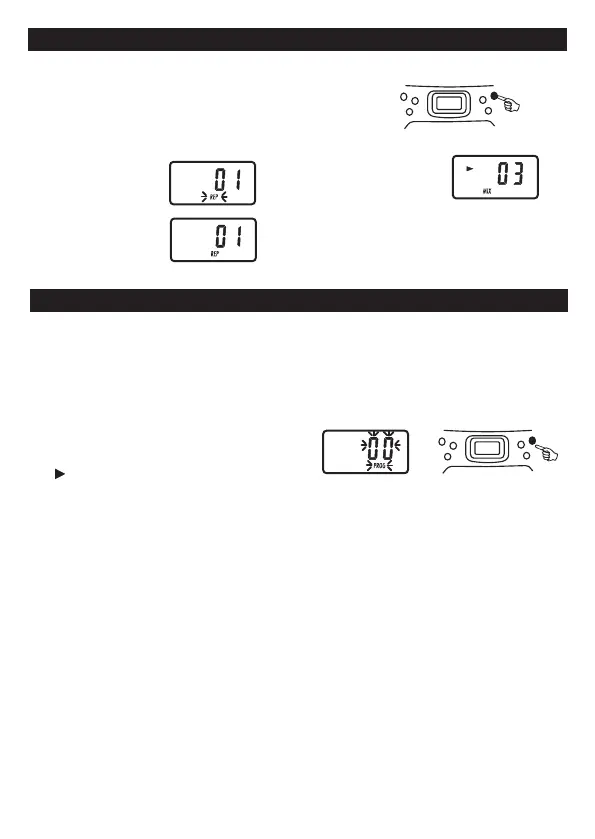
1. Press the " PROGRAM " button.
2. Press the " NEXT" and " BACK " buttons to select
thedesiredtracknumber.
3. Press the " PROGRAM" button again to memorize
thetrack.
4. Repeat steps 2 and3 until all desired tracks are
programmed.
5. Press the " PLAY/PAUSE " button to start.
" " , " PROG " & track number are shown on the
LCDdisplay.
6. Press the " STOP " button once to stop programmed
playback.
LCDdisplay
" PROGRAM "
Note on CD-R/RW discs
- Becauseofnon-standardizedformatdenition/productionofCD-R/RW,
playbackqualityandperformancearenotguaranteed.
- ManufacturerisnotresponsiblefortheplayabilityofCD-R/RWduetorecordingconditions,suchasPCperformance,
writingsoftware,mediaability,etc.
- DonotattachasealorlabeltoeithersideoftheCD-R/RWdisc.Itmaycauseamalfunction.
- ItisrecommendedtorecordonlyaudiolesonCD-R/RWdiscsforeasyreading.
7. Press the " PLAY/PAUSE " button to resume
programmedplayback.
8. OpentheCDdoor,turnofftheCDplayerorpress
the " STOP " button twice to clear the programmed
memory.
Note: Programming can only be made when the player
is in stop mode.
PLAY MODE
REPEAT , REPEAT ALL AND MIX PLAYBACK
PressPLAYMODEbuttonduringCDplayback.CDplayswithasingletrackrepeat,
alltracksrepeatorrandomly.
FOR NORMAL COMPACT DISC PLAYBACK
ModesequenceREPEAT>>REPEATALL>>MIX>>CLEAR.
DuringRepeat1mode,
displayshows
DuringRepeat2mode,
displayshows
DuringMixmode,
displayshows
LCDdisplay
LCDdisplay
LCDdisplay


 To Next Page