-11-
Displaying DAB+ Station Information
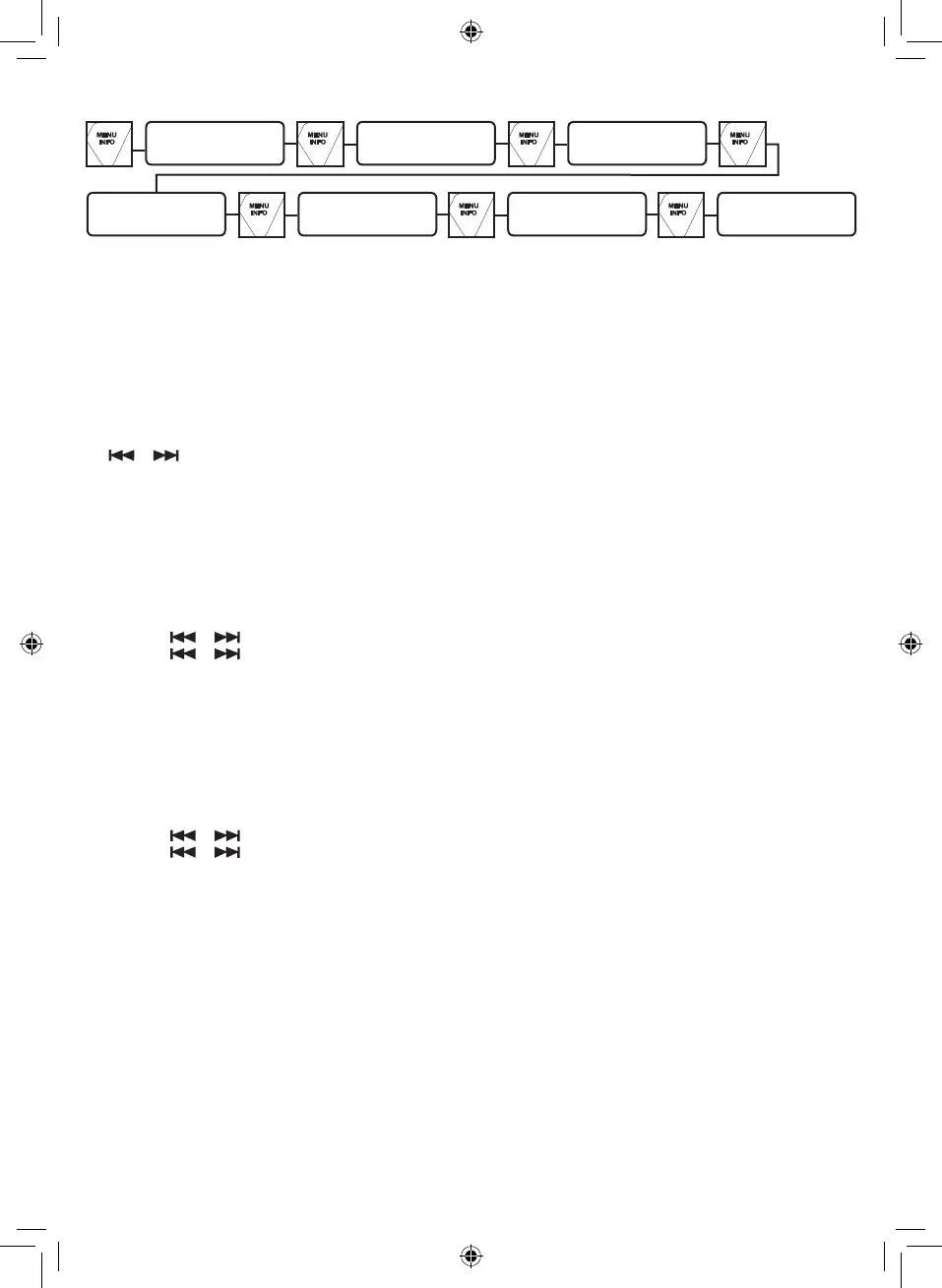
There are several types of information as listed below. To change the display information, press the INFO button repeatedly.
Radio Text scrolling
Signal Bar Program Type (PTY)
Multiplex Name Frequency Signal Error Rate Audio Bit Rate
1. Radio Text scrolling: Shows music titles or program details provided by the broadcaster.
2. Signal Bar: Transmission signal level. The more characters are displayed, the stronger the signal being received.
To improve the reception adjust the antenna position.
3. Program Type (PTY): Type of program provided by the broadcaster.
4. Multiplex Name: Displays name of multiplex to which the current station belongs.
5. Frequency: Current channel frequency.
6. Signal Error Rate: Shows the error rate. The larger this value, the more errors it receives. To improve the reception, adjust
the antenna position.
7. Audio Bit Rate: This is the current channel audio Bitrate.
OTHER DAB+ MENU OPERATION
Press and hold the MENU button (or press the MENU button on the remote control) to access the menu control. Then press
the or button for dierent options as described below.
Dynamic Range Control (DRC) (see Note.)
DRC can make quieter sounds easier to hear when the unit is used in a noisy environment. The DRC level of a broadcast is
set by the broadcaster and transmitted with the service. Changing the DRC value on your unit enables you to apply a scaling
factor to this level.
There are three levels of compression:
DRC high: Maximum compression as sent with the transmitted service
DRC low: Set to 1/2 that of the sent transmitted service
DRC o: No compression
1. Press and hold the MENU button (or press the MENU button on the remote control) to access the menu control.
2. Press the or button until “DRC” is displayed and then press the ENTER button.
3. Press the or button to select the DRC value and then press the ENTER to conrm.
4. Press the MENU button to exit the menu control.
Note:
- Not all DAB+ broadcasts are able to use DRC function. If the broadcast does not support DRC then the DRC setting in the
unit will have no eect.
- After you have adjusted the DRC level the sound may be louder.
Prune
This function removes inactive stations.
1. Press and hold the MENU button (or press the MENU button on the remote control) to access the menu control.
2. Press the or button until “Prune” is displayed and then press the ENTER button.
3. Press the or button to select “Yes” and then press the ENTER button to prune the unit.
4. Press the MENU button to exit the menu control.


 To Next Page
 Loading...