Need help?
Do you have a question about the LENCO SCD-24 and is the answer not in the manual?
Essential guidelines for safe and proper operation of the device, covering ventilation, heat, and liquids.
Instructions on unpacking and verifying mains voltage before connecting the unit.
Diagram and list identifying the various buttons, indicators, and ports on the device.
Guidance on using the device with AC power or batteries.
Instructions for adjusting volume and using headphones for private listening.
Step-by-step guide for tuning into and enjoying FM radio broadcasts.
Basic operations for playing CDs, including inserting, starting, and stopping discs.
How to interrupt, resume, stop, skip tracks, and search within a CD track.
Instructions for repeating single tracks or the entire disc, and how to cancel repeat mode.
How to activate the Bass Boost feature for enhanced audio.
Steps to create and play a custom sequence of CD tracks.
Guidelines for cleaning the CD, CD lens, and the unit itself.
Detailed technical data for the CD player and radio components.
Information on product guarantee, suitability for professional use, and documentation disclaimers.
Instructions for the environmentally sound disposal of the device and batteries.
Statement confirming compliance with EU directives for radio equipment.
Information on obtaining helpdesk support and service for the product.
This document serves as an instruction manual for the Lenco SCD-24 / SCD-27 Stereo FM Radio with CD Player. It provides essential information regarding the device's functions, usage, and maintenance, ensuring safe and optimal operation.
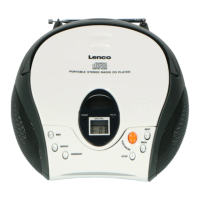
The Lenco SCD-24 / SCD-27 is a versatile audio device designed for playing compact discs and receiving FM radio broadcasts. It features a top-loading CD player and an FM radio tuner, offering a range of playback and listening options. The device is equipped with a telescopic antenna for improved FM reception and built-in speakers for audio output. For private listening, a headphones jack is provided, which automatically disconnects the speakers when headphones are plugged in. The unit also includes a Bass Boost (BBS) function to enhance the low-frequency sound, providing a richer audio experience. Power can be supplied either through a standard AC connection or via batteries, offering portability.
The device can be powered by house current using the supplied AC power cord. It's crucial to ensure the unit's rated voltage matches the local voltage before connecting. The plug acts as the disconnect device and should remain readily operable. For portable use, the device can operate on six UM-2 (size C) batteries. When using batteries, the AC power cord must be disconnected from the unit. Battery power is automatically cut when the AC cord is connected. If the volume decreases or the sound distorts during battery operation, it indicates that the batteries need to be replaced with new ones.
The volume can be adjusted using the VOLUME control, which allows users to set the desired listening level from minimum to maximum. The Bass Boost (BBS) button can be pressed to activate a sound effect that enhances bass frequencies.
To listen to the radio, the FUNCTION switch must be set to "RADIO." Users can then select the desired mode using the MODE switch, choosing between "FM MONO" or "FM ST." (FM Stereo). The TUNING CONTROL is used to tune in to a specific radio station. For better FM reception, the telescopic antenna should be extended and adjusted. An FM stereo LED indicator will light up when receiving an FM stereo broadcast and the MODE switch is set to "FM STEREO." If excessive noise is heard during FM stereo reception, switching the MODE to "FM MONO" can improve clarity. After listening, the FUNCTION selector should be set to "OFF."
To play a CD, set the FUNCTION switch to "CD." The CD door is opened by pressing the OPEN/CLOSE CD button. A disc should be inserted with the label side facing up. After closing the CD door, the disc will rotate, and the total number of tracks will be displayed. Pressing the PLAY / PAUSE button will start playback, indicated by "01" and "PLAY" on the display. To interrupt playback, press the PLAY/PAUSE button again; the "PLAY" symbol will flash. Pressing it once more will resume playback. To stop playback, press the STOP button, and the display will show the total tracks of the disc. Users can skip to the beginning of a track by pressing either the CD NEXT or CD BACK buttons. Pressing the CD BACK button once during play will restart the previous track, while pressing the CD NEXT button once will advance to the next track. To search for a specific passage within a track, hold down the CD NEXT or CD BACK button during playback. Release the button when the desired passage is recognized, and normal CD playback will resume from that point. The unit features an auto-off function, automatically turning off after approximately 15 minutes of no operation (in stop mode or with the CD door open). To reactivate, slide the FUNCTION selector to "OFF" and then back to "RADIO" or "CD" position.
The repeat function allows a single track or all tracks on a disc to be played repeatedly. To repeat the same track, press the REPEAT button once during playback; the CD display will show "REPEAT." To repeat the entire disc, press the REPEAT button twice; the display will show "REPEAT ALL." To cancel the repeat playback function, press the REPEAT button again until "REPEAT" or "REPEAT ALL" disappears from the display.
Programmed playback allows users to play tracks on a disc in a desired order, with up to 20 tracks programmable. To program tracks:
If a CD skips or fails to play, it may need cleaning. Before playing, wipe the disc from the center outwards with a soft cleaning cloth. After playing, always store the disc in its case to prevent damage.
A dusty CD lens can affect playback quality. To clean it, use a brush-blower. Blow several times on the lens to remove dust. For fingerprints, a cotton swab moistened with alcohol can be used.
Avoid using volatile chemicals on the unit. The exterior should be cleaned by lightly wiping it with a soft, dry cloth.
Playback quality and performance of CD-R/RW discs are not guaranteed due to non-standardized format definitions and production conditions (e.g., PC performance, writing software, media ability). The manufacturer is not responsible for issues arising from these conditions. It is advised not to attach seals or labels to CD-R/RW discs, as this can cause malfunctions. For easy reading, it is recommended to record only audio files on CD-R/RW discs.
In case of an abnormal display or operating problem, disconnect the AC power cord and remove the batteries. Wait at least 5 seconds before reconnecting the power cord or reinstalling the batteries. If the CD door is opened before the CD reading is complete, a jamming noise may occur. This can be resolved by simply closing the CD door. The manual also provides warnings regarding laser radiation (Class 1 Laser Product), advising against touching the lens and avoiding exposure to the beam when the unit is open. It also warns against disposing of batteries in fire. General precautions include avoiding covering ventilation openings, keeping the device away from heat and strong magnetic fields, and protecting it from moisture and electrostatic discharge. Servicing should be referred to qualified personnel if the device is damaged or malfunctions.
 CD Section
| channels | 2 channels |
|---|---|
| S / N ratio | 60 dB |
| sampling frequency | 44.1 kHz |
| pick up wave length | 790 nm |
Radio Section| tuning ranges | FM 87.5 - 108 MHz |
|---|---|
| antennas | FM Rod antenna |
General Specifications| output power | 1 W + 1 W (RMS) |
|---|---|
| power consumption | 13.5 W |
| power source AC | 230V ~ 50Hz |
 Weight and Dimensions
| dimensions | 224(L) x 234(D) x 126(H)mm |
|---|---|
| weight | 2.4 KGS |

 To Next Page